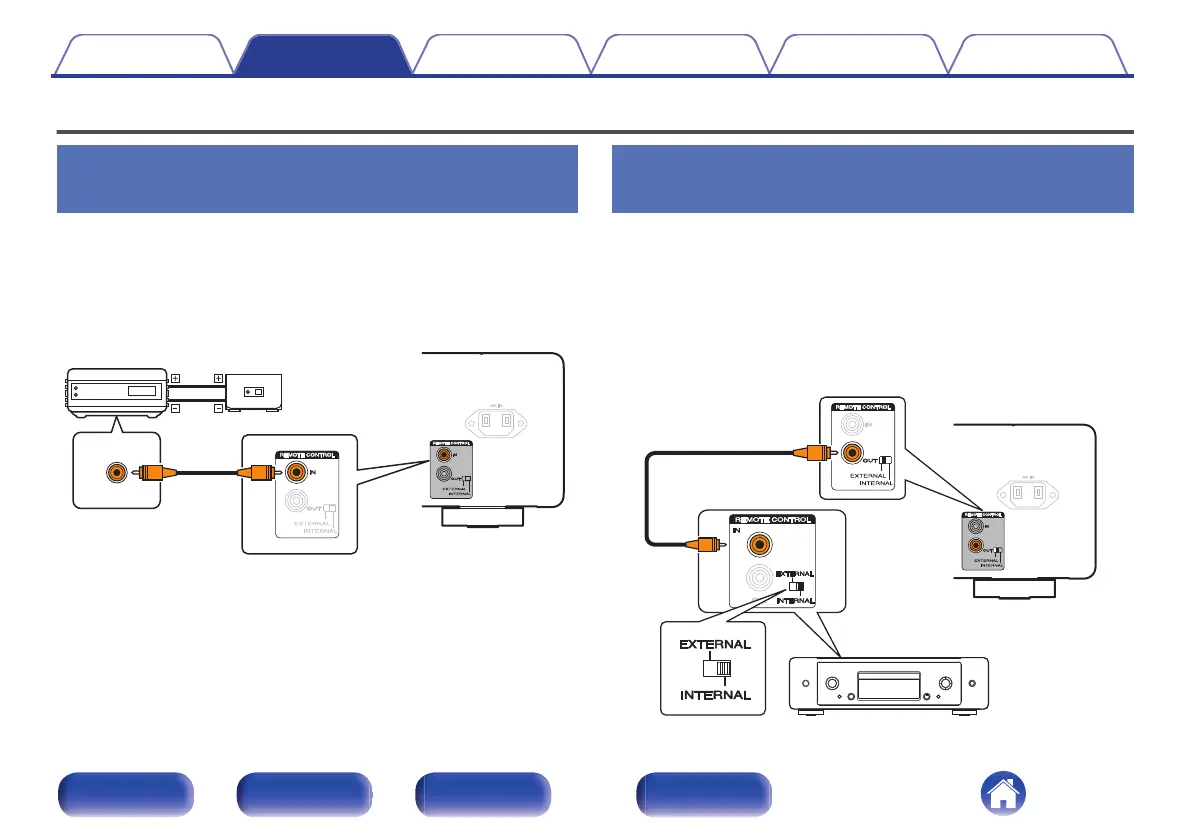
Connecting devices with remote control connectors
Performing operations by RC on this
unit without visual contact
You can connect an external IR receiver to the REMOTE CONTROL
connectors to perform operations on this unit with the included remote
control unit without visual contact. This might be necessary if the unit is
hidden in a cupboard or corner, so you can’t directly point with the remote
control unit to the device.
RC OUT
Infrared
retransmitter
Infrared
sensor
Remotely connecting Marantz audio
devices
You can transmit remote control signals simply by connecting a Marantz
audio device to the REMOTE CONTROL IN/OUT connectors using the
remote connection cable provided with the device.
Set the EXTERNAL/INTERNAL switch on the rear panel of this unit and
the connected device as follows.
0
Turn this unit’s EXTERNAL/INTERNAL switch to “EXTERNAL”.
0
Turn the EXTERNAL/INTERNAL switch of the connected device to
“INTERNAL”.
Contents Connections Playback Settings Tips Appendix
22
Front panel Rear panel
Remote control
unit
Index



 To Next Page