EasyManua.ls Logo

Marantz PM500 - Page 7

Marantz PM500
37 pages
Print Icon
To Next Page IconTo Next Page
To Previous Page IconTo Previous Page
Loading...
TOTAL
HUM
AND
NOISE
TEST
.
With
shorting
plugs
connected
to
the
Phono
input
jacks
and
an
8
ohm
resistive
load
connected
across
the
speaker
system
output
terminals,
connect
a
dis-
tortion
analyzer
across
the
load.
NOTE:
If
the
distortion
analyzer
does
not
contain
a
built-in
voltmeter,
an
AC
VTVM
may
be
substituted.
.
Set
the
distortion
analyzer
controls
for
voltge
measurements
and
apply
power
to
the
amplifier.
Set
the
volume
control
fully
CCW.
Set
the
SELECTOR
switch
to
PHONO.
.
If
the
distortion
analyzer
indicates
more
than
1.0
mV
refer
to
the
trouble
analysis
section
of
this
manual.
.
Set
the
volume
control
fully
CW.
If
the
distortion
analyzer
indicates
more
than
15
mV,
refer
to
the
trouble
analysis
section
of
this
manual.
MAXIMUM
POWER
OUTPUT
.
Connect
the
audio
oscillator
to
the
AUX
input.
Set
audio
oscillator
frequency
to
1
kHz.
Set
SELECTOR
switch
to
AUX.
.
With
the
distortion
analyzer
connected
across
the
output
load
(8-ohm),
set
the
analyzer
on
the
30
VAC
scale.
.
Turn
the
analyzer
on
and
increase
the
audio
oscillator
output
to
150
mV.
The
AC
VTVM
should
read
23.6
VAC
{20
VAC
For
Model
PMS50O0
only)
or
more.
E.
HARMONIC
DISTORTION
TEST
1.
Set
the
frequency
of
the
audio
oscillator
and
the
distortion
analyzer
to
20
kHz.
2.
Set
the
controls
of
the
analyzer
for
voltage
measure-
ment
on
the
30
volt
scale.
3.
Adjust
the
audio
oscillator
output
level
until
the
analyzer
meter
indicates
23.6
VAC.
(20
VAC
For
Mode!
PM500
only)
4.
Switch
the
distortion
analyzer
to
Set
Level
and
adjust
SENSITIVITY
for
full
scale
reading
on
0
~
0.1%
scale.
5.
Measure
the
total
harmenic
distortion
with
the
analyzer
and
verify
it
is
less
than
0.03%.
NOTE:
Any
parasitic
oscillation
in
the
amplifier
will
be
displayed
on
the
oscilloscope
when
capacitance
is
switched
into
the
load.
6.
Switch.
the
distortion
analyzer
back
to
SET
LEVEL.
(Do
not
readjust
sensitivity
of
analyzer.)
7.
Change
the
frequency
of
the
audio
oscillator
and
dis-
tortion
analyzer
to
1
kHz.
Adjust
audio
oscillator
output
for
a
full
scale
reading
on
the
0
~
1%
scale.
8.
Measure
the
distortion,
verifying
it
is
no
greater
than
0.03%,
9.
Repeat
steps
7
and
8,
changing
frequency
to
20
Hz.
Distortion
should
be
no
more
than
0.03%.
10.
Check
for
parasitic
oscillation;
there
should
be
none.
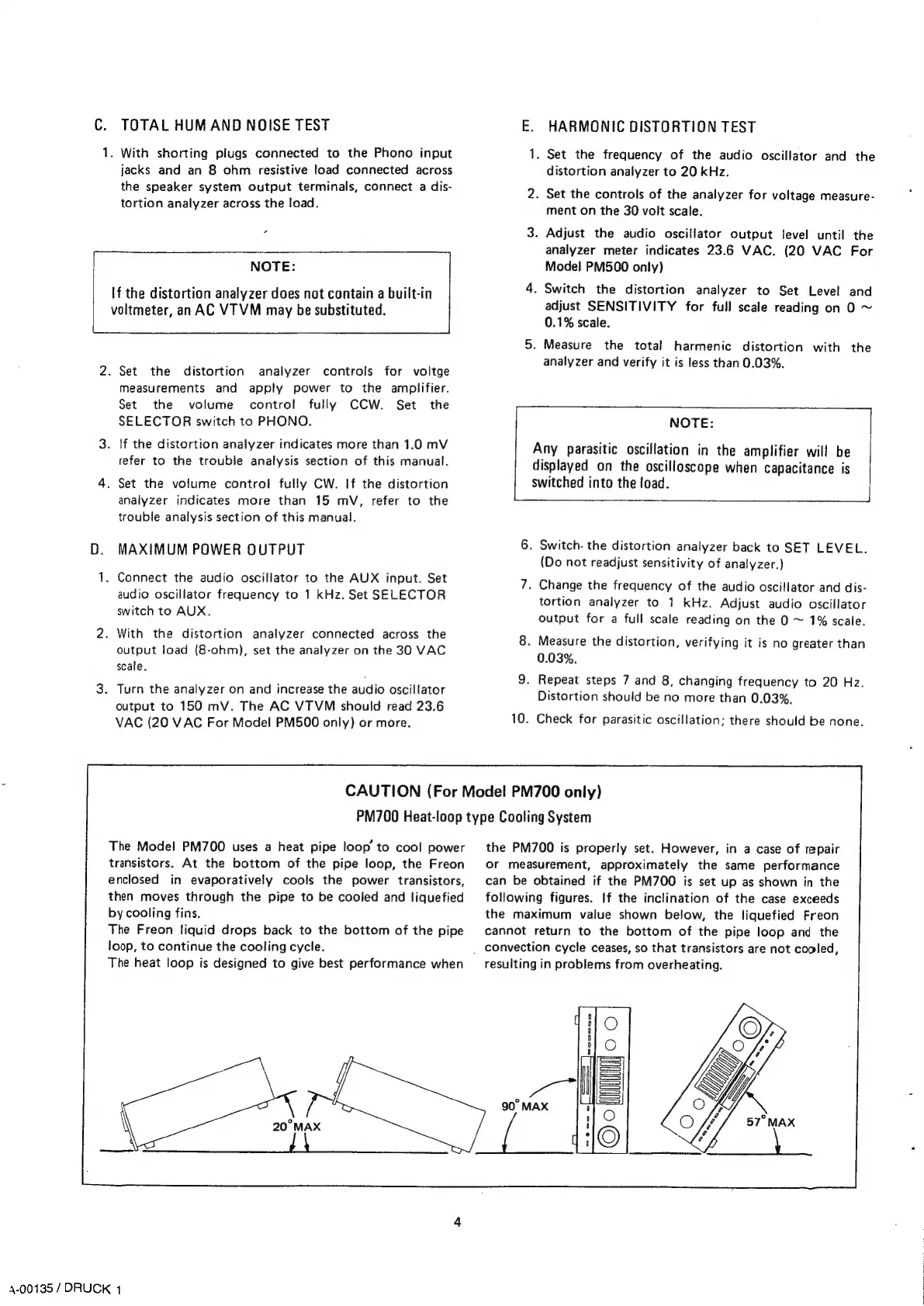
CAUTION
(For
Model
PM700
only)
PM700
Heat-loop
type
Cooling
System
The
Model
PM700
uses
a
heat
pipe
loop’
to
cool
power
transistors.
At
the
bottom
of
the
pipe
loop,
the
Freon
enclosed
in
evaporatively
cools
the
power
transistors,
then
moves
through
the
pipe
to
be
cooled
and
liquefied
by
cooling
fins.
The
Freon
liquid
drops
back
to
the
bottom
of
the
pipe
loop,
to
continue
the
cooling
cycle.
The
heat
loop
is
designed
to
give
best
performance
when
4-00135
/
DRUCK
1
the
PM700
is
properly
set.
However,
in
a
case
of
repair
Or
measurement,
approximately
the
same
performance
can
be
obtained
if
the
PM700
is
set
up
as
shown
in
the
following
figures.
If
the
inclination
of
the
case
exceeds
the
maximum
value
shown
below,
the
liquefied
Freon
cannot
return
to
the
bottom
of
the
pipe
loop
and
the
_
convection
cycle
ceases,
so
that
transistors
are
not
cooled,
resulting
in
problems
from
overheating.

Related product manuals