9
6. MAIN MICROPROCESSOR (QU01) UPDATE
PROCEDURE
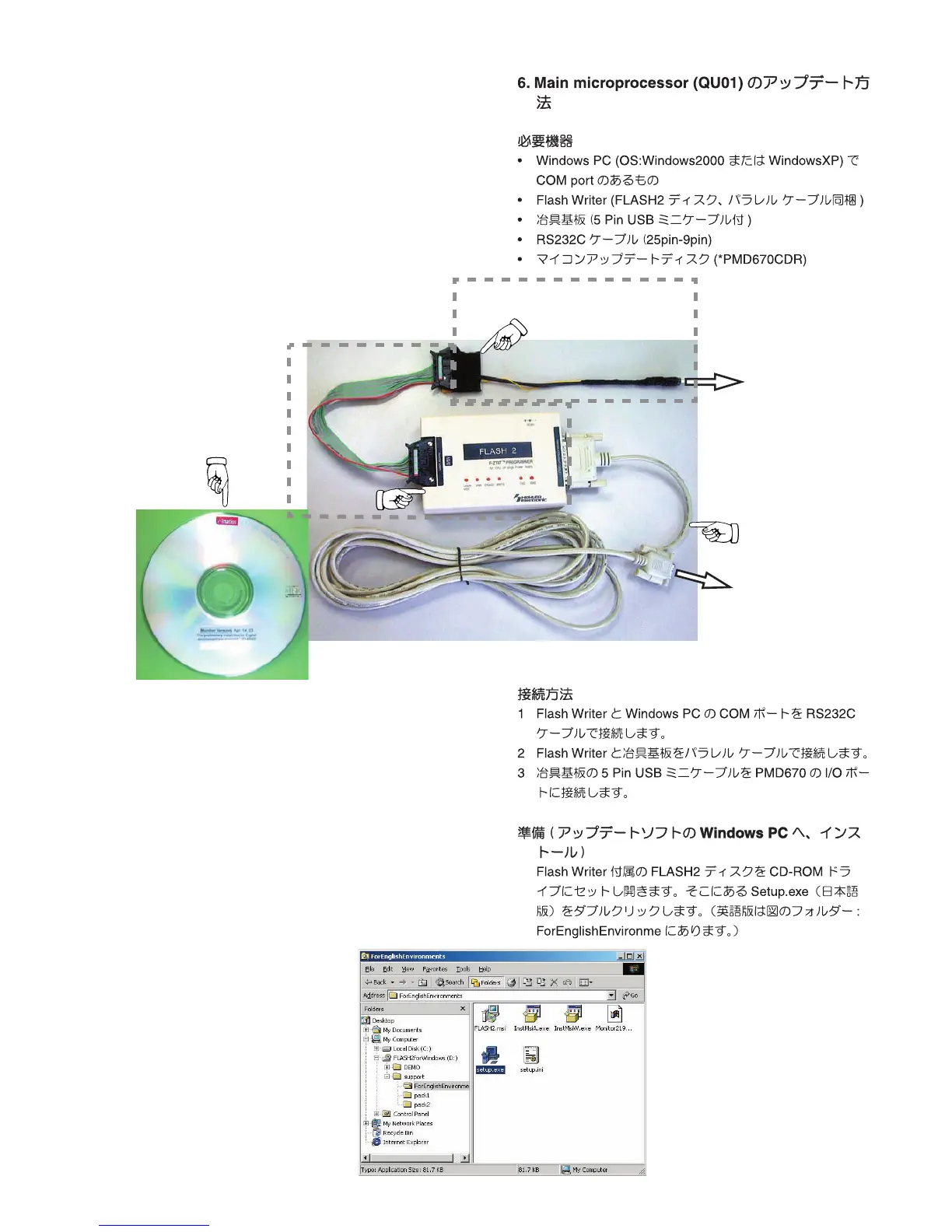
Necessary Equipment
•
Flash Writer (FLASH2 Disc and Parallel cable are packed
together)
•
JIG PCB with the cable(5 pin USB mini cable)
•
RS232C cable (25pin-9Pin )
•
Update Disc (
*PMD670CDR
)
•
Windows PC (Windows2000 or WindowsXP) with COM
port
Connection
1. Connect COM port of Windows PC and Flash Writer with
RS232C cable
2. Connect Flash Writer and JIG PCB with Parallel cable
3. Connect 5pin USB mini cable to I/O port of PMD670.
Preparation (The installation procedure of the
Update software)
Open FLASH2 Disc , and double click "Setup.exe", and
writing software is installed in the PC.
There is English edition of holder of "ForEnglishEnvi-
ronme"
RS232C cable
PMD670
I/O port
PC
COM port
Flash Writer
JIG PCB
FLASH2 Disc



 To Next Page
 Loading...










