EasyManua.ls Logo

Marantz PROFESSIONAL PMD740 - Auto Functions

Marantz PROFESSIONAL PMD740
18 pages
Print Icon
To Next Page IconTo Next Page
To Previous Page IconTo Previous Page
Loading...
SPEED
This
switch
selects
one
of
the
PMD740's
two
tape
speeds.
The
higher
tape
speed
provides
lower
noise,
and
better
frequency
response,
so
we
recommend
that
all
important
recordings
be
made
on
high
speed.
@?
TAPE
COUNTER
This
display
shows
the
current
tape
counter
location,
in
addition
to
the
location
of
various
memory
points,
etc.
There
are
several
LEDs
located
on
the
TAPE
COUNTER
display,
directly
above
the
numbers.
These
LEDs
indicate
what
the
number
on
the
display
means.
You
can
press
the
DISPLAY
button
to
step
through
the
various
display
modes.
AUTO
FUNCTIONS
This
section
is
used
for
the
operation
of
the
PMD740's
Automatic
functions.
While
the
specific
operation
is
covered
in
more
detail
in
another
section,
we
will
define
the
keys
and
their
basic
functions
here.
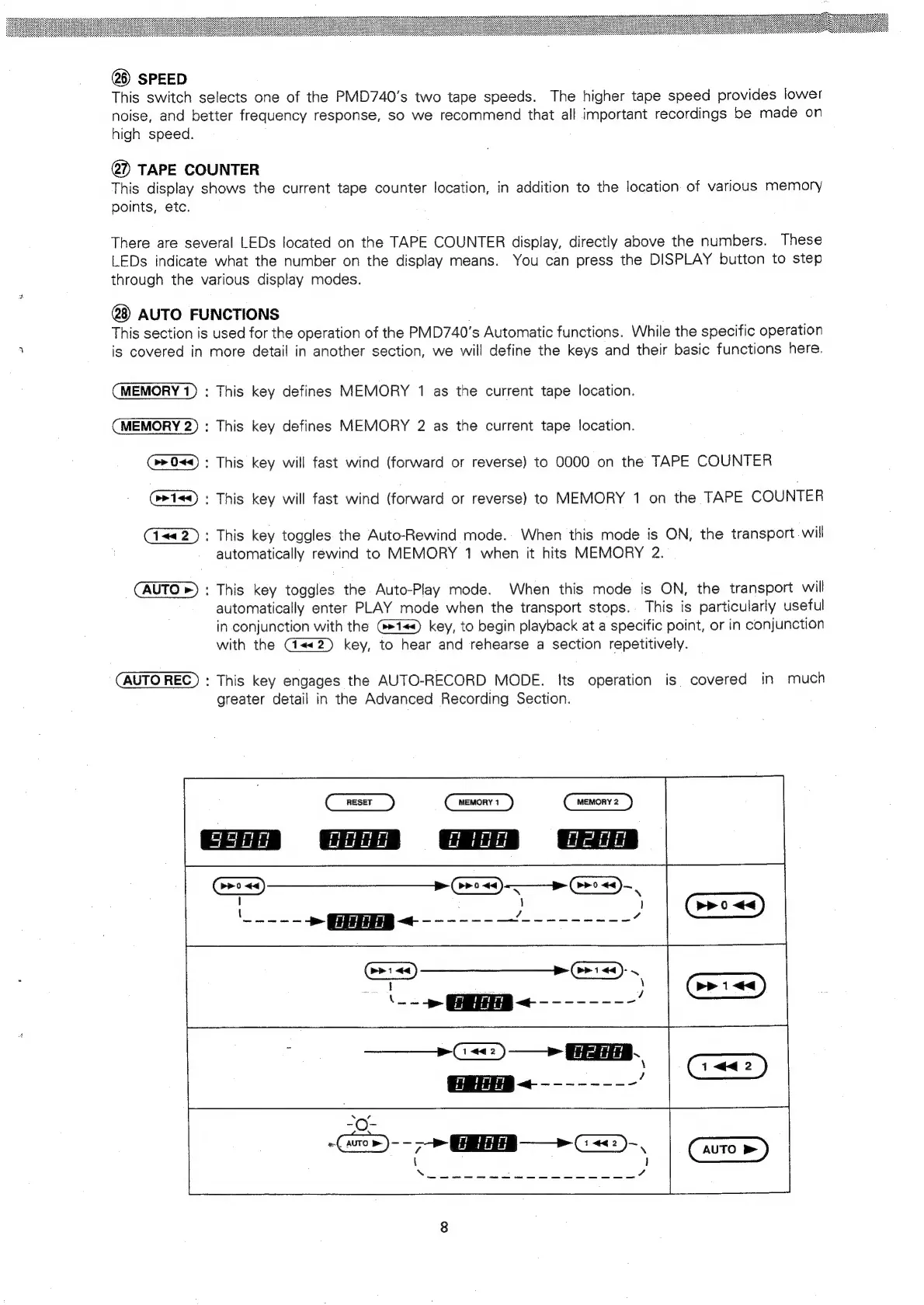
MEMORY
1)
:
This
key
defines
MEMORY
1
as
the
current
tape
location.
MEMORY
2)
:
This
key
defines
MEMORY
2
as
the
current
tape
location.
:
This
key
will
fast
wind
(forward
or
reverse)
to
0000
on
the
TAPE
COUNTER
:
This
key
will
fast
wind
(forward
or
reverse)
to
MEMORY
1
on
the
TAPE
COUNTER
:
This
key
toggles
the
Auto-Rewind
mode.
When
this
mode
is
ON,
the
transport
will
automatically
rewind
to
MEMORY
1
when
it
hits
MEMORY
2.
AUTO
>)
:
This
key
toggles
the
Auto-Play
mode.
When
this
mode
is
ON,
the
transport
will
automatically
enter
PLAY
mode
when
the
transport
stops.
This
is
particularly
useful
in
conjunction
with
the
key,
to
begin
playback
at
a
specific
point,
or
in
conjunction
with
the
G@@«<«2)
key,
to
hear
and
rehearse
a
section
repetitively.
|
§aag
AUTO
REC)
:
This
key
engages
the
AUTO-RECORD
MODE.
Its
operation
is
covered
in
much
greater
detail
in
the
Advanced
Recording
Section.
rer
~
Gos)
--
>>
GEE
>
C=
-,
ere
AUTO

Related product manuals