4
ENGLISH
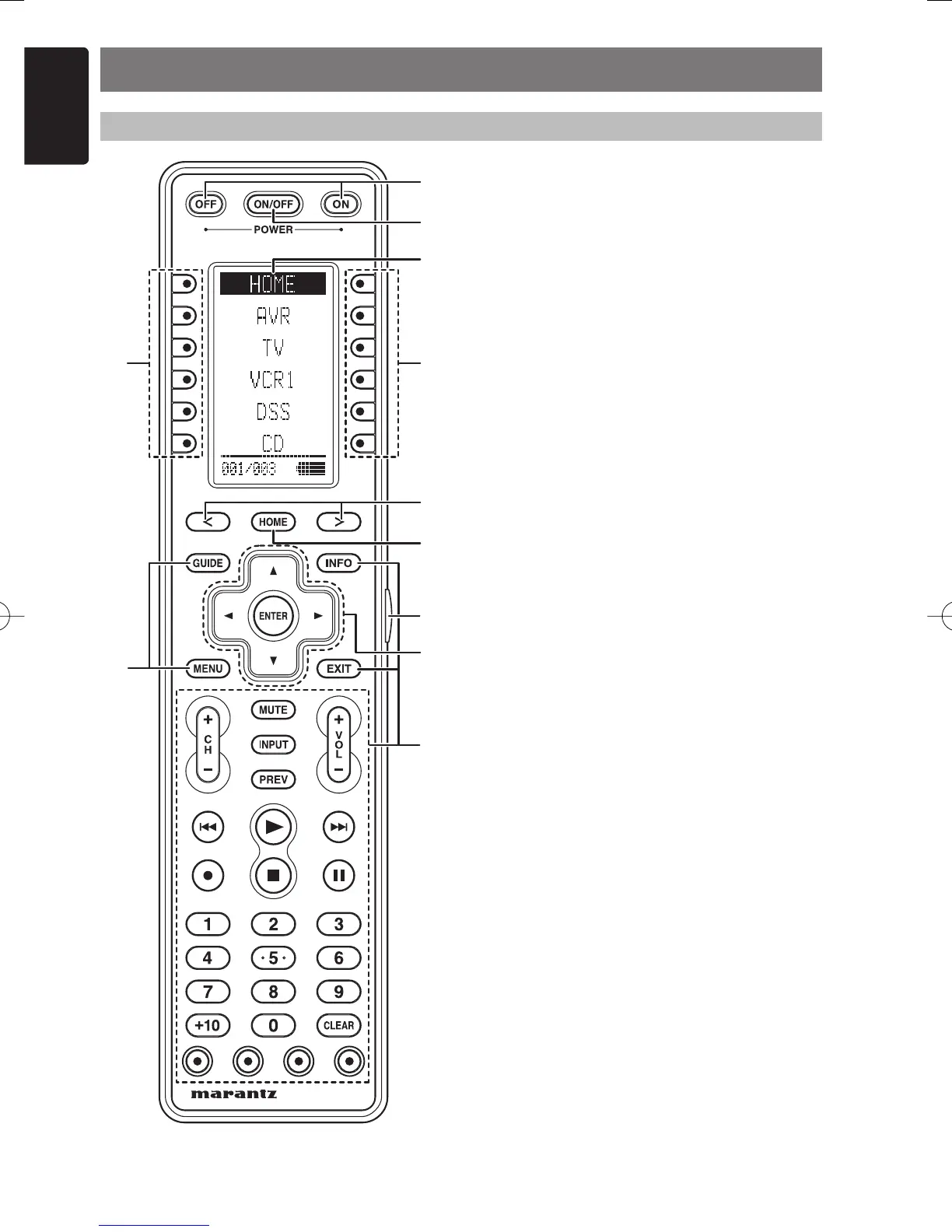
NAMES AND FUNCTIONS
q POWER ON and OFF buttons
These buttons are used when controlling devices
that have been set with separately powered on
and off remote commands.
w SOURCE ON/OFF button
This button is used when controlling devices that
have been set with a single power on/off remote
command.
e LCD Display
Remote controller display
r Programable soft buttons
These buttons are used by the Wizz.it 3 editor
software to make LCD display and button
operation settings.
These buttons are also used to adjust the
number of pages for each device.
t Page Scroll buttons
These buttons are used when scrolling pages in
Home mode and the device modes.
y Home button
This button is used to select Home mode.
To select a device that will be controlled, fi rst
select Home mode, then select the device.
u Light button
This button is used to turn on the backlight for the
buttons and LCD.
i Cursor, ENTER buttons
o Programable Hard buttons
These buttons are used by the Wizz.it 3 editor
software to make the remote controller command
settings for learning and macro operations.
REMOTE CONTROLLER
q
w
e
rr
t
y
o
o
u
i
RC3001E01ENG.indd4RC3001E01ENG.indd4 07.8.311:04:38PM07.8.311:04:38PM



 To Next Page