EasyManua.ls Logo

Marantz SD1000 - Switch Positioning Procedures; Motor and Muting Switch Setup; Fast Forward;Rewind Switch Setup

Marantz SD1000
32 pages
Print Icon
To Next Page IconTo Next Page
To Previous Page IconTo Previous Page
Loading...
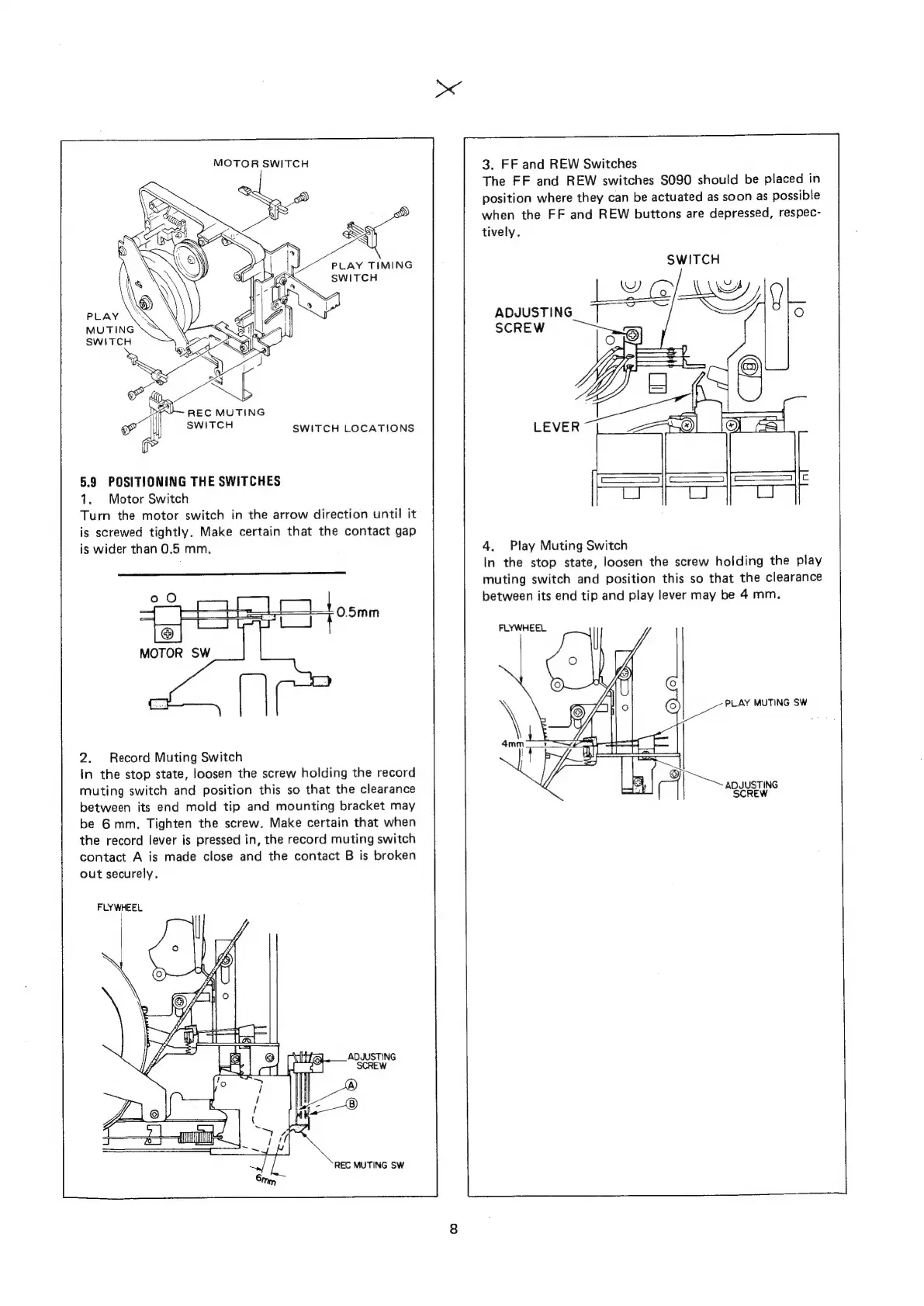
MOTOR
SWITCH
PLAY
TIMING
Bow
Swiren
“Ue
g
PLAY
MUTING
SWITCH
!
REC
MUTING
i.
SWITCH
5.9
POSITIONING
THE
SWITCHES
1.
Motor
Switch
Turn
the
motor
switch
in
the
arrow
direction
until
it
is
screwed
tightly.
Make
certain
that
the
contact
gap
is
wider
than
0.5
mm,
SWITCH
LOCATIONS
2.
Record
Muting
Switch
In
the
stop
state,
loosen
the
screw
holding
the
record
muting
switch
and
position
this
so
that
the
clearance
between
its
end
mold
tip
and
mounting
bracket
may
be
6mm.
Tighten
the
screw.
Make
certain
that
when
the
record
lever
is
pressed
in,
the
record
muting
switch
contact
A
is
made
close
and
the
contact
B
is
broken
out
securely.
FLYWHEEL
REC
MUTING
SW
3.
FF
and
REW
Switches
The
FF
and
REW
switches
S090
should
be
placed
in
position
where
they
can
be
actuated
as
soon
as
possible
when
the
FF
and
REW
buttons
are
depressed,
respec-
tively.
SWITCH
[PGI
Mweol9
ADJUSTING
SCREW
sa
aw
LEVER
©
I
isan
c
4.
Play
Muting
Switch
In
the
stop
state,
loosen
the
screw
holding
the
play
muting
switch
and
position
this
so
that
the
clearance
between
its
end
tip
and
play
lever
may
be
4
mm.
FLYWHEEL
PLAY
MUTING
SW
ADJUSTING
SCREW

Related product manuals