EasyManua.ls Logo

Marantz SD9000 - Page 17

Marantz SD9000
69 pages
Print Icon
To Next Page IconTo Next Page
To Previous Page IconTo Previous Page
Loading...
So
Ls
cl
Het
ne.
——-——~
5.
Programming
Fig.
2.4
shows
the
program
signal
input
circuit.
The
switches
in
the
matrix
circuit,
program
memory
and
control
signal
output
are
controlled
by
the
micro-
computer.
This
section
explains
the
operating
conditions
of
the
program
setting
switches
and
related
functions.
The
program
setting
switches
have
various
functions,
so
special
care
should
be
taken
when
checking
for
circuit
trouble
or
misoperation.
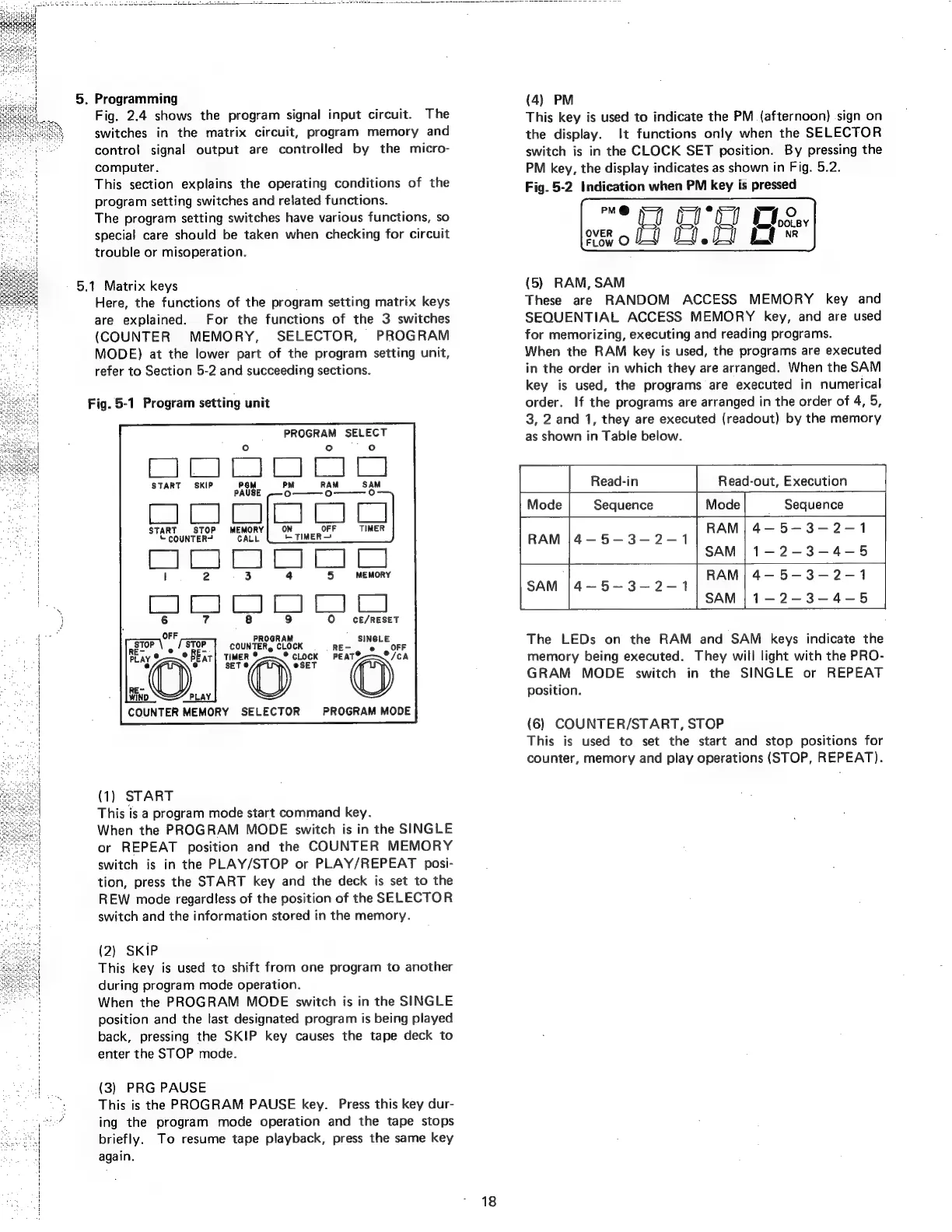
5.1
Matrix
keys
Here,
the
functions
of
the
program
setting
matrix
keys
are
explained.
For
the
functions
of
the
3
switches
(COUNTER
MEMORY,
SELECTOR,
PROGRAM
MODE)
at
the
lower
part
of
the
program
setting
unit,
refer
to
Section
5-2
and
succeeding
sections.
Fig.
5-1
Program
setting
unit
bliss
ges
SiSieterr)
a
START
SKIP
paote
PM
RAM
SAM
°
°
ie
tis
START
STOP
MEMORY
©
COUNTER?
CALL
Ce
a
MEMORY
CE/RESET
IOQ
STOP
COUNTERg
ev
cK
.
.
RE-
e e
Play
oO"
TIMER
*cLock
FEAT
©)
oO”
O
Binp
©).
COUNTER
MEMORY
SELECTOR
PROGRAM
MODE
(1)
START
This
is
a
program
mode
start
command
key.
When
the
PROGRAM
MODE
switch
is
in
the
SINGLE
or
REPEAT
position
and
the
COUNTER
MEMORY
switch
is
in
the
PLAY/STOP
or
PLAY/REPEAT
posi-
tion,
press
the
START
key
and
the
deck
is
set
to
the
REW
mode
regardless
of
the
position
of
the
SELECTOR
switch
and
the
information
stored
in
the
memory.
(2)
SKIP
This
key
is
used
to
shift
from
one
program
to
another
during
program
mode
operation.
When
the
PROGRAM
MODE
switch
is
in
the
SINGLE
position
and
the
last
designated
program
is
being
played
back,
pressing
the
SKIP
key
causes
the
tape
deck
to
enter
the
STOP
mode.
(3)
PRG
PAUSE
This
is
the
PROGRAM
PAUSE
key.
Press
this
key
dur-
ing
the
program
mode
operation
and
the
tape
stops
briefly.
To
resume
tape
playback,
press
the
same
key
again.
18
(4)
PM
This
key
is
used
to
indicate
the
PM
(afternoon)
sign
on
the
display.
It
functions
only
when
the
SELECTOR
switch
is
in
the
CLOCK
SET
position.
By
pressing
the
PM
key,
the
display
indicates
as
shown
in
Fig.
5.2.
Fig.
5-2
Indication
when
PM
key
is
pressed
oe
ro
et
UI
ostey
so
OA
i"
FLow
O
(5)
RAM,
SAM
These
are
RANDOM
ACCESS
MEMORY
key
and
SEQUENTIAL
ACCESS
MEMORY
key,
and
are
used
for
memorizing,
executing
and
reading
programs.
When
the
RAM
key
is
used,
the
programs
are
executed
in
the
order
in
which
they
are
arranged.
When
the
SAM
key
is
used,
the
programs
are
executed
in
numerical
order.
If
the
programs
are
arranged
in
the
order
of
4,
5,
3,
2
and
1,
they
are
executed
(readout)
by
the
memory
as
shown
in
Table
below.
a
Read-in
Read-out,
Execution
Sequence
Sequence
RAM
|
4-—5—3-2-1
1-2-3-4-5
rn
a
The
LEDs
on
the
RAM
and
SAM
keys
indicate
the
memory
being
executed.
They
will
light
with
the
PRO-
GRAM
MODE
switch
in
the
SINGLE
or
REPEAT
position.
(6)
COUNTER/START,
STOP
This
is
used
to
set
the
start
and
stop
positions
for
counter,
memory
and
play
operations
(STOP,
REPEAT).