EasyManua.ls Logo

Marantz SD9000 - Timer Set

Marantz SD9000
69 pages
Print Icon
To Next Page IconTo Next Page
To Previous Page IconTo Previous Page
Loading...
e.
To
ensure
stable
program
operation,
the
sensitivity
and
response
of
the
program
detection
circuit
and
the
tape
speed
in
the
CUE/REVIEW
mode
should
be
stabilized
(refer
to
section
3.8).
f.
During
playback,
the
display
indicates
the
number
of
the
program
being
played.
g.
To
stop
any
program
being
played
to
play
the
next
program,
press
the
SKIP
key.
The
tape
advances
to
the
beginning
of
the
next
program
and
this
program
is
played.
h.
To
stop
the
tape
temporarily
during
playback,
press
the
PMG
PAUSE
key.
To
resume
playback,
press
the
same
key
again.
i.
During
the
execution
of
the
programs,
the
REW,
STOP,
FF,
PLAY
and
REC
keys
will
not
function.
The
SENSOR
STOP
switch
is
also
inoperative.
j.
To
stop
the
program
operation,
set
the
PROGRAM
MODE
switch
to
the
OFF/CA
position.
k.
Once
the
programs
are
stored
in
memory,
they
can
be
played
by
pressing
the
START
key
regardless
of
the
positions
of
the
COUNTER
MEMORY
switch
and
SELECTOR
switch.
At
this
time,
the
PROGRAM
MODE
switch
should
be
in
the
SINGLE
or
REPEAT
position.
1.
By
using
the
timer,
the
programs
can
be
played
at
any
desired
time.
For
details,
refer
to
section
5.5.
(4)
COUNTER
The
digital
indicator
functions
as
a
tape
counter
when
the
SELECTOR
switch
is
in
the
COUNTER
positien.
The
counter
signal
is
fed
from
photocoupler
Q001
inter-
locked
with
the
right
reel
disk
to
drive
the
up/down
counter
in
the
microcomputer.
The
counter
keeps
operating
as
long
as
the
tape
is
run-
ning.
With
the
switch
in
the
COUNTER
position,
the
start/
stop
count
of
the
counter
memory
play
also
functions.
1.
Tape
counter:
a.
The
tape
counter
indicates
0000
through
9999.
b.
In
the
PLAY
FF
or
CUE
mode,
the
count
is
in-
creased.
In
the
REW
or
REVIEW
mode,
the
count
is
decreased.
c.
The
counter
increases/decreases
by
two
for
every
rotation
of
the
right
reel
disc.
2.
Counter
reset:
a.
Pressing
the
CE/RESET
key,
the
counter
is
reset
to
0000.
b.
The
counter
is
reset
when
CE/RESET
key
is
pres-
sed.
If
it
is
reset
while
the
tape
is
moving,
the
counter
is
reset
to
0000
and
then
starts
counting
even
if
the
CE/RESET
key
is
kept
depressed.
c.
The
counter
will
not
be
reset
until
the
power
of
the
tape
deck
is
switched
OFF
unless
the
CE/
RESET
key
is
pressed.
3.
Setting
of
start/stop
count:
For
the
functions
of
the
counter
memory
play,
refer
to
section
5.3.
a.
Set
the
SELECTOR
switch
to
the
COUNTER
_
position.
b.
Set
the
PROGRAM
MODE
switch
to
the
OFF/CA
position.
23
c.
Set
the
COUNTER
MEMORY
switch
to
the
PLAY/STOP
or
PLAY/REPEAT
position.
d.
Set
the
counter
to
the
desired
starting
point.
To
start
it
from
100,
press
the
following
keys:
COUNTER/START,
1,0,0,
MEMORY.
e.
Set
the
counter
to
the
desired
stopping
point.
To
stop
it
at
300,
press
the
following
keys:
COUNTER/STOP,
3,
0, 0,
MEMORY.
f.
The
counter
can
be
set
in
the
above
way
even
if
the
procedures
in
times
d
and
e
are
reversed.
g.
By
pressing
the
MEMORY
CALL
key,
the
preset
count
can
be
indicated.
Pressing
the
key
once
(or
an
odd
number
of
times),
the
start
count
is
indi-
cated.
Pressing
twice
(or
an
even
number
of
times),
the
stop
count
indicated.
h.
To
change
the
preset
count,
recall
the
count
to
be
changed
by
pressing
the
MEMORY
CALL
key,
then
input
a
new
count.
Then
press
the
MEMORY
key.
i.
The
start/stop
count
preset
is
reset
when
the
COUNTER
MEMORY
is
set
to
the
OFF
position
or
the
cassette
is
removed.
j.
The
start/stop
counter
can
be
used
in
combination
with
the
timer.
For
details,
refer
to
section
5.5.
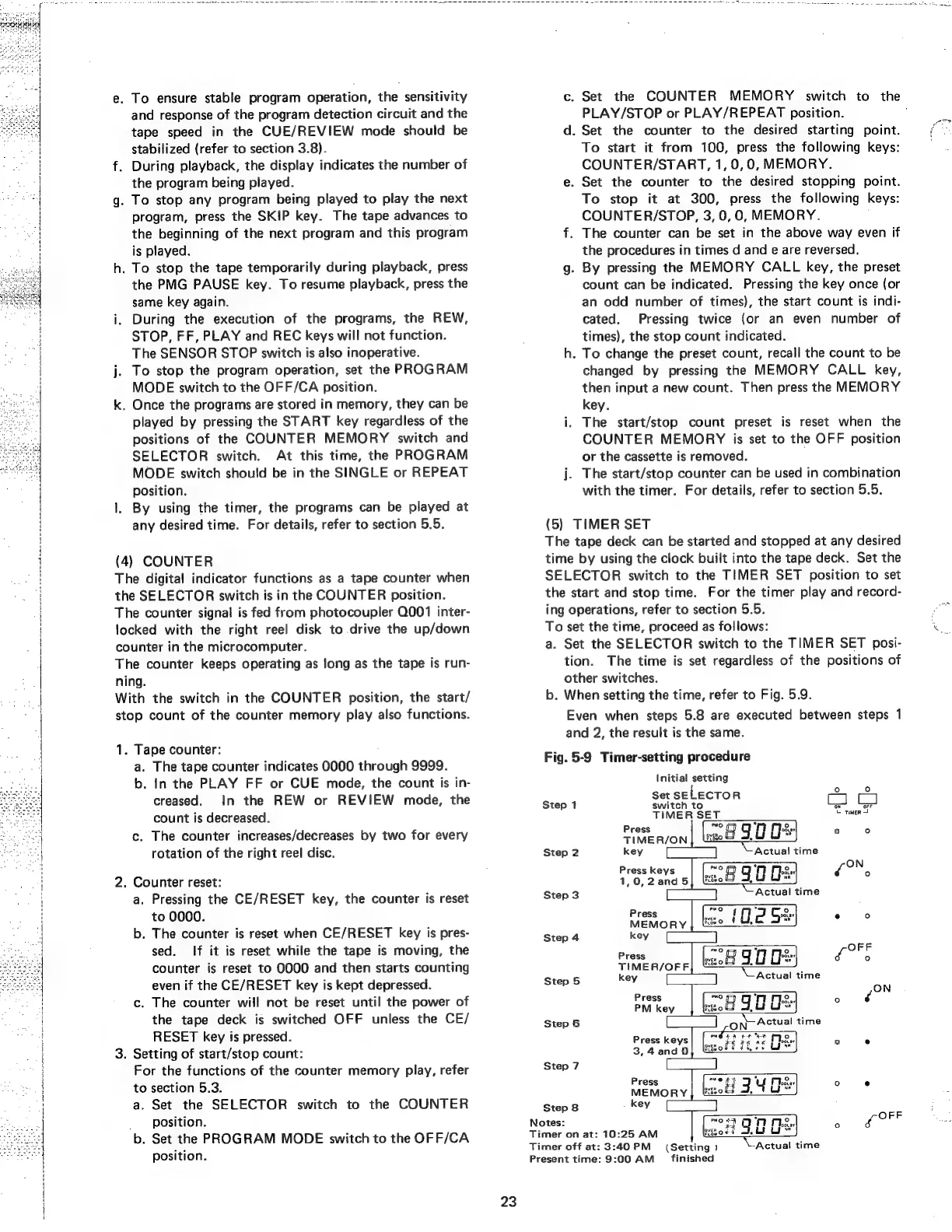
(5)
TIMER
SET
The
tape
deck
can
be
started
and
stopped
at
any
desired
time
by
using
the
clock
built
into
the
tape
deck.
Set
the
SELECTOR
switch
to
the
TIMER
SET
position
to
set
the
start
and
stop
time.
For
the
timer
play
and
record-
ing
operations,
refer
to
section
5.5.
To
set
the
time,
proceed
as
follows:
a.
Set
the
SELECTOR
switch
to
the
TIMER
SET
posi-
tion.
The
time
is
set
regardless
of
the
positions
of
other
switches.
b.
When
setting
the
time,
refer
to
Fig.
5.9.
Even
when
steps
5.8
are
executed
between
steps
1
and
2,
the
result
is
the
same.
Fig.
5-9
Timer-setting
procedure
Initial
setting
I
Set
SELECTOR
a
Step
1
switch
to
aor
TIMER
SET.
©
ren
2
Press
mo.
4
ce
3
FS
TIMER/ON|
&
8900
Step
2
key
mn
Actual
time
Press
keys
—2
OO
Oe
Pe
1,0,2and5]|
lke
x
ii
Step
3
=
Actual
time
Press
ere}
,
8.)
.
5
MEMORY
|
“2
(O.2
S%
Step
4
key
m
7
OFF
Press
oe
g
0
Hes
F
anne
TIMER/OFF
Fiow
0
le
Step
5
key
—-
y
Actual
time
ss
Press
ox)
y
2.)
J
PM
key
reno
OD
9a
Of
be
Step
6
fo
ON
Actual
time
Press
keys
aur
be
abel
whe
3 .
3,4
and
0}
lsoft
7h
0S
Ure
Step
7
Press
“ert
DU
Moe
2 e
MEMORY
eed
34
Oe
Step
8
key
:
Notes:
NO
&
nne..
:
fer
Timer
on
at:
10:25
AM
evssoet
Lt
Ly
Timer
off
at:
3:40
PM
Present
time:
9:00
AM
(Setting
)
finished
Actual
time
[a
wr