EasyManua.ls Logo

Marantz SD9000 - Page 23

Marantz SD9000
69 pages
Print Icon
To Next Page IconTo Next Page
To Previous Page IconTo Previous Page
Loading...
‘c.
For
setting
AM
or
PM,
refer
to
section
5.3(1)
C
and
Fig.
5.4.
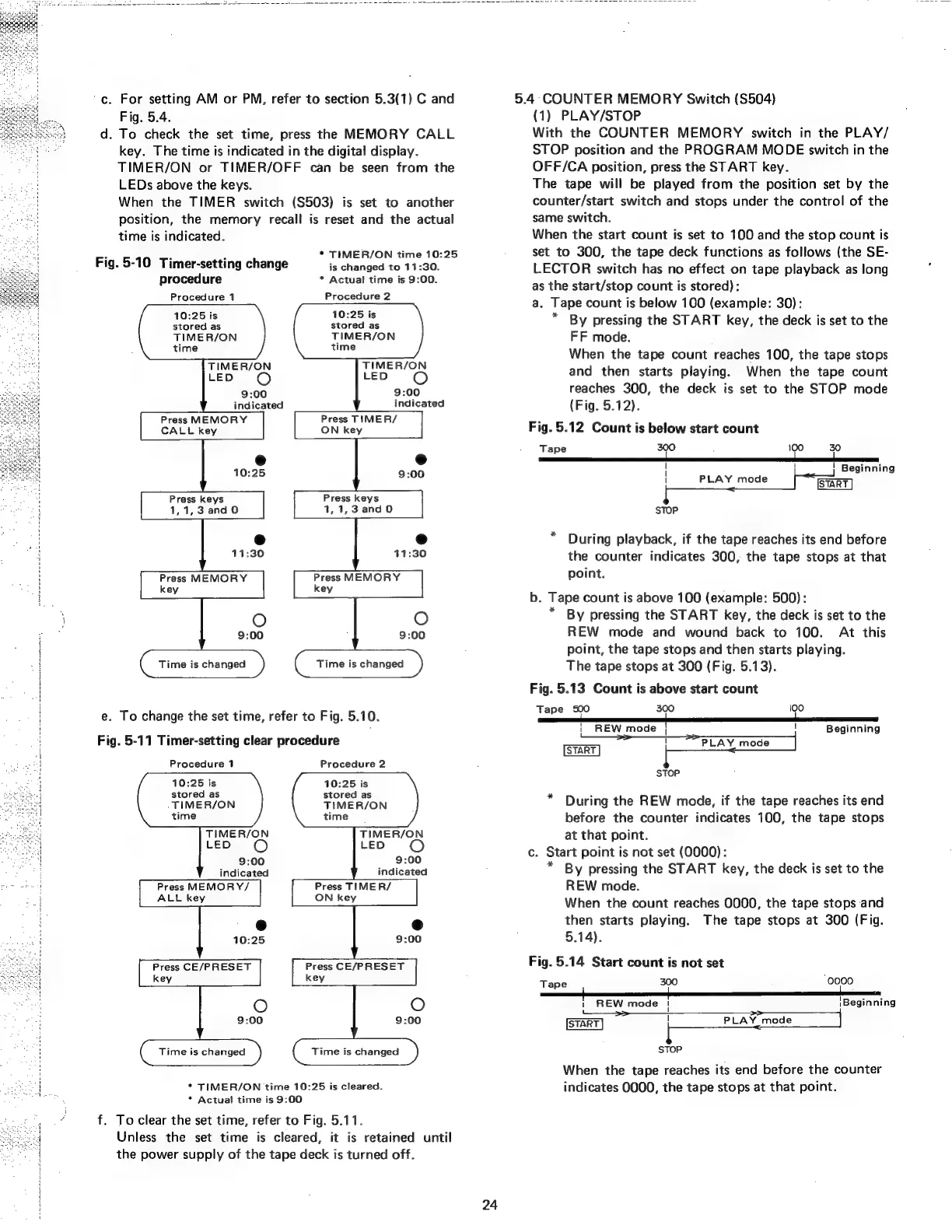
d.
To
check
the
set
time,
press
the
MEMORY
CALL
key.
The
time
is
indicated
in
the
digital
display.
TIMER/ON
or
TIMER/OFF
can
be
seen
from
the
LEDs
above
the
keys.
When
the
TIMER
switch
(S503)
is
set
to
another
position,
the
memory
recall
is
reset
and
the
actual
time
is
indicated.
*
TIMER/ON
time
10:25
is
changed
to
11:30.
*
Actual
time
is
9:00.
Fig.
5-10
Timer-setting
change
procedure
Procedure
1
Procedure
2
10:25
is
stored
as
TIMER/ON
time
10:25
is
stored
as
TIME
R/ON
time
TIMER/ON
LED
oO
TIMER/ON
LED
O
9:00
9:00
indicated
indicated
Press
MEMORY
Press
TIMER/
CALL
key
ON
key
e
Press
keys
41,1,3
and0
Press
keys
1,
1,3
and
0
Press
MEMORY
key
9:00
Time
is
changed
Time
is
changed
e.
To
change
the
set
time,
refer
to
Fig.
5.10.
Fig.
5-11
Timer-setting
clear
procedure
Procedure
2
Procedure
1
10:25
is
stored
as
TIMER/ON
time
10:25
is
stored
as
TIMER/ON
time
TIMER/ON
TIMER/ON
LED
O
LED
9:00
9:00
indicated
indicated
Press
MEMORY/
Press
TIME
R/
ALL
key
ON
key
Time
is
changed
Time
is
changed
*
TIMER/ON
time
10:25
is
cleared.
*
Actual
time
is
9:00
f.
To
clear
the
set
time,
refer
to
Fig.
5.11.
Unless
the
set
time
is
cleared,
it
is
retained
until
the
power
supply
of
the
tape
deck
is
turned
off.
5.4
COUNTER
MEMORY
Switch
(S504)
(1)
PLAY/STOP
With
the
COUNTER
MEMORY
switch
in
the
PLAY/
STOP
position
and
the
PROGRAM
MODE
switch
in
the
OFF/CA
position,
press
the
START
key.
The
tape
will
be
played
from
the
position
set
by
the
counter/start
switch
and
stops
under
the
control
of
the
same
switch.
When
the
start
count
is
set
to
100
and
the
stop
count
is
set
to
300,
the
tape
deck
functions
as
follows
(the
SE-
LECTOR
switch
has
no
effect
on
tape
playback
as
long
as
the
start/stop
count
is
stored):
a.
Tape
count
is
below
100
(example:
30):
By
pressing
the
START
key,
the
deck
is
set
to
the
FF
mode.
When
the
tape
count
reaches
100,
the
tape
stops
and
then
starts
playing.
When
the
tape
count
reaches
300,
the
deck
is
set
to
the
STOP
mode
(Fig.
5.12).
Fig.
5.12
Count
is
below
start
count
Tape
300
100
30
|
\
'
Beginning
|
|___
PLAY
mode
[eer
sToP
During
playback,
if
the
tape
reaches
its
end
before
the
counter
indicates
300,
the
tape
stops
at
that
point.
b.
Tape
count
is
above
100
(example:
500):
By
pressing
the
START
key,
the
deck
is
set
to
the
REW
mode
and
wound
back
to
100.
At
this
point,
the
tape
stops
and
then
starts
playing.
The
tape
stops
at
300
(Fig.
5.13).
Fig.
5.13
Count
is
above
start
count
Tape
SO
300
100
|
REW
mode
|
!
Beginning
STOP
*
During
the
REW
mode,
if
the
tape
reaches
its
end
before
the
counter
indicates
100,
the
tape
stops
at
that
point.
c.
Start
point
is
not
set
(0000):
*
By
pressing
the
START
key,
the
deck
is
set
to
the
REW
mode.
When
the
count
reaches
0000,
the
tape
stops
and
then
starts
playing.
The
tape
stops
at
300
(Fig.
5.14).
Fig.
5.14
Start
count
is
not
set
Tape
300
“0000
1
REW
mode
|!
|Beginning
[START]
|
PLAY
mode
STOP
When
the
tape
reaches
its
end
before
the
counter
indicates
0000,
the
tape
stops
at
that
point.