EasyManua.ls Logo

Marantz SD9000 - Page 21

Marantz SD9000
69 pages
Print Icon
To Next Page IconTo Next Page
To Previous Page IconTo Previous Page
Loading...
!
i
|
}
'
'
'
i
'
1
H
i
i
'
H
i
!
i
5
5)
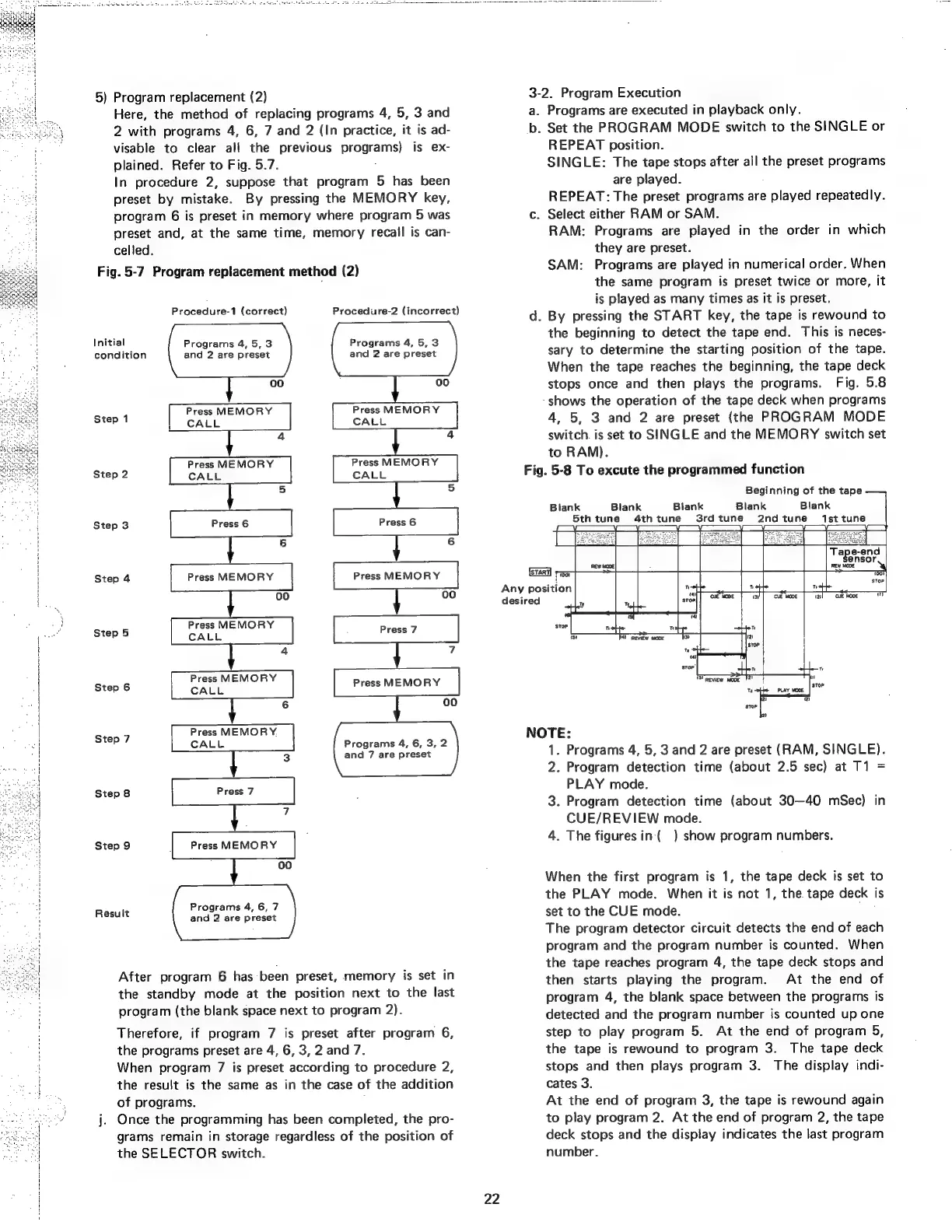
Program
replacement
(2)
Here,
the
method
of
replacing
programs
4,
5,
3
and
2
with
programs
4,
6,
7
and
2
(In
practice,
it
is
ad-
visable
to
clear
all
the
previous
programs)
is
ex-
plained.
Refer
to
Fig.
5.7.
In
procedure
2,
suppose
that
program
5
has
been
preset
by
mistake.
By
pressing
the
MEMORY
key,
program
6
is
preset
in
memory
where
program
5
was
preset
and,
at
the
same
time,
memory
recall
is
can-
celled.
Fig.
5-7
Program
replacement
method
(2)
Procedure-1
(correct)
Procedure-2
(incorrect)
Initial
Programs
4,
5,3
Programs
4, 5,
3
condition
and
2
are
preset
and
2
are
preset
00
00
Press
MEMORY
Press
MEMORY
Step
1
CALL CALL
4
4
Press
MEMORY
Press
MEMORY
Step
2
CALL
CALL
5
5
Step
3
6
6
Step
4
Press
MEMORY
Press
MEMORY
00
00
Step
5
aed
aout
Press
7
4
7
Press
MEMORY
Step
6
CALL
Press
MEMORY
6
oo
Step
7
Press
MEMORY.
P
CALL
Programs
4,
6,
3,
2
3
and
7
are
preset
7
Step
9
Press
MEMORY
00
Result
Programs
4,
6,
7
and
2
are
preset
After
program
6
has-been
preset,
memory
is
set
in
the
standby
mode
at
the
position
next
to
the
last
program
(the
blank
space
next
to
program
2).
Therefore,
if
program
7
is
preset
after
program
6,
the
programs
preset
are
4,
6, 3,
2
and
7.
When
program
7
is
preset
according
to
procedure
2,
the
result
is
the
same
as
in
the
case
of
the
addition
of
programs.
;
j.
Once
the
programming
has
been
completed,
the
pro-
grams
remain
in
storage
regardless
of
the
position
of
the
SELECTOR
switch.
22
3-
a.
b.
Fig.
2.
Program
Execution
Programs
are
executed
in
playback
only.
Set
the
PROGRAM
MODE
switch
to
the
SINGLE
or
REPEAT
position.
SINGLE:
The
tape
stops
after
all
the
preset
programs
are
played.
REPEAT:
The
preset
programs
are
played
repeatedly.
.
Select
either
RAM
or
SAM.
RAM:
Programs
are
played
in
the
order
in
which
they
are
preset.
SAM:
Programs
are
played
in
numerical
order.
When
the
same
program
is
preset
twice
or
more,
it
is
played
as
many
times
as
it
is
preset.
.
By
pressing
the
START
key,
the
tape
is
rewound
to
the
beginning
to
detect
the
tape
end.
This
is
neces-
sary
to
determine
the
starting
position
of
the
tape.
When
the
tape
reaches
the
beginning,
the
tape
deck
stops
once
and
then
plays
the
programs.
Fig.
5.8
shows
the
operation
of
the
tape
deck
when
programs
4,
5,
3
and
2
are
preset
(the
PROGRAM
MODE
switch.
is
set
to
SINGLE
and
the
MEMORY
switch
set
to
RAM).
5-8
To
excute
the
programmed
function
Beginning
of
the
tape
Blank
1st
tune
Blank
Blank
Blank
4thtune
S3rdtune
2nd
tune
Blank
5th
tune
NOTE:
1.
Programs
4,
5,
3
and
2
are
preset
(RAM,
SINGLE).
2.
Program
detection
time
(about
2.5
sec)
at
T1
=
PLAY
mode.
3.
Program
detection
time
(about
30—40
mSec)
in
CUE/REVIEW
mode.
4.
The
figures
in
(
)
show
program
numbers.
When
the
first
program
is
1,
the
tape
deck
is
set
to
the
PLAY
mode.
When
it
is
not
1,
the
tape
deck
is
set
to
the
CUE
mode.
.
The
program
detector
circuit
detects
the
end
of
each
program
and
the
program
number
is
counted.
When
the
tape
reaches
program
4,
the
tape
deck
stops
and
then
starts
playing
the
program.
At
the
end
of
program
4,
the
blank
space
between
the
programs
is
detected
and
the
program
number
is
counted
up
one
step
to
play
program
5.
At
the
end
of
program
5,
the
tape
is
rewound
to
program
3.
The
tape
deck
stops
and
then
plays
program
3.
The
display
indi-
cates
3.
At
the
end
of
program
3,
the
tape
is
rewound
again
to
play
program
2.
At
the
end
of
program
2,
the
tape
deck
stops
and
the
disptay
indicates
the
last
program
number.