EasyManua.ls Logo

Marantz SD9000 - Page 20

Marantz SD9000
69 pages
Print Icon
To Next Page IconTo Next Page
To Previous Page IconTo Previous Page
Loading...
1
H
i
1
|
|
1
a
i
1
4
|
1
(2)
CLOCK
When
the
SELECTOR
switch
is
in
the
CLOCK
position,
the
digital
display
functions
as
a
clock.
With
the
POWER
switch
OFF,
time
is
indicated
regardless
of
the
position
of
the
SELECTOR
switch.
When
power
is
restored
after
a
power
failure,
the
clock
is
reset
to
‘‘0:00’’
and
the
time
indication
flickers
but
the
clock
remains
operating.
If
the
indication
‘0:36
is
flickering,
it
means
that
it
is
34
minutes
after
a
power
failure.
(3)
PROGRAM
3-1.
Program
Setting
a.
Set
the
POWER
switch
to
ON
and
the
SELECTOR
switch
to
PROGRAM.
The
display
indicates
00.
b.
Set the
PROGRAM
MODE
switch
to
SINGLE
or
RE-
PEAT.
c.
The
COUNTER
MEMORY
switch
may
be
set
to
any
position,
since
it
is
independent
of
program
opera-
tion.
d.
Press
the
RAM
or
SAM
key.
The
LED
above
the
key
will
light.
RAM:
Memory
call
and
piayback
operations
are
carried
out
in
the
order
of
program
setting.
SAM:
Memory
call
and
playback
operations
are
carried
out
in
the
sequential
order
of
the
program
number,
regardless
of
the
order
of
program
setting.
e.
Set
the
desired
programs.
Store
the
desired
program
numbers
in
the
memory
in
the
desired
playback
order.
For
example,
if
programs
4,
5,
3
and
2
are
to
be
played
in
that
order,
use
the
keys
as
follows:
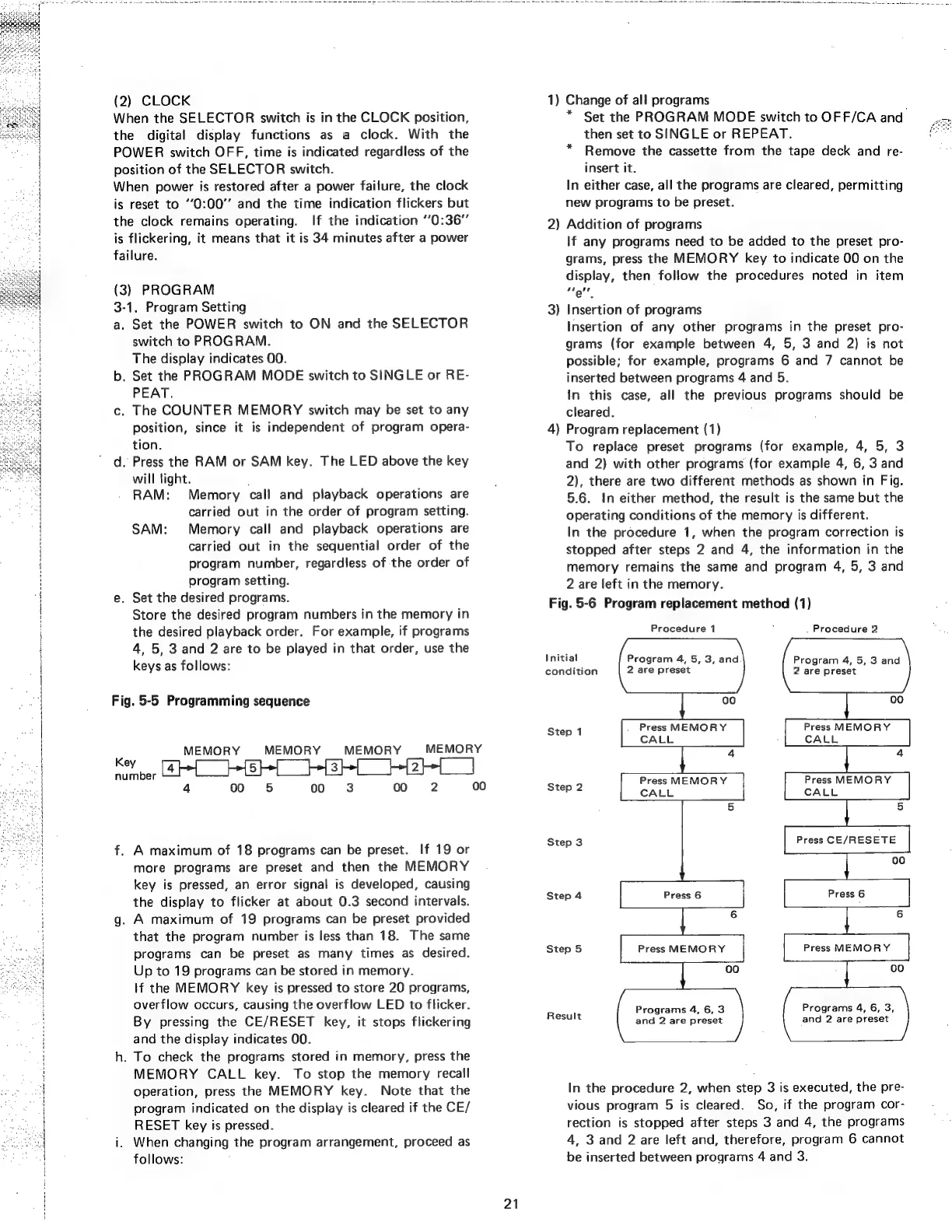
Fig.
5-5
Programming
sequence
MEMORY
MEMORY
MEMORY
key
GRR
GR
ee
4
oo
65
co
«(3
f.
A
maximum
of
18
programs
can
be
preset.
If
19
or
more
programs
are
preset
and
then
the
MEMORY
key
is
pressed,
an
error
signal
is
developed,
causing
the
display
to
flicker
at
about
0.3
second
intervals.
g.
A
maximum
of
19
programs
can
be
preset
provided
that
the
program
number
is
less
than
18.
The
same
programs
can
be
preset
as
many
times
as
desired.
Up
to
19
programs
can
be
stored
in
memory.
lf
the
MEMORY
key
is
pressed
to
store
20
programs,
overflow
occurs,
causing
the
overflow
LED
to
flicker.
By
pressing
the
CE/RESET
key,
it
stops
flickering
and
the
display
indicates
00.
h.
To
check
the
programs
stored
in
memory,
press
the
MEMORY
CALL
key.
To
stop
the
memory
recall
operation,
press
the
MEMORY
key.
Note
that
the
program
indicated
on
the
display
is
cleared
if
the
CE/
RESET
key
is
pressed.
i.
When
changing
the
program
arrangement,
proceed
as
follows:
MEMORY
00
2
00
21
1)
Change
of
all
programs
*
Set
the
PROGRAM
MODE
switch
to
OFF/CA
and
then
set
to
SINGLE
or
REPEAT.
Remove
the
cassette
from
the
tape
deck
and
re-
insert
it.
In
either
case,
all
the
programs
are
cleared,
permitting
new
programs
to
be
preset.
*
2)
Addition
of
programs
If
any
programs
need
to
be
added
to
the
preset
pro-
grams,
press
the
MEMORY
key
to
indicate
00
on
the
display,
then
follow
the
procedures
noted
in
item
elt
3)
Insertion
of
programs
Insertion
of
any
other
programs
in
the
preset
pro-
grams
(for
example
between
4,
5,
3
and
2)
is
not
possible;
for
example,
programs
6
and
7
cannot
be
inserted
between
programs
4
and
5.
In
this
case,
all
the
previous
programs
should
be
cleared.
4)
Program
replacement
(1)
To
replace
preset
programs
(for
example,
4,
5,
3
and
2)
with
other
programs
(for
example
4, 6,
3
and
2),
there
are
two
different
methods
as
shown
in
Fig.
5.6.
In
either
method,
the
result
is
the
same
but
the
operating
conditions
of
the
memory
is
different.
In
the
procedure
1,
when
the
program
correction
is
stopped
after
steps
2
and
4,
the
information
in
the
memory
remains
the
same
and
program
4,
5,
3
and
2
are
left
in
the
memory.
Fig.
5-6
Program
replacement
method
(1)
Procedure
1
.
Procedure
2
Initial
Program
4,
5,
3,
and
Program
4,
5,
3
and
condition
2
are
preset
2
are
preset
00
Step
1
Press
MEMORY
CALL
4
Press
MEMORY
Press
MEMORY
Press
MEMORY
Step
2
CALL
5
Press
CE/RESETE
Step
3
Step
4
6
Step
5
Press
MEMORY
oo
Press
MEMORY
Programs
4,
6, 3,
and
2
are
preset
Programs
4,
6,
3
and
2
are
preset
Result
In
the
procedure
2,
when
step
3
is
executed,
the
pre-
vious
program
5
is
cleared.
So,
if
the
program
cor-
rection
is
stopped
after
steps
3
and
4,
the
programs
4,
3
and
2
are
left
and,
therefore,
program
6
cannot
be
inserted
between
programs
4
and
3.