EasyManua.ls Logo

Marantz SD9000 - Page 19

Marantz SD9000
69 pages
Print Icon
To Next Page IconTo Next Page
To Previous Page IconTo Previous Page
Loading...
5.2
PROGRAM
MODE
Switch
(S506)
(1)
OFF/CA
CA
represents
CLEAR
ALL.
Use
the
OFF/CA
position
of
the
PROGRAM
MODE
switch
referring
to
the
sec-
tion
5.3.
When
the
switch
is
set
from
SINGLE
to
OFF/CA
(or
from
OFF/CA
to
SINGLE
and
to
OFF/CA),
the
follow-
ing
functions
are
performed
according
to
the
conditions
of
the
tape
deck
and
the
microcomputer.
a.
The
tape
deck
is
set
to
the
STOP
mode.
b.
Program
mode
operation
is
cancelled
and
the
deck
is
set
to
the
STOP
mode.
The
programs
are
cleared
from
the
memory.
5.3
SELECTOR
Switch
(S505)
(1)
CLOCK
SET
When
setting
time,
the
switch
should
be
placed
in
this
position.
Make
sure
that
the
POWER
switch
is
ON.
If
it
is
OFF,
the
clock
set
input
signa!
is
not
fed
to
the
memory
circuit
of
the
microcomputer.
Time
can
be
set
regardless
of
the
positions
of
the
PRO-
GRAM
MODE
and
COUNTER
MEMORY
switches.
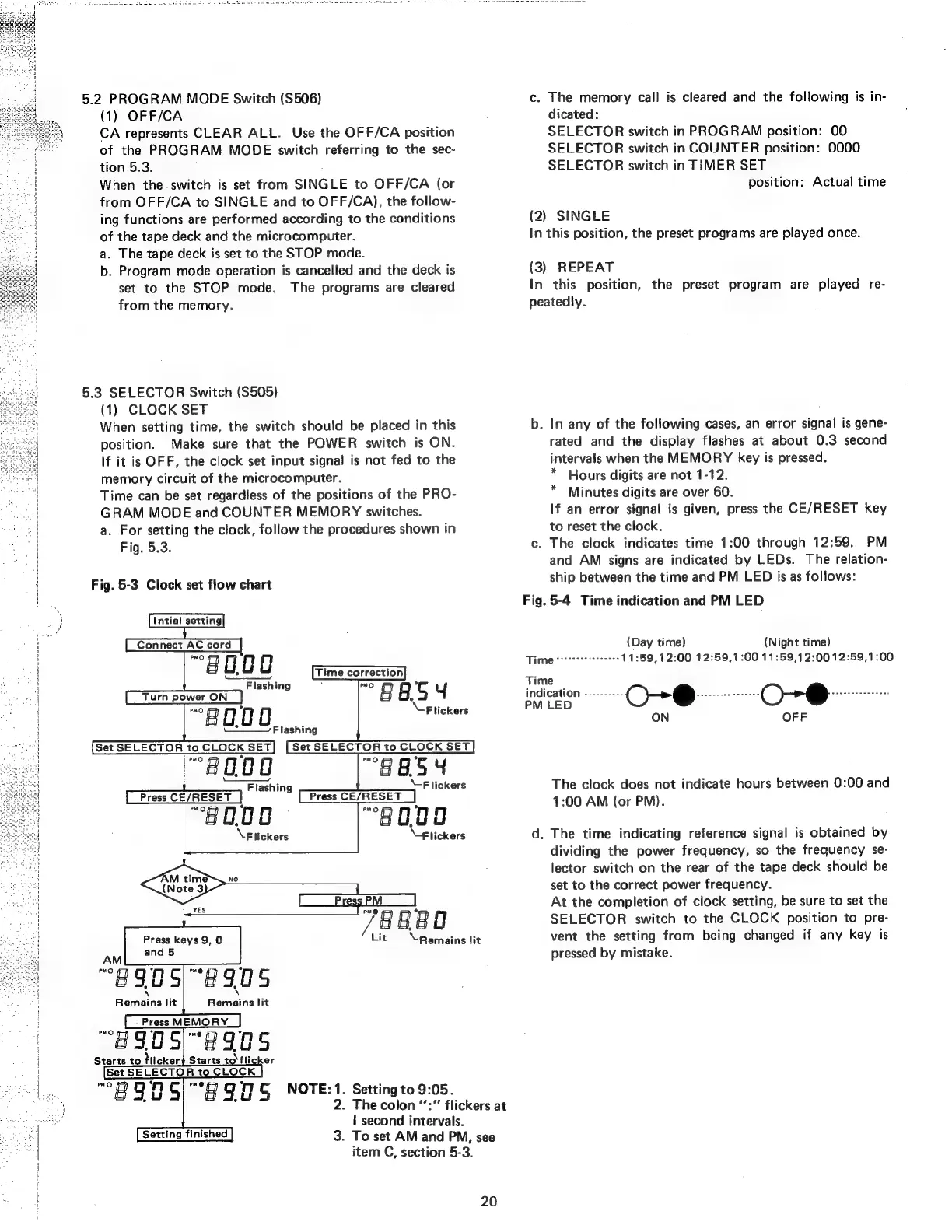
a.
For
setting
the
clock,
follow
the
procedures
shown
in
Fig.
5.3.
Fig.
5-3
Clock
set
flow
chart
Connect
AC
cord
“80.00
Flashing
[Turn
power
ON]
“80.00
U-—_
Flashing
Set
SELECTOR
to
CLOCK
SET
Set
SELECTOR
to
CLOCK
SET
“8
O00
“AES
4
Flashing
Flickers
Press
CE/RESET
Press
CE/RESET
“8
0.00
“8000
\
Flickers
\-F
lickers
LT
it
Remains
lit
Time
correction
“BASH
Flickers
Press
keys
9,
O
“8905
AM
PMO
nN
#905
\
Remains
lit
Remains
lit
(Pres
MEMORY]
“BSCS
e89es
Starts
to
ticker
Starts
to'fli
90
CG
“*t
90
S
oe
Setting
finished
Setting
to
9:05.
The
colon
“’:”
flickers
at
|
second
intervals.
3.
To
set
AM
and
PM,
see
item
C,
section
5-3.
20
c.
The
memory
call
is
cleared
and
the
following
is
in-
dicated:
SELECTOR
switch
in
PROGRAM
position:
00
SELECTOR
switch
in
COUNTER
position:
0000
SELECTOR
switch
in
TIMER
SET
position:
Actual
time
(2)
SINGLE
In
this
position,
the
preset
programs
are
played
once.
(3)
REPEAT
In
this
position,
the
preset
program
are
played
re-
peatedly.
b.
In
any
of
the
following
cases,
an
error
signal
is
gene-
rated
and
the
display
flashes
at
about
0.3
second
intervals
when
the
MEMORY
key
is
pressed.
Hours
digits
are
not
1-12.
Minutes
digits
are
over
60.
If
an
error
signal
is
given,
press
the
CE/RESET
key
to
reset
the
clock.
c.
The
clock
indicates
time
1:00
through
12:59.
PM
and
AM
signs
are
indicated
by
LEDs.
The
relation-
ship
between
the
time
and
PM
LED
is
as
follows:
Fig.
5-4
Time
indication
and
PM
LED
*
(Day
time)
(Night
time)
Times
11:59,12:00
12:59,
1:00
11:59,12:0012:59,1:00
Time
indication
----------
O-®@
Basie
aes
O-@
ees
ah
PM
LED
ON
OFF
The
clock
does
not
indicate
hours
between
0:00
and
1:00
AM
(or
PM).
d.
The
time
indicating
reference
signal
is
obtained
by
dividing
the
power
frequency,
so
the
frequency
se-
lector
switch
on
the
rear
of
the
tape
deck
should
be
set
to
the
correct
power
frequency.
At
the
completion
of
clock
setting,
be
sure
to
set
the
SELECTOR
switch
to
the
CLOCK
position
to
pre-
vent
the
setting
from
being
changed
if
any
key
is
pressed
by
mistake.