EasyManua.ls Logo

Marantz SD9000 - Page 18

Marantz SD9000
69 pages
Print Icon
To Next Page IconTo Next Page
To Previous Page IconTo Previous Page
Loading...
(7)
MEMORY
CALL
This
is
used
to
check
the
information
stored
in
memory.
It
has
no
effect
on
the
programs
being
executed
and
tape
deck
operation.
To
cancel
memory
call,
press
the
ME-
MORY
key.
When
the
CE/RESET
key
is
pressed
while
the
memory
is
recalled
by
pressing
the
MEMORY
CALL
key,
the
information
in
the
memory
is
reset
and
cleared.
a.
Recalling
the
programs
The
preset
programs
can
be
recalled
when
the
SE-
LECTOR
switch
is
in
the
PROGRAM
position
and
the
PROGRAM
MODE
switch
is
in
the
SINGLE
or
REPEAT
position.
For
example,
if
programs
are
pre-
set
in
the
RAM
in
the
order
of
4,
5,
3,
2
and
1
and
the
MEMORY
CALL
key
is
pressed,
the
memory
is
recalled
and
the
display
is
as
shown
in
the
Table
be-
low.
In
this
example,
the
indication
is
clear
from
the
6th
position,
indicating
that
all
the
programs
have
been
executed.
If
no
programs
are
stored
in
the
me-
mory,
the
indication
goes
off
when
the
MEMORY
CALL
key
is
pressed.
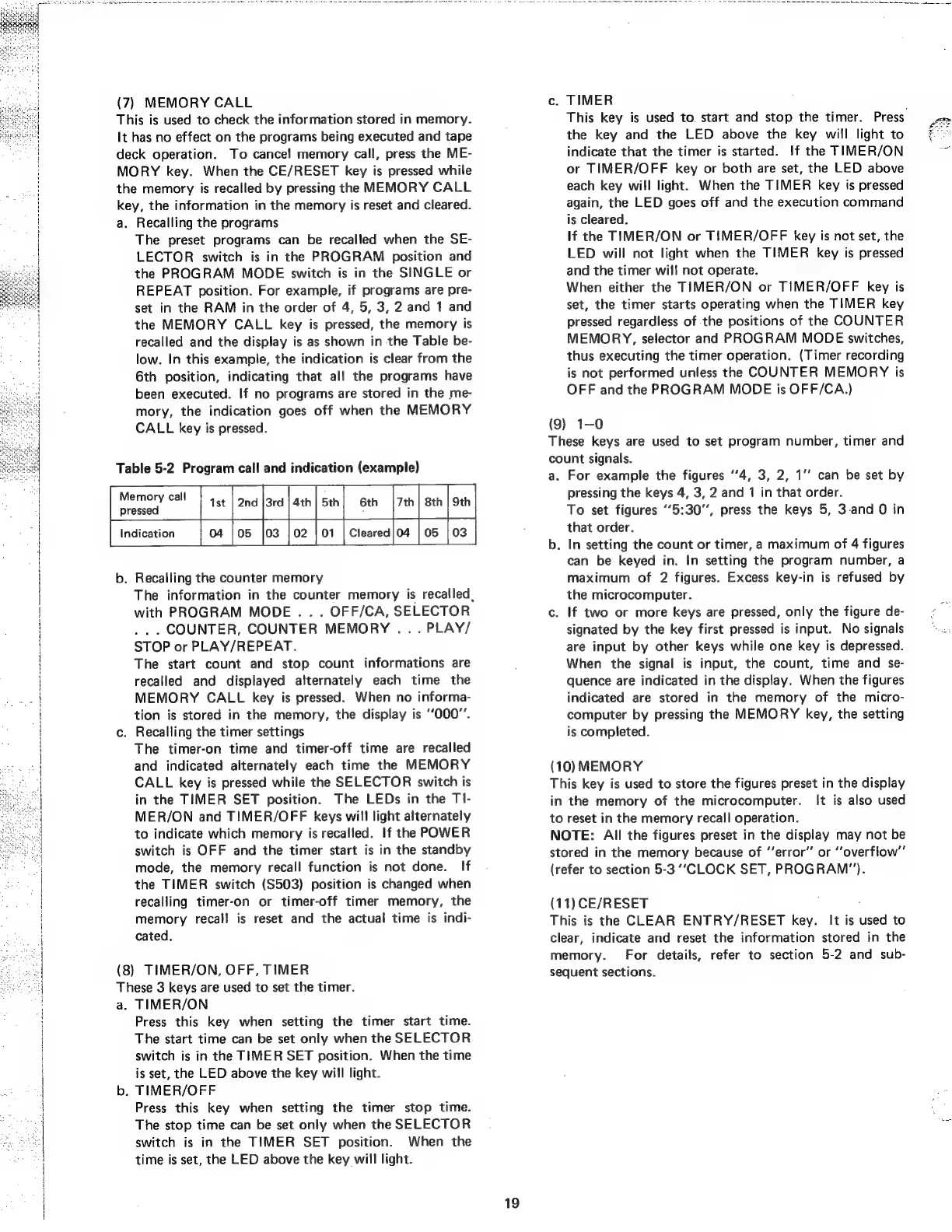
Table
5-2
Program
call
and
indication
(example)
Memory
call
|
46
ana
[ara
[ah
st
6th
|7th|
sth]
9th
pressed
:
Indication
04
105
|03
|02
|
01
|
Cleared|04
|
05
|03
b.
Recalling
the
counter
memory
The
information
in
the
counter
memory
is
recalled,
with
PROGRAM
MODE
.
. .
OFF/CA,
SELECTOR
..
.
COUNTER,
COUNTER
MEMORY
..
.
PLAY/
STOP
or
PLAY/REPEAT.
The
start
count
and
stop
count
informations
are
recalled
and
displayed
alternately
each
time
the
MEMORY
CALL
key
is
pressed.
When
no
informa-
tion
is
stored
in
the
memory,
the
display
is
‘‘000’’.
c.
Recalling
the
timer
settings
The
timer-on
time
and
timer-off
time
are
recalled
and
indicated
alternately
each
time
the
MEMORY
CALL
key
is
pressed
while
the
SELECTOR
switch
is
in
the
TIMER
SET
position.
The
LEDs
in
the
TI-
MER/ON
and
TIMER/OFF
keys
will
light
alternately
to
indicate
which
memory
is
recalled.
If
the
POWER
switch
is
OFF
and
the
timer
start
is
in
the
standby
mode,
the
memory
recall
function
is
not
done.
If
the
TIMER
switch
($503)
position
is
changed
when
recalling
timer-on
or
timer-off
timer
memory,
the
memory
recall
is
reset
and
the
actual
time
is
indi-
cated.
(8)
TIMER/ON,
OFF,
TIMER
These
3
keys
are
used
to
set
the
timer.
a.
TIMER/ON
Press
this
key
when
setting
the
timer
start
time.
The
start
time
can
be
set
only
when
the
SELECTOR
switch
is
in
the
TIMER
SET
position.
When
the
time
is
set,
the
LED
above
the
key
will
light.
b.
TIMER/OFF
Press
this
key
when
setting
the
timer
stop
time.
The
stop
time
can
be
set
only
when
the
SELECTOR
switch
is
in
the
TIMER
SET
position.
When
the
time
is
set,
the
LED
above
the
key
will
light.
19
c.
TIMER
This
key
is
used
to.
start
and
stop
the
timer.
Press.
the
key
and
the
LED
above
the
key
will
light
to
indicate
that
the
timer
is
started.
!f
the
TIMER/ON
or
TIMER/OFF
key
or
both
are
set,
the
LED
above
each
key
will
light.
When
the
TIMER
key
is
pressed
again,
the
LED
goes
off
and
the
execution
command
is
cleared.
If
the
TIMER/ON
or
TIMER/OFF
key
is
not
set,
the
LED
will
not
light
when
the
TIMER
key
is
pressed
and
the
timer
will
not
operate.
When
either
the
TIMER/ON
or
TIMER/OFF
key
is
set,
the
timer
starts
operating
when
the
TIMER
key
pressed
regardless
of
the
positions
of
the
COUNTER
MEMORY,
selector
and
PROGRAM
MODE
switches,
thus
executing
the
timer
operation.
(Timer
recording
is
not
performed
unless
the
COUNTER
MEMORY
is
OFF
and
the
PROGRAM
MODE
is
OFF/CA.}
(9)
1—0
These
keys
are
used
to
set
program
number,
timer
and
count
signals.
a.
For
example
the
figures
‘’4,
3, 2,
1’’
can
be
set
by
pressing
the
keys
4,
3,
2
and
1
in
that
order.
To
set
figures
‘‘5:30’’,
press
the
keys
5,
3-and
0
in
that
order.
b.
In
setting
the
count
or
timer,
a
maximum
of
4
figures
can
be
keyed
in.
In
setting
the
program
number,
a
maximum
of
2
figures.
Excess
key-in
is
refused
by
the
microcomputer.
c.
If
two
or
more
keys
are
pressed,
only
the
figure
de-
signated
by
the
key
first
pressed
is
input.
No
signals
are
input
by
other
keys
while
one
key
is
depressed.
When
the
signal
is
input,
the
count,
time
and
se-
quence
are
indicated
in
the
display.
When
the
figures
indicated
are
stored
in
the
memory
of
the
micro-
computer
by
pressing
the
MEMORY
key,
the
setting
is
completed.
(10)
MEMORY
This
key
is
used
to
store
the
figures
preset
in
the
display
in
the
memory
of
the
microcomputer.
It
is
also
used
to
reset
in
the
memory
recall
operation.
NOTE:
All
the
figures
preset
in
the
display
may
not
be
stored
in
the
memory
because
of
“‘error”
or
“overflow”
(refer
to
section
5-3
‘“‘CLOCK
SET,
PROGRAM").
(11)
CE/RESET
This
is
the
CLEAR
ENTRY/RESET
key.
It
is
used
to
clear,
indicate
and
reset
the
information
stored
in
the
memory.
For
details,
refer
to
section
5-2
and
sub-
sequent
sections.