EasyManua.ls Logo

Marantz SD9000 - Page 36

Marantz SD9000
69 pages
Print Icon
To Next Page IconTo Next Page
To Previous Page IconTo Previous Page
Loading...
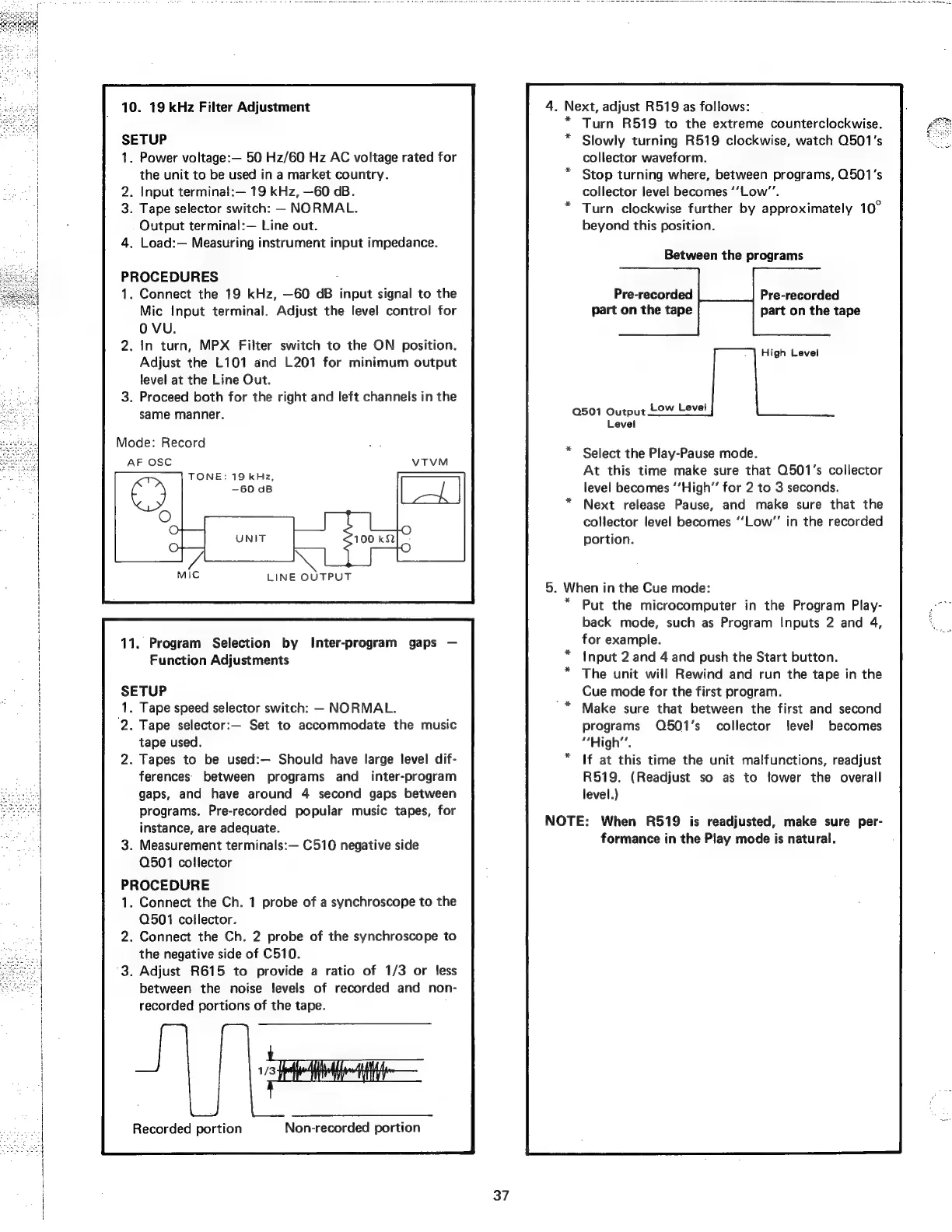
10.
19
kHz
Filter
Adjustment
SETUP
.
Power
voltage:—
50
Hz/60
Hz
AC
voltage
rated
for
the
unit
to
be
used
in
a
market
country.
aes]
.
Input
terminal:—
19
kHz,
—60
dB.
‘|
.
Tape
selector
switch:
-
NORMAL.
:
Output
terminal:—
Line
out.
.
Load:—
Measuring
instrument
input
impedance.
PROCEDURES
1.
Connect
the
19
kHz,
—60
dB
input
signal
to
the
Mic
Input
terminal.
Adjust
the
level
control
for
OVU.
.
in
turn,
MPX
Filter
switch
to
the
ON
position.
Adjust
the
L101
and
L201
for
minimum
output
level
at
the
Line
Out.
.
Proceed
both
for
the
right
and
left
channels
in
the
same
manner.
Mode:
Record
AF
OSC
TONE:
19
kHz,
11.
Program
Selection
by
Inter-program
gaps
Function
Adjustments
SETUP
1.
Tape
speed
selector
switch:
NORMAL.
‘2.
Tape
selector:—
Set
to
accommodate
the
music
tape
used.
2.
Tapes
to
be
used:— Should
have
large
level
dif-
ferences’
between
programs
and_
inter-program
gaps,
and
have
around
4
second
gaps
between
programs.
Pre-recorded
popular
music
tapes,
for
instance,
are
adequate.
.
Measurement
terminals:—
C510
negative
side
Q501
collector
PROCEDURE
.
Connect
the
Ch.
1
probe
of
a
synchroscope
to
the
Q501
collector.
.
Connect
the
Ch.
2
probe
of
the
synchroscope
to
the
negative
side
of
C510.
°3.
Adjust
R615
to
provide
a
ratio
of
1/3
or
less
between
the
noise
levels
of
recorded
and
non-
recorded
portions
of
the
tape.
Recorded
portion
Non-recorded
portion
:
Next,
adjust
R519
as
follows:
Turn
R519
to
the
extreme
counterclockwise.
Slowly
turning
R519
clockwise,
watch
0501's
collector
waveform.
Stop
turning
where,
between
programs,
0501's
collector
level
becomes
‘‘Low’’.
Turn
clockwise
further
by
approximately
10°
beyond
this
position.
Between
the
programs
Pre-recorded
Pre-recorded
part
on
the
tape
part
on
the
tape
High
Level
Q501
Output
Low
Level
Level
Select
the
Play-Pause
mode.
At
this
time
make
sure
that
Q501’s
collector
level
becomes
‘’High”’
for
2
to
3
seconds.
Next
release
Pause,
and
make
sure
that
the
collector
level
becomes
‘‘Low”’
in
the
recorded
portion.
i
When
i
in
the
Cue
mode:
Put
the
microcomputer
in
the
Program
Play-
back
mode,
such
as
Program
Inputs
2
and
4,
for
example.
Input
2
and
4
and
push
the
Start
button.
The
unit
will
Rewind
and
run
the
tape
in
the
Cue
mode
for
the
first
program.
Make
sure
that
between
the
first
and
second
programs
Q501’s_
collector
level
becomes
“High”.
If
at
this
time
the
unit
malfunctions,
readjust
R519.
(Readjust
so
as
to
tower
the
overall
level.)
*
NOTE:
When
R519
is
readjusted,
make
sure
per-
formance
in
the
Play
mode
is
natural.