EasyManua.ls Logo

Marantz SD9000 - Page 35

Marantz SD9000
69 pages
Print Icon
To Next Page IconTo Next Page
To Previous Page IconTo Previous Page
Loading...
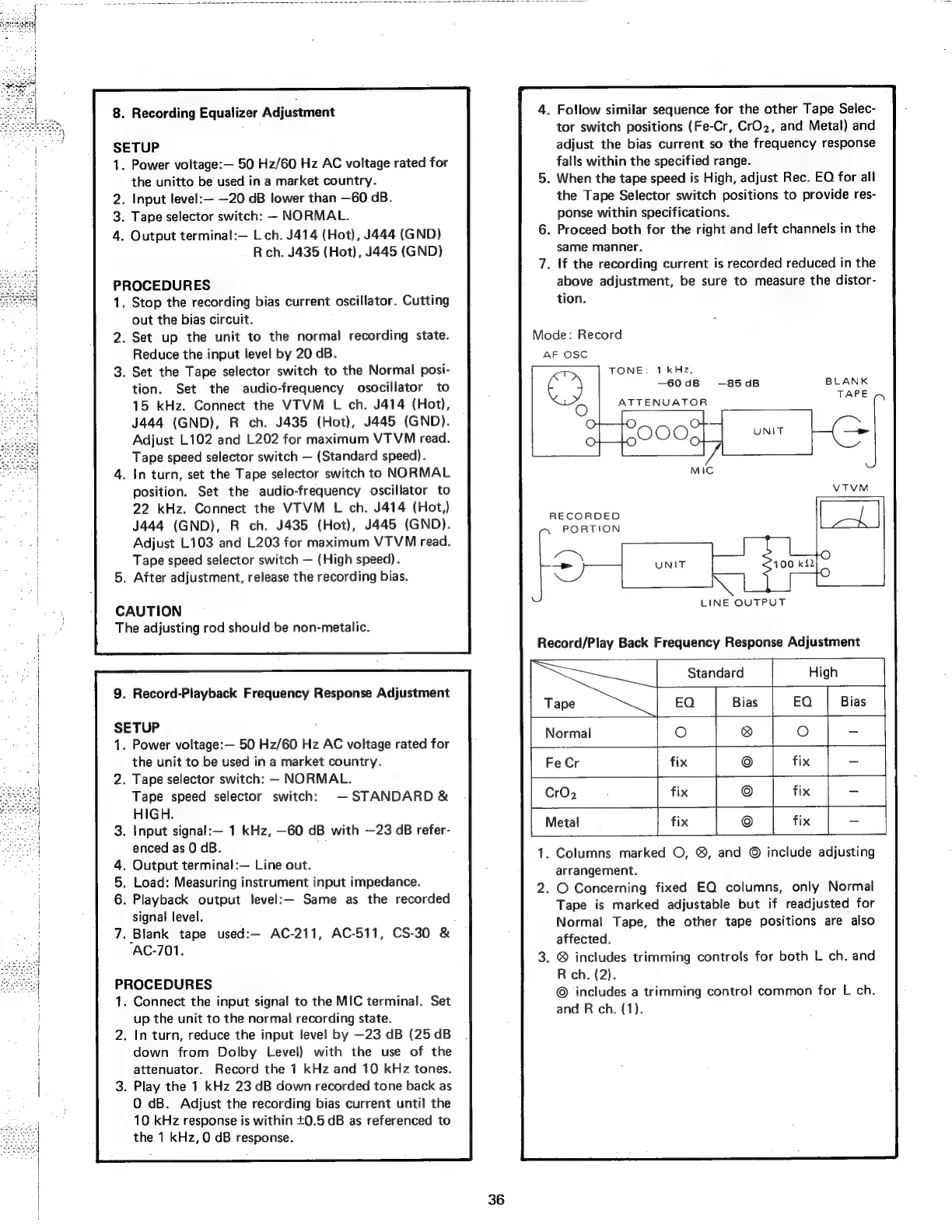
8.
Recording
Equalizer
Adjustment
SETUP
1.
Power
voltage:—
50
Hz/60
Hz
AC
voltage
rated
for
the
unitto
be
used
in
a
market
country.
2.
Input
level:—
—20
dB
lower
than
—60
GB.
3.
Tape
selector
switch:
-
NORMAL.
4.
Output
terminal:—
Lch.
J414
(Hot),
J444
(GND)
R
ch.
J435
(Hot),
J445
(GND)
PROCEDURES
1.
Stop
the
recording
bias
current
oscillator.
Cutting
out
the
bias
circuit.
2.
Set
up
the
unit
to
the
normal
recording
state.
Reduce
the
input
level
by
20
dB.
3.
Set the
Tape
selector
switch
to
the
Normal
posi-
tion.
Set
the
audio-frequency
osocillator
to
15
kHz.
Connect
the
VTVM
L
ch.
J414
(Hot),
J444
(GND),
R
ch.
J435
(Hot),
J445
(GND).
Adjust
L102
and
L202
for
maximum
VTVM
read.
Tape
speed
selector
switch
(Standard
speed).
4.
In
turn,
set
the
Tape
selector
switch
to
NORMAL
position.
Set the
audio-frequency
oscillator
to
22
kHz.
Connect
the
VTVM
L
ch.
J414
(Hot,)
J444
(GND),
R
ch.
J435
(Hot),
J445
(GND).
Adjust
L103
and
L203
for
maximum
VTVM
read.
Tape
speed
selector
switch
(High
speed).
5.
After
adjustment,
release
the
recording
bias.
CAUTION
The
adjusting
rod
should
be
non-metalic.
9.
Record-Playback
Frequency
Response
Adjustment
SETUP
.
Power
voltage:—
50
Hz/60
Hz
AC
voltage
rated
for
the
unit
to
be
used
in
a
market
country.
.
Tape
selector
switch:
—-
NORMAL.
Tape
speed
selector
switch:
STANDARD
&
HIGH.
.
Input
signalt:—
1
kHz,
—60
dB
with
~—23
dB
refer-
enced
as
0
dB.
.
Output
terminal:—
Line
out.
.
Load:
Measuring
instrument
input
impedance.
.
Playback
output
level:—
Same
as
the
recorded
signal
level.
.
Blank
tape
used:—
AC-211,
AC-511,
CS-30
&
AC-701.
PROCEDURES
.
Connect
the
input
signal
to
the
MIC
terminal.
Set
up
the
unit
to
the
normal
recording
state.
.
In
turn,
reduce
the
input
level
by
—23
dB
(25
dB
down
from
Dolby
Level)
with
the
use
of
the
attenuator.
Record
the
1
kHz
and
10
kHz
tones.
.
Play
the
1
kHz
23
dB
down
recorded
tone
back
as
O
dB.
Adjust
the
recording
bias
current
until
the
10
kHz
response
is
within
+0.5
dB
as
referenced
to
the
1
kHz,
0
dB
response.
36
.
Follow
similar
sequence
for
the
other
Tape
Selec-
tor
switch
positions
(Fe-Cr,
CrO2,
and
Metal)
and
adjust
the
bias
current
so
the
frequency
response
falls
within
the
specified
range.
.
When
the
tape
speed
is
High,
adjust
Rec.
EQ
for
all
the
Tape
Selector
switch
positions
to
provide
res-
ponse
within
specifications.
.
Proceed
both
for
the
right
and
left
channels
in
the
same
manner.
.
If
the
recording
current
is
recorded
reduced
in
the
above
adjustment,
be
sure
to
measure
the
distor-
tion.
Mode:
Record
TONE:
1
kHz,
—60
dB
ATTENUATOR
—85
dB
RECORDED
PORTION
LINE
OUTPUT
Record/Play
Back
Frequency
Response
Adjustment
Standard
Tape
EQ
Bias
Normal
O
@
Fe
Cr
fix
©
CrO2
.
fix
©
©
Metal
fix
1.
Columns
marked
O, ®,
and
©
include
adjusting
arrangement.
2.
O
Concerning
fixed
EQ
columns,
only
Normal
Tape
is
marked
adjustable
but
if
readjusted
for
Normal
Tape,
the
other
tape
positions
are
also
affected.
.
®
includes
trimming
controls
for
both
L
ch.
and
R
ch.
(2).
©
includes
a
trimming
contro!
common
for
L
ch.
and
R
ch.
(1).