EasyManua.ls Logo

Marantz SR-3600 - Page 3

Marantz SR-3600
8 pages
Print Icon
To Next Page IconTo Next Page
To Previous Page IconTo Previous Page
Loading...
ir
;This
intormation becomes
your permanent
i
i,record ol a
valuable
purchase.
lt
should be
i
?filled
in
promptly
then
kept
in
a sale
place
i
iabng
wittr
pur
purchase
receipt to be rerer-
'i
i
red
to as
necessary lor insurance
purposes
i
$or
when corresponding
with Marantz-
i
:.a
i
,uPoRrANr
I
et
iwHEN
SEEKTNG
TJVARRANW
SERVTCE.
tT
i
irs
THE RESPONSTBTLTry
OF
THE
CON-
I
isuMER
TO
ESTABLTSH PROOF
AND
i
::DATE
oF
PUHCHASE,
(YoUR
PURCHASE
i
iRECEIPT
OR INVOICE lS ADEQUAIE FOB
i
isucn
PRooF.)
i
FOBEWORII
To
obtain optimum
performance
and enjoyme,rt
from
your
Model SR-360O
please
study
the6e
an
struction$
carelully.
Refer
to the figure
2
on
page
4. The
callout
numbers
conmpond
to
those
found in
this
manual.
All
rebrences
to the
connections
and
ccntrols
are
printed
in
BoLDFACE
type
as they
appeat
on the
unit-
t
REAB
PATEI
COTTIECTIOilS
Figure
1 shows
the
location
of
the
input
and
oui-
put
jacks
on the rear
panel.
(Front
panel
c!n-
trols.
and
jacks
wall
be
discussed
later).
The
stereo
pairs
ol
shiny
round
jacks
such
as
those
used
for the
phono
inputs
are called "RCA
ptnro
jacks"
and
are
dsigned
to
accommodate
shielded
audio cables outfitted
with
"RCA
phono
dugs".
Appropiate cables
of
varbus lengths
are
available
at
your
Marantz dealer.
Lengths of
up
to 24
fr. may be
used. ll it
is
necessary
to
pur-
chase
cable for
your
installatircn,
$E
suggd
),ou
first
arrange
your
componenB
in
the desired
position,
and
then
with
a
measuilng tape
deter-
mine
how much cable will
be
needed.
This
will
ensure that
you
do
not
underestimate
the
lengths
required for
a
neat,
attraciive inSallation.
To
avoid contugion, connect
one
cable
at a time
between the unit
and the
other
componenls
ol
your
system- This is
the
safesi
way
to
avoid
cross-connecting
channels
or confusing
source
outputs
with
inputs.
SPEAKEBS
Use speaker systems
with
im@ance
ratings
of
&16
ohms. IrYhen
you
hork
up
2
sets of speaker
systems,
be
sure to use
speakers
with ratings
of &16
ohms.
Belore
hooking up
your
speaker s]rstem,
check
its
impedanc€,
which
should be
indicatd
either
on the
back of the
speak6r, or in its insutruction
manual.
HOOTIilG
UP SPEAKEBS
On
the rear
panel
there are
two
sets of speaker
terminals,
SPEAKER
A
and
B, to which
two
sp€aker systems
may be
connected.
Connect
the speaker leads
of
the
right-hand
speaker
to
terminals
"8"
of
"A"
{or
"B"),
and
the speaker
leads
of the
left-hand
speaker
to ierminals
"L"
ol
"A"
(or
"B')-
Make sure that
the "
+
"
speaker
lead is
connected to th€
"
+
"
terminal,
and
the
"*"
lead
to the
"*" terminals.
Strip
1.0cm
(UBJ
of the insuialion
from
the end
of
each
speaker lead- Twist
the exposed
strands tight-
ly,
and
secure lhe end
with
a touch
o, solder.The
terminals
are the
pEh-insert
type. lnsert the
erd
of
the
lead into
lhe hole whib
pushing
on the
button. Then release the
button;
the
hole will
close and
the cord is
tirmly
fixed.
A]ITEilTA
ITISTAITATIOI
ATD
COHTEGTIOX
I FH Antenna
Proper
antenna installation is
the
key
to smooth
signal
recepion-
To install
thesrpplied
T-slrape
indoor
antenna,
stretch
it
laut and secure
horizontally
alorg
a
wall
or
ina location
where
signd reception is
oflimal.
Secw4
connect the
antenna
to FM anten*a
terminals
marked
"30OO"
on
the
rear
panel-
lf
an
outdoor
We
FM
antenna is installed, the T-shape
antenna is
not
necessary.
For
proper
use
of
your
outdoor FM
antenna. follow
the instructions
below.
1. Be
sure to select the most
appropriate
type
of
antenna lor the signal reception
conditions
in
your
area
2. A 75-ohm
coaxial
cable
is
recommended
to
crnnect the antenna to
the
unit.
Be
sure to
use the
coaxial
jack
en the
rear
panel
mark-
ed Antenna A.
3. Set the antenna in a
pasition
as higrh
s
peri-
ble
if
buildings,mountains
or other
obstruc-
tions nearby
affect
reception"
I Gable Fll
{Antenna
8}
This c-oaxial
ilck
on
the
rear panel
is used for
receiving
(FM)
signals
from
cable
or
pay
TV
(CATV),
where
FM
signals
are being tranSrnit-
ted separately
lrom
video
signals
{e.9.,
a satellite
cable
TV
with
hi-fi
stereo
sodnd)-
Note:
this
is used in coniuction with
the
Anlen-
na B
(Cable
FM) button
{24)
on the front
pan6l.
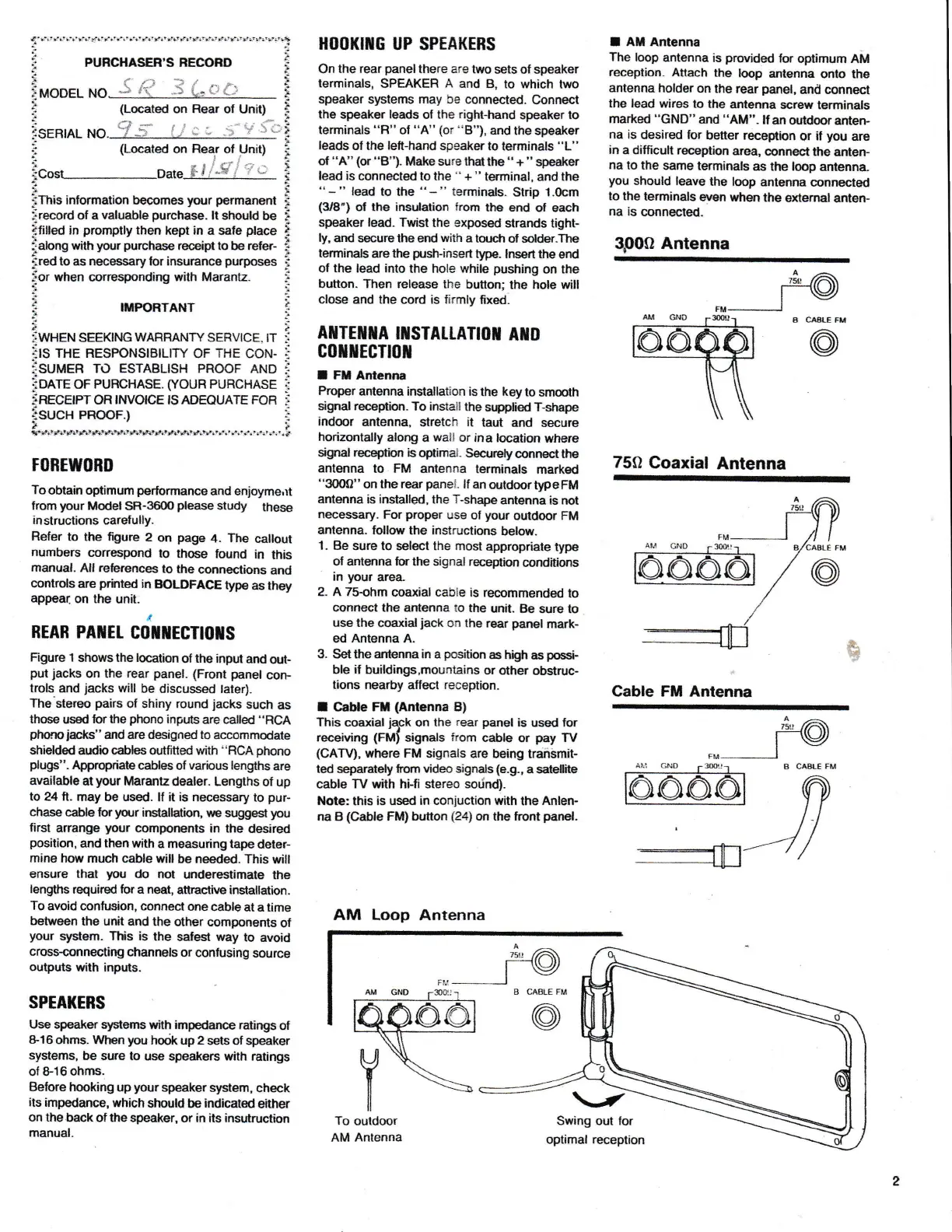
AM
Loop Antenna
I AM Antenna
The
loop
antenna
is
provided
lor
optimum AM
reception-
Attach
the
koop
antenna
onto
the
antenna
holder
on the
rear
panel,
and connest
the lead wiros to
the
antenna
screw terminals
marked
"GND"
and
"AM"-
Itan
outdooranten-
na is
desired for
better recedion
or
il
you
are
in
a difficult reception
area,
cDnnect the
anten-
na
to the
same
terminals
as
the
l@p
antenna
you
should leave
the
loop antenna
connected
lo the
terminals
eryen when
the
exlemal
anlen-
na is
connected.
QpOO
Antenna
75O
Coaxial
Antenna
Cable FM Antenna
B C^AI.E
FM
@

Related product manuals