Operating devices
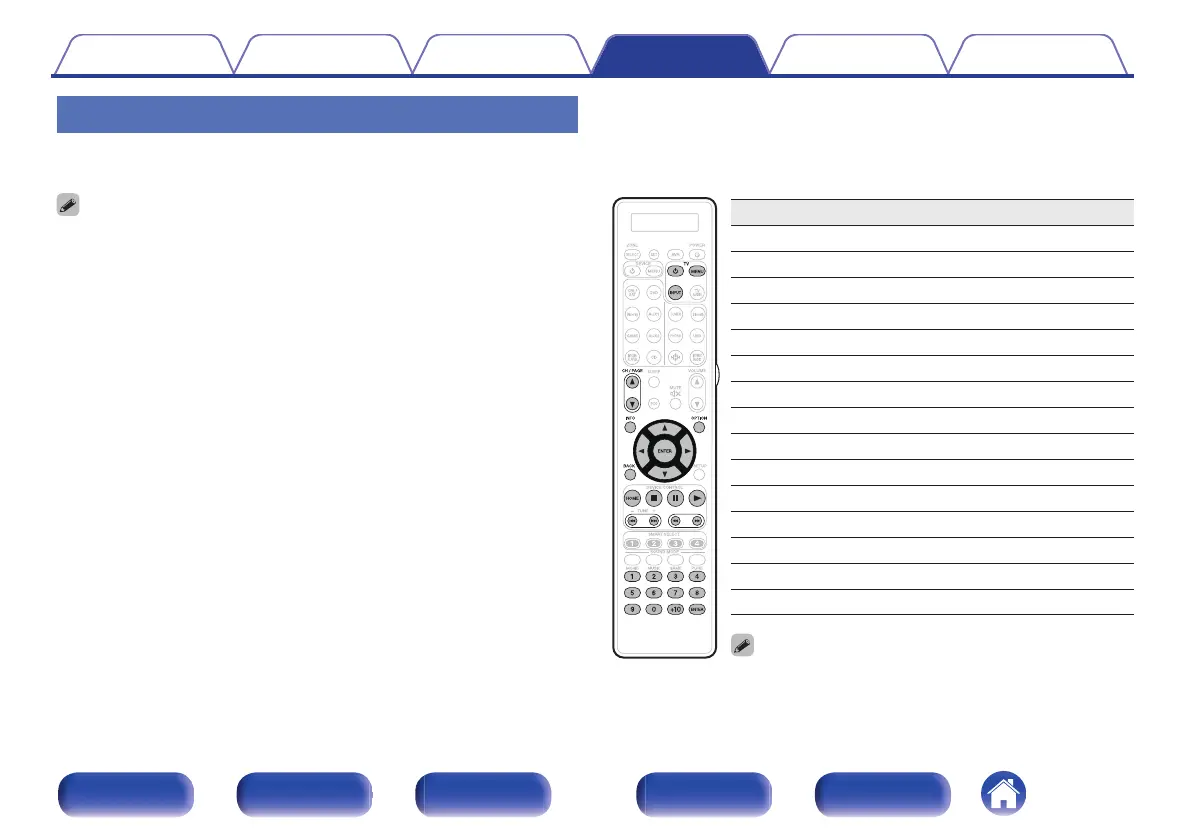
To operate an external device, press the input source button registered
with the preset code, followed by one of the buttons in the following tables.
0
When operating an external device, the display on the remote control unit shows
the input source name.
0
The “TV” indicator lights when the TV is being operated.
0
To operate the menu of this unit, press AVR before operating the unit. The “AVR”
indicator lights when this unit is being operated.
n
TV group
(TV) operation
Operation buttons Function
TV X
TV power on/off
TV INPUT Switch TV input
TV MENU TV menu
CH/PAGE df
Switch channels (up/down)
INFO Information
OPTION Sub menu, Option
u i o p
Cursor operation
ENTER(Cursor) Enter
BACK Back
8 9
Skip chapter
1
Playback
6 7
Fast-reverse / Fast-forward
3
Pause
2
Stop
0 – 9, +10 Channel selection
0
TV X and TV INPUT buttons can be operated at any time
without pressing the TV button.
Contents Connections Playback Settings Tips Appendix
256
Front panel Display Rear panel Remote Index



 To Next Page