T
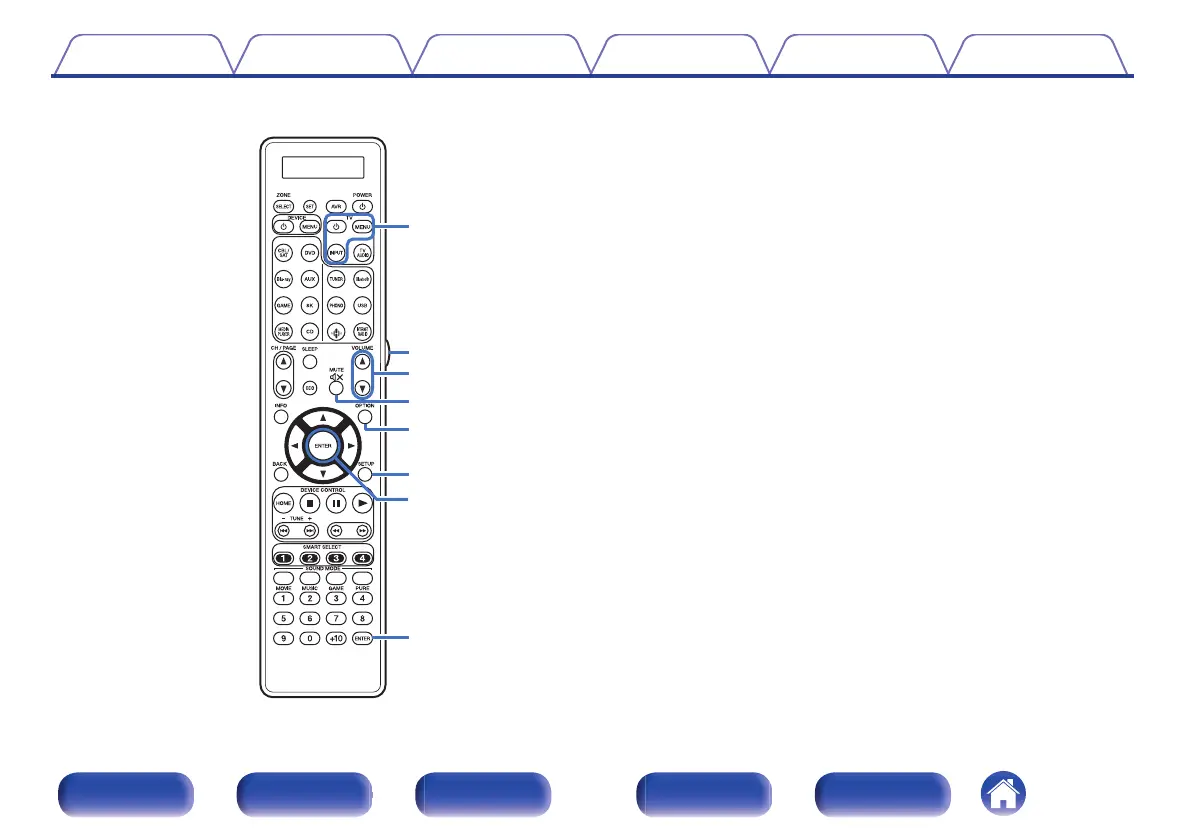
TV operation buttons (TV X / TV MENU / TV INPUT)
These turn the TV power on/off, switch the TV input and call up menus.
Preset codes need to be registered in order to use these buttons.
(v p. 284)
U
Light button
This turns on the backlight for approx. 2 seconds. (v p. 291)
V
VOLUME buttons (df)
These adjust the volume level.
0
“Adjusting the volume” (v p. 104)
0
“Adjusting the volume (ZONE2/ZONE3)” (v p. 179)
W
MUTE button (:)
This mutes the output audio.
0
“Turning off the sound temporarily (Muting)” (v p. 104)
0
“Turning off the sound temporarily (Muting) (ZONE2/
ZONE3)” (v p. 179)
X
OPTION button
This displays the option menu on the TV screen.
Y
SETUP button
This displays the menu on the TV screen. (v p. 184)
Z
ENTER button
This determines the selection.
Contents
Connections Playback Settings Tips Appendix
34
Front panel Display Rear panel Remote Index








 To Next Page