o
Contents
Speaker installation 36
Connecting speakers 45
Connecting a TV 85
Connecting a playback device 89
Connecting a USB memory device to the USB port 96
Connecting to a home network (LAN) 97
Connecting an external control device 99
Connecting the power cord 101
NOTE
0
Do not plug in the power cord until all connections have been completed.
However, when the “Setup Assistant” is running, follow the instructions in the
“Setup Assistant” (page 9 in the separate “Quick Start Guide”) screen for making
connections. (During “Setup Assistant” operation, the input/output connectors do
not conduct current.)
0
Do not bundle power cords together with connection cables. Doing so can result in
noise.
o
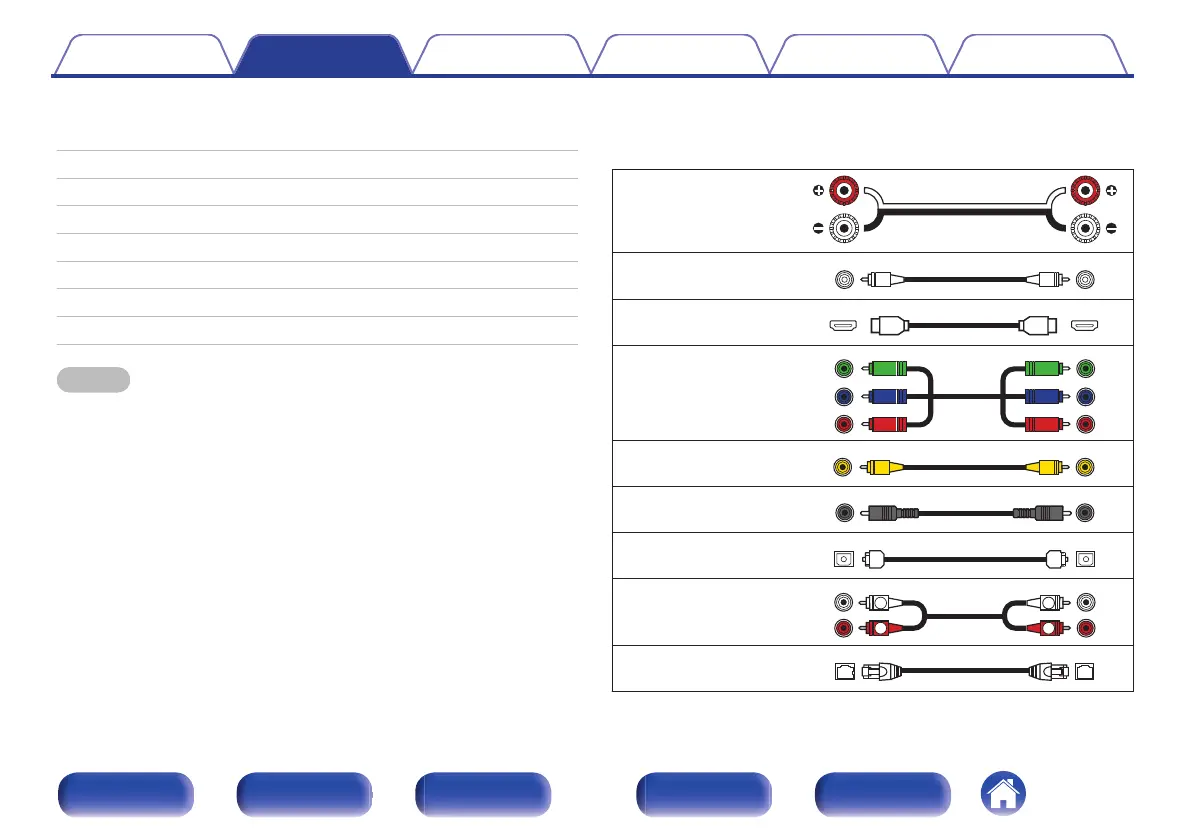
Cables used for connections
Provide necessary cables according to the devices you want to
connect.
Speaker cable
.
Subwoofer cable
.
HDMI cable
.
Component video cable
.
Video cable
.
Coaxial digital cable
.
Optical cable
.
Audio cable
.
LAN cable
.
Contents Connections Playback Settings Tips Appendix
35
Front panel Display Rear panel Remote Index








 To Next Page