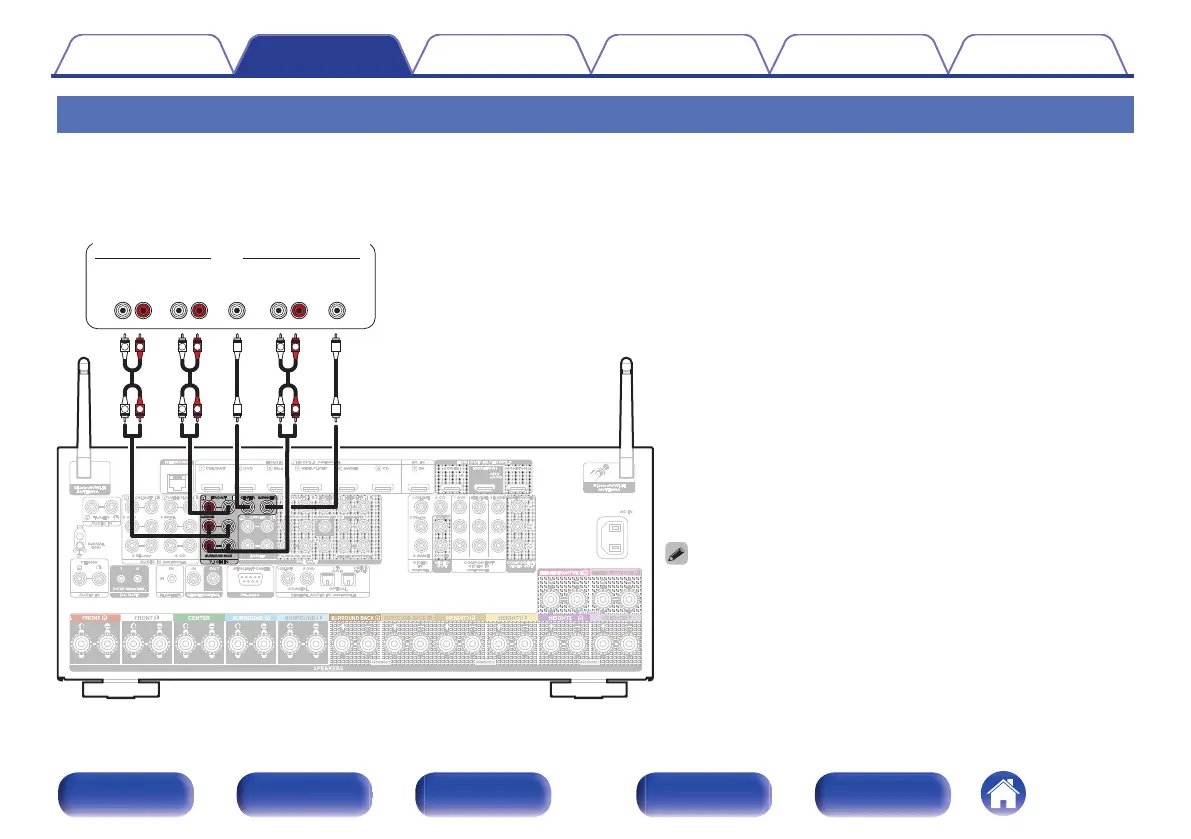
Connecting a device with a multi-channel output connector
You can connect this unit to an external device fitted with multi-channel sound audio output connectors to enjoy music and video.
To play analog signals input from 7.1CH IN connectors, set “INPUT MODE” to “7.1CH IN”. (v p. 218)
0
The video signal can be connected in the same way as a Blu-ray Disc
player/DVD player. (“Connecting a DVD player or Blu-ray Disc
player” (v p. 91))
L
L
R
R
L
L
R
R
L
L
R
R
SUB-
WOOFER
CENTERSURROUND
RL
FRONT
RL
AUDIO
Devices with a multi-channel output connector
(Blu-ray Disc player, DVD player,
External decoder etc.)
SURROUND
BACK
RL
Contents
Connections Playback Settings Tips Appendix
95
Front panel Display Rear panel Remote Index








 To Next Page