6
ENGLISH
CONNECTING THE AMPLIFIER
Note
• If you want to enjoy listening to the digital output audio of
the DAB, connect to an amplifier outfitted with a digital
optical or coaxial input.
• Do not plug in the mains cord until all connections have
been completed.
• When making connections, also refer to the operating
instructions of the other components.
• Be sure to connect the left and right channels properly
(left with left, right with right).
• Note that binding pin-plug cords together with mains cords
or placing them near a power transformer will result in
generating hum or other noise.
7
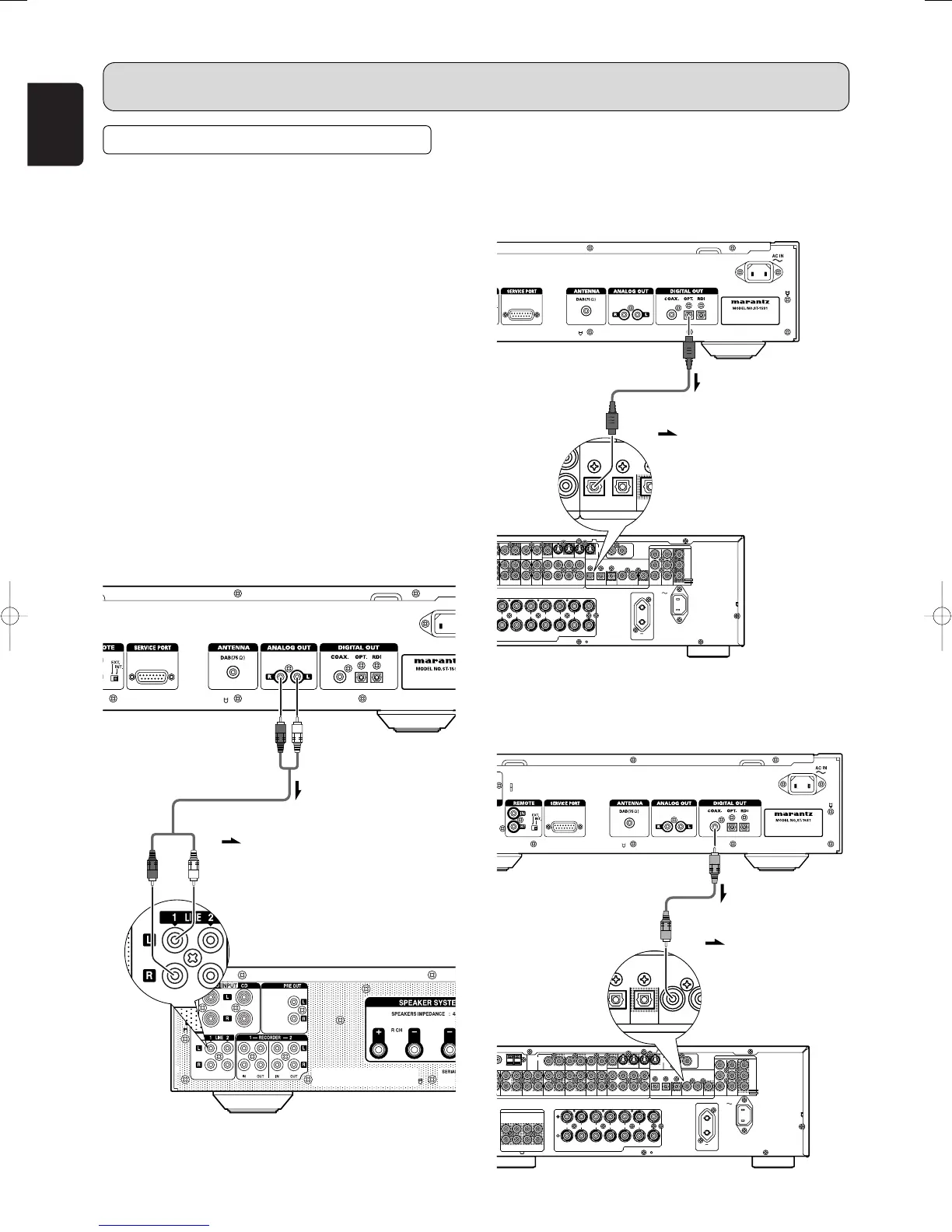
Connecting the analog output
connector
Use the audio connecting cord to connect the unit with a
stereo amplifier or AV amplifier. Do not connect the unit to
the PHONO input connectors on the amplifier.
When making the connections, insert the plugs securely into
the connectors. Failure to insert the plugs securely may
result in noise.
CONNECTIONS
7
Connecting the optical output
connector
Use an optical digital connecting cable available on the
market. Insert the plug firmly in until it clicks into place. Do
not bend or bundle the optical digital connecting cable.
7
Connecting the coaxial output
connector
Use a coaxial digital connecting cable available on the market.
(Red) (White)
Audio connecting cord (supplied)
(White)
Signal flow
Optical digital connecting cable
(available on the market)
Signal flow
Coaxial digital connecting cable
(available on the market)
Signal flow
(Red)



 To Next Page