EasyManua.ls Logo

Marantz ST-55 - Page 8

Marantz ST-55
13 pages
Print Icon
To Next Page IconTo Next Page
To Previous Page IconTo Previous Page
Loading...
PRESET
MEMORY
This
unit
is
equipped
with
the
one-touch
preset
tuning
system
which
is
particularly
convenient
when
there
is
a
large
number
of
receivable
stations.
The
preset
tuning
system
allows
up
to
59
stations
on
FM
and
AM
(MW,
LW)
to
be
preset
in
a
random
order.
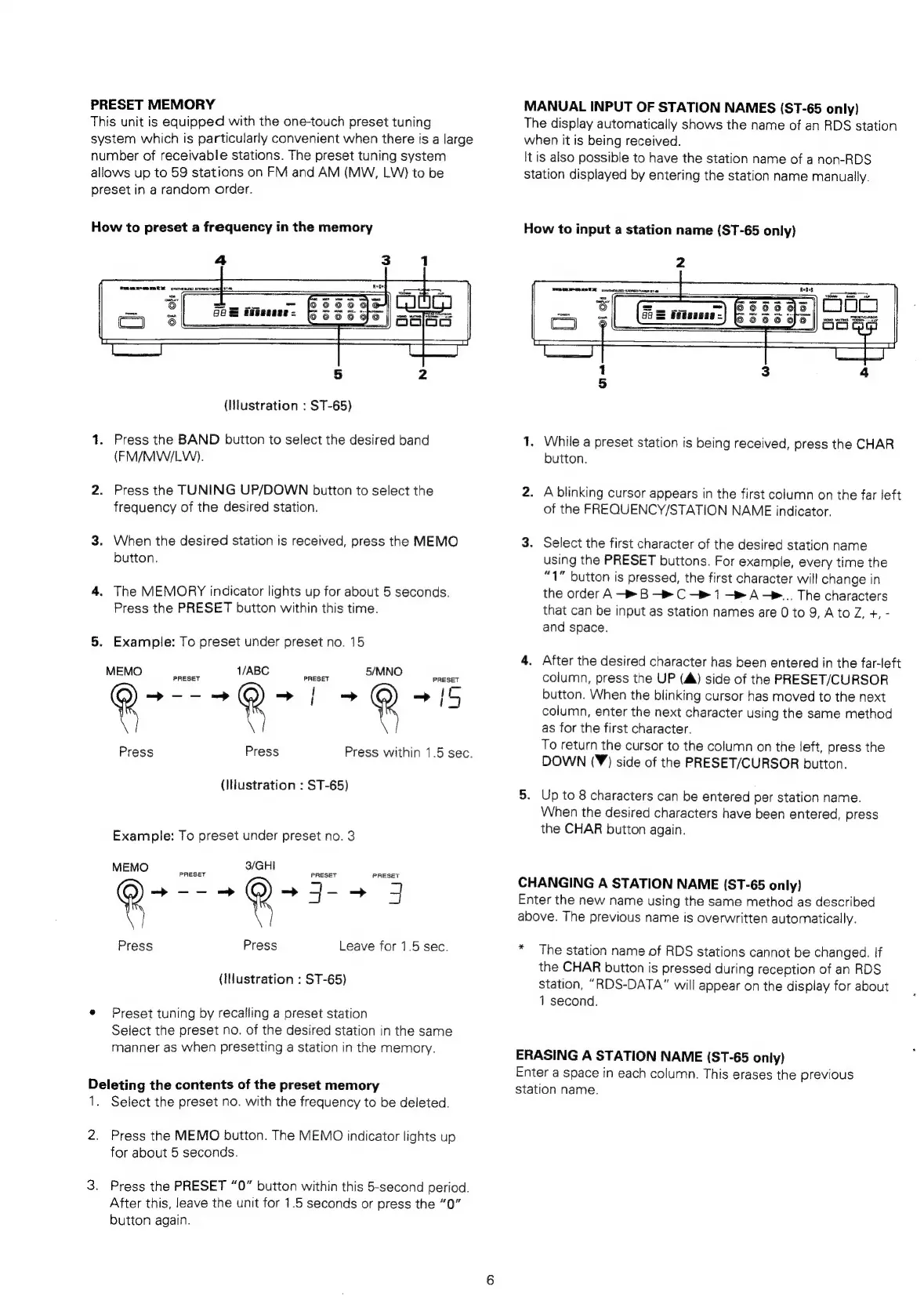
How
to
preset
a
frequency
in
the
memory
(Hlustration
:
ST-65)
1.
Press
the
BAND
button
to
select
the
desired
band
(FM/MW/LW).
2.
Press
the
TUNING
UP/DOWN
button
to
select
the
frequency
of
the
desired
station.
3.
When
the
desired
station
is
received,
press
the
MEMO
button.
4.
The
MEMORY
indicator
lights
up
for
about
5
seconds.
Press
the
PRESET
button
within
this
time.
5.
Example:
To
preset
under
preset
no.
15
M
EMO
PRESET
1
/ABC
PRESET
5/MNO
PRESET
®
_
@
~
|
~
e
Press
Press
Press
within
1.5
sec.
(Illustration
:
ST-65)
Example:
To
preset
under
preset
no.
3
MEMO
S|
S/GHI
PRESET
PRESET
2
>--=
R
~j--
J
Press
Press
Leave
for
1.5
sec.
(INustration
:
ST-65)
e
Preset
tuning
by
recalling
a
preset
station
Select
the
preset
no.
of
the
desired
station
in
the
same
manner
as
when
presetting
a
station
in
the
memory.
Deleting
the
contents
of
the
preset
memory
1.
Select
the
preset
no.
with
the
frequency
to
be
deleted.
2.
Press
the
MEMO
button.
The
MEMO
indicator
lights
up
for
about
5
seconds.
3.
Press
the
PRESET
“0”
button
within
this
5-second
period.
After
this,
leave
the
unit
for
1.5
seconds
or
press
the
“0”
button
again.
MANUAL
INPUT
OF
STATION
NAMES
(ST-65
only)
The
display
automatically
shows
the
name
of
an
RDS
station
when
it
is
being
received.
It
is
also
possible
to
have
the
station
name
of
a
non-RDS
station
displayed
by
entering
the
station
name
manually.
How
to
input
a
station
name
(ST-65
only)
MRR
MOEN
srtrensco
senoremn
ees
1,
While
a
preset
station
is
being
received,
press
the
CHAR
button.
2.
A
blinking
cursor
appears
in
the
first
column
on
the
far
Jeft
of
the
FREQUENCY/STATION
NAME
indicator.
3.
Select
the
first
character
of
the
desired
station
name
using
the
PRESET
buttons.
For
example,
every
time
the
“1”
button
is
pressed,
the
first
character
will
change
in
the
order
A
B
>
C
1
A-®..
The
characters
that
can
be
input
as
station
names
are
0
to
9,
Ato
Z,
+,
-
and
space.
4.
After
the
desired
character
has
been
entered
in
the
far-left
column,
press
the
UP
(A)
side
of
the
PRESET/CURSOR
button.
When
the
blinking
cursor
has
moved
to
the
next
column,
enter
the
next
character
using
the
same
method
as
for
the
first
character.
To
return
the
cursor
to
the
column
on
the
left,
press
the
DOWN
(¥)
side
of
the
PRESET/CURSOR
button.
5.
Up
to
8
characters
can
be
entered
per
station
name.
When
the
desired
characters
have
been
entered,
press
the
CHAR
button
again.
CHANGING
A
STATION
NAME
(ST-65
only)
Enter
the
new
name
using
the
same
method
as
described
above.
The
previous
name
is
overwritten
automatically.
*
The
station
name
of
RDS
stations
cannot
be
changed.
If
the
CHAR
button
is
pressed
during
reception
of
an
RDS
station,
“RDS-DATA”
will
appear
on
the
display
for
about
1
second.
ERASING
A
STATION
NAME
(ST-65
only)
Enter
a
space
in
each
column.
This
erases
the
previous
station
name.

Related product manuals