Automatic Clock Set up: RCC WWVB Reception
NOTE: Ensure the RCC switch is set to ON, to enable automatic clock set up.
When the RC function is set to ON
After powering up, if the
RCC switch is set to ON the clock will automatically
start to synchronize with the WWVB radio wave signal. The Radio Control
Icon will ash on the LCD.
The clock can be set to scan the time signal manually by holding the
button for 3 seconds.
Reminder:
•
Reception can take up to 10 minutes.
•
If the signal is weak, it can take up to 24 hours to get a valid signal.
•
The clock automatically synchronizes with the radio wave signal at
3:00am every day to ensure accurate timing. If reception fails, the icon
will disappear from the LCD.
•
You can stop the clock from automatically synchronizing by holding the
button for 2 seconds.
Clock set up
Daylight Savings Mode
•
Slide the DST switch to AUTO, when the RCC function is ON, and the
clock is in an area where the RC-WWVB signal can be received.
NOTE: the DST icon will appear on the LCD during daylight saving time.
•
Slide the DST switch to OFF to turn off Daylight savings mode
•
Slide the DST switch to ON, and the time will change to daylight saving
time automatically, whether the RCC function is ON or OFF.
Time Zone
Slide TIME ZONE switch to select the time zone, there are 8 time zone for
selectable:
Manual Clock Set Up: RCC function is set to OFF
Hawaii = HST
Alaskan = AKST
Pacic = PST
Mountain = MST
Central = CST
Eastern = EST
Atlantic = AST
Newfoundland = NST
Steps
Press the CLOCK SET button to toggle the display between year & time.
To enter Clock Set Up
Hold the CLOCK SET button for 3 seconds, or until you hear a beep.
NOTE: Press and hold or to speed up the digits cycling.
Default = 12/24 HOUR FORMAT
Press or to select 12 or 24 hour display.
Press 1x = SET HOUR
Press or to set hours.
Press 2x = SET MINUTE
Press or to set minutes.
Press 3x = SET SECONDS
Press or to reset seconds to zero.
Press 4x = SET YEAR
Press or to set a year.
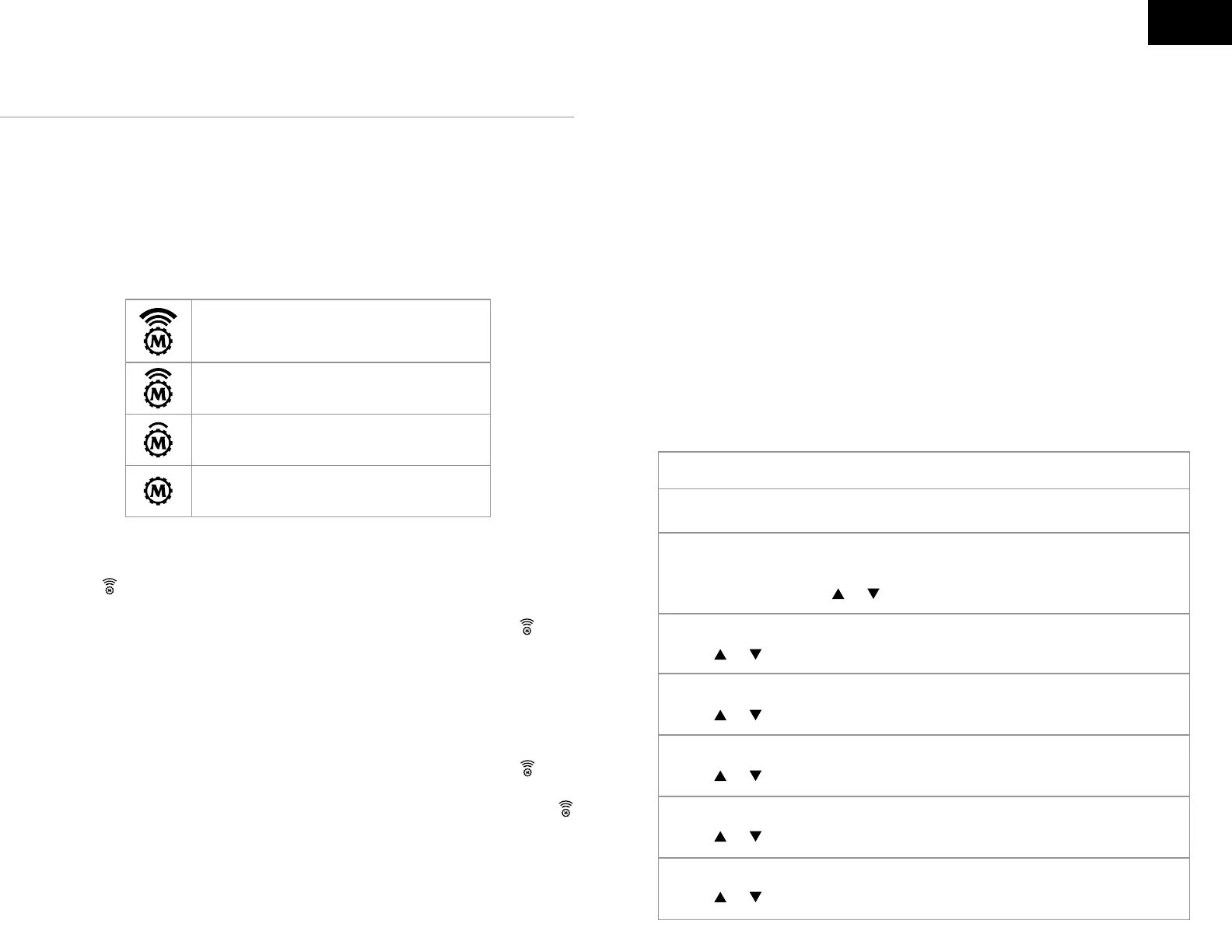
Indicating excellent signal connection
Indicating acceptable signal connection
Indicating no signal connection
Indicating weak signal connection
EN




 To Next Page