22
- Mineral glass
Power supply:
• Icon HD:
- lithium-ion rechargeable battery, with
battery charge indicator
- operating temperature
- discharging: from -10 to +50°C / 14 to 122°F
- charging: from 0 to 45°C / 32 to 113°F
- battery duration from one charge: approx
5-7 hours of diving. Actual battery
duration depends on the usage of the
high intensity backlight and the water
temperature
- lifetime of the battery: approx 500
charging cycles
• Tank module:
- CR123
- Battery life: 150-200 dives. Actual battery
life depends on the number of dives per
year, the length of each dive and the water
temperature.
4.2. MAINTENANCE
The tank pressure gauge and the parts of this
product used to measure tank pressure should
be serviced by an authorized Mares dealer
every other year or after 200 dives (whichever
comes first). In addition, the depth accuracy
should be verified every two years. Aside from
that, Icon HD is virtually maintenance free. All
you need to do is rinse it carefully with fresh
water after each dive (avoid any chemical
products) and charge the battery when needed.
To avoid possible problems with your IconHD,
the following recommendations will help
assure years of trouble free service:
- avoid dropping or jarring your Icon HD;
- do not expose Icon HD to intense, direct
sunlight;
- do not store Icon HD in a sealed container,
always ensure free ventilation.
NOTE
If you notice signs of moisture on the
inner wall of the mineral glass, take your
IconHD immediately to an authorized
Mares service center.
WARNING
The mineral glass is not exempt from
scratches resulting from improper use.
WARNING
Do not blow compressed air onto IconHD,
because it could damage the pressure
sensor area.
4.2.1. REPLACING THE BATTERY IN ICON HD
Icon HD uses a rechargeable battery, so it may
be necessary to replace it after approximately
500charging cycles. The battery should only
be replaced in a center authorized by Mares.
Mares declines all responsibility for any
damage caused by replacing the battery.
NOTE
Dispose of the old battery properly.
Mares adopts a policy of respect for
the environment, and urges use of the
appropriate separated waste collection
services.
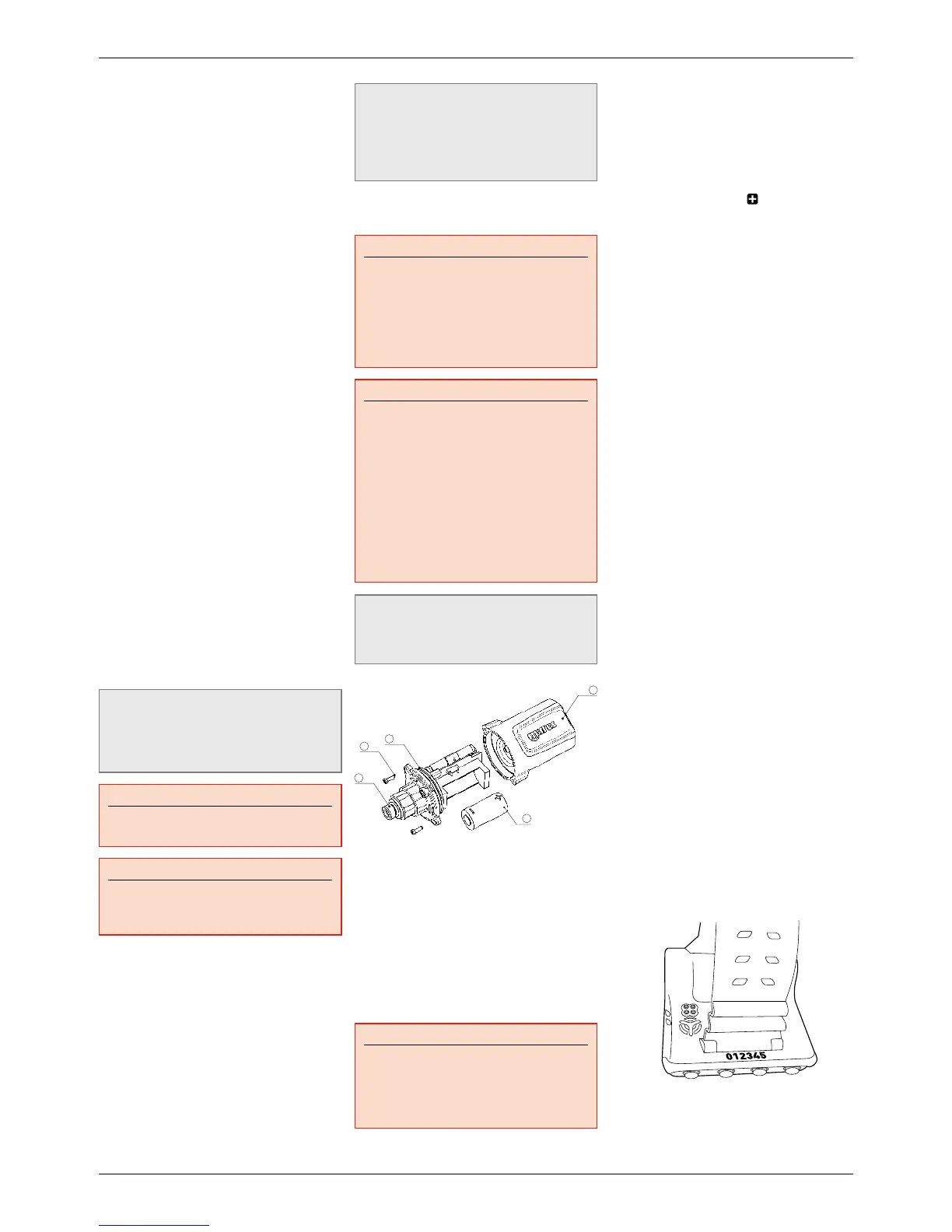
4.2.2. REPLACING THE BATTERY IN THE
TANK MODULE
WARNING
We recommend having the battery of the
tank module replaced by an authorized
Mares dealer. The change must be made
with particular care in order to prevent
water from seeping in. The warranty does
not cover damages due to an improper
placement of the battery.
WARNING
- Never touch the metal surface of the
battery with bare fingers. The two
battery poles must never be short
circuited.
- A leaking tank module cap may lead
to the destruction of the tank module
by water seeping in or cause the tank
module to switch off without prior notice.
- Always open the tank module in a dry
and clean environment.
- Only open the tank module to replace the
battery.
NOTE
You do NOT have to repeat the pairing
procedure after replacing the battery in the
tank module.
2
4
5
3
1. Remove the tank module from the HP port
of the first stage regulator.
2. Dry the tank module with a soft towel.
3. Remove the 2 screws (5) with a Phillips
screwdriver.
4. Carefully remove the tank module cap (1).
5. Carefully remove the tank module cap o-ring
(3) Be careful not to damage the sealing
surfaces.
6. Remove the battery (2) by holding it on both
sides. Do not touch the contacts or the
electronic parts.
WARNING
If you notice traces of seeping water,
damages or other defects on the o-ring, do
not use the tank module for further dives.
Take it to an authorized Mares dealer to be
checked.
7. Always insert a new o-ring when you replace
the battery and dispose the old o-ring. Make
sure that the new, lubricated o-ring is in
perfect condition, and that o-ring, o-ring
groove and the sealing surface of the tank
module and tank module cap are free of dust
and dirt. If necessary, clean the parts with a
soft cloth. Fit the o-ring in the o-ring groove.
8. Wait for 30 seconds, then insert the new
battery. Ensure that the
side is facing
away from the base of the tank module. The
tank module can be damaged if you do not
insert the battery correctly.
9. The tank module will now perform an
automatic test and switch into ready mode
after 60 seconds.
4.3. WARRANTY
Mares products are guaranteed for a period of
two years subject to the following limitations
and conditions:
The warranty is non-transferable and applies
strictly to the original purchaser.
Mares products are warranted free from
defects in materials and workmanship:
components that, upon technical inspection,
are found to be defective, will be replaced free
of charge.
Mares S.p.A. declines all responsibility
for accidents of any kind that result from
tampering or incorrect use of its products.
Any products returned for overhaul or repairs
under warranty, or for any other reason, must
be forwarded exclusively via the vendor and
accompanied with a proof of purchase slip.
Products travel at the risk of the sender.
4.4. WARRANTY EXCLUSIONS
Damage caused by water seepage resulting
from improper use (e.g. dirty seal, battery
compartment closed incorrectly, etc.).
Rupture or scratching of the case, glass or
strap as a result of violent impact or blows.
Damage resulting from excessive exposure to
elevated or low temperatures.
Damage caused by the use of compressed air
to clean the dive computer.
4.5. HOW TO FIND THE PRODUCT
SERIAL NUMBER AND ELECTRONIC ID
The serial number is laser-engraved on the
back side of Icon HD, in front of the front
attachment point of the strap.
To see the electronic ID, enter theSETTINGS
submenu, go to ABOUT ICON HD using
thecentral buttons, and press SELECT.



 To Next Page
 Loading...