1.5. WATCH DISPLAY
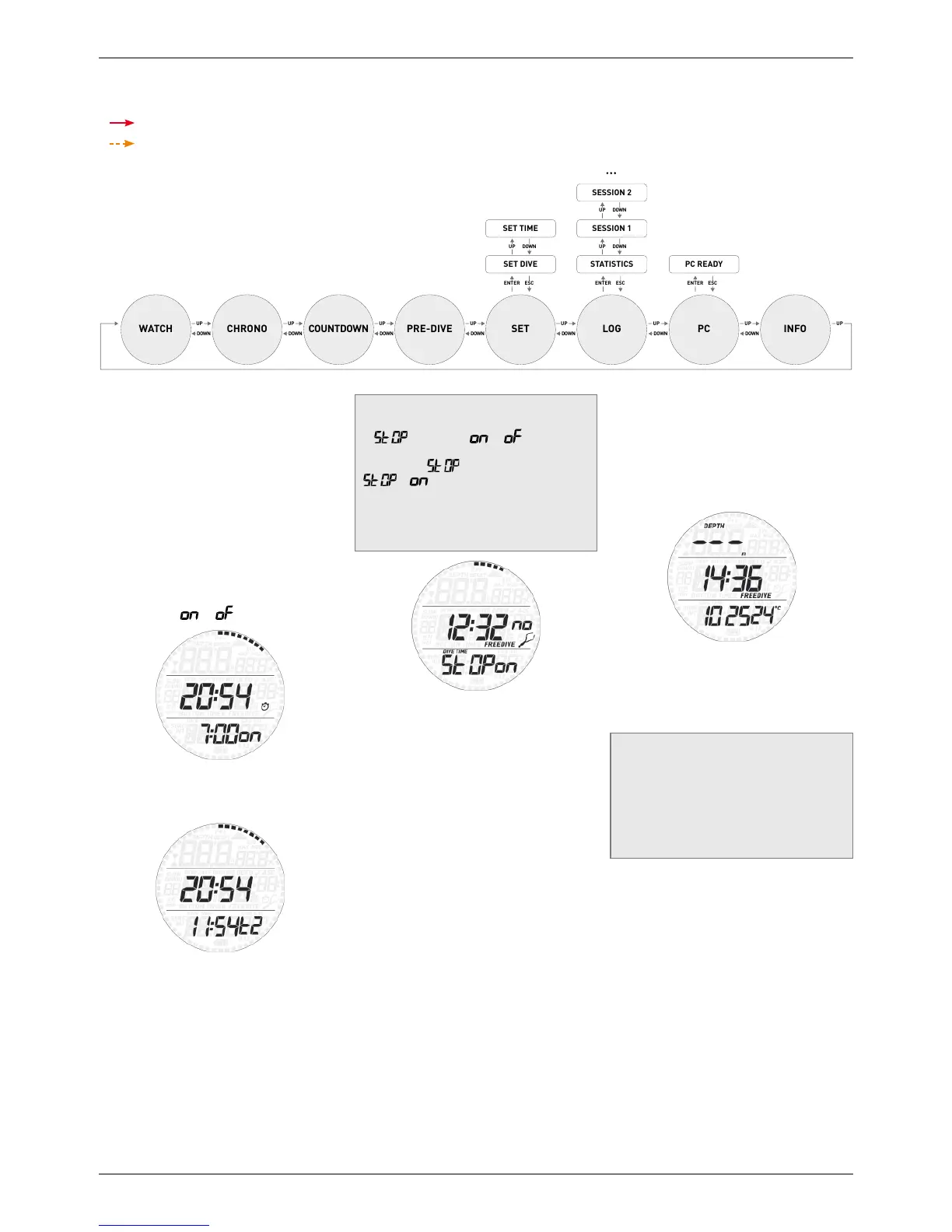
The watch display is the “home” display of
Smart Apnea. In this mode, the time of day is
shown in the middle row of the display while
date, temperature, seconds, wake-up time and
second time can be displayed at the bottom
by pressing the lower button. Note that the
temperature reading will be affected by your
body heat while you are wearing the watch. A
growing or diminishing ring of 60 dots around
the perimeter of the display represents the
seconds.
When the wake-up time is displayed, pressing
and holding the upper button turns the
wake-up alarm
or .
When the second time is displayed, pressing
and holding the upper button switches main
time and second time.
NOTE
At the end of the bottom row sequence there
is
with setting or . The setting
is changed by pressing and holding the upper
button while
is on the display. When
is , SMART will not start diving
even if exposed to 1.2m of depth for a
prolonged time. This allows you to perform
pool activities like swiming without constantly
activating the dive mode.
• 2. MENUS, SETTINGS AND
FUNCTIONS
This chapter describes in detail all menus,
setting and functions of the Smart Apnea
computer.
From the time of day display, pressing the
upper button allows you to scroll through the
following sequence of menus (note that once
inside the menu loop, pressing the lower
button scrolls through the menus in reverse
sequence):
- CHROnO: allows you to operate Smart
Apnea like a normal stopwatch;
- Countdown: turns Smart Apnea into a single,
multilap or continuous countdown timer;
- PRE dIVE: places Smart Apnea in the ready-
to-dive mode;
- SEt: allows you to view and change all
settings relating to the dive computer (SEt
dIVE) and to the watch (SEt tIME);
- LOG: allows you to access the detailed
history of the dives performed;
- PC: allows you to download dives to a PC or
Mac;
- INFO: allows you to view information about
software and hardware of your Smart Apnea.
The pre-dive mode puts the computer in a
ready-to-dive mode and ensures that Smart
Apnea starts to monitor the dive as soon as
a depth of 1.2m/4ft is reached. If you start
the dive without putting Smart Apnea into
pre-dive mode, it will start to monitor the
dive automatically but with a delay of up to 20
seconds from immersion.
The pre-dive display shows time of day and
temperature. The 4-digit number in the bottom
left corner is the set water density without the
decimal point. Refer to section 2.3.1 for more
information about setting the water density.
NOTE
- If you remain in pre-dive for longer than
3 minutes without pressing any button,
Smart will revert to normal watch function.
- It is recommended to put Smart into pre-
dive before submerging. Not doing so
can lead to a delay of up to 20s in Smart
monitoring the dive.



 To Next Page
 Loading...