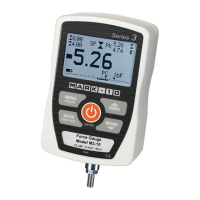
The Mark-10 Series E Advanced Ergonomics Kits are designed for various ergonomic force measurement applications. These kits include a Mark-10 Series E Ergonomics Force Gauge and a comprehensive set of accessories, allowing for a wide range of push and pull testing. The kits are available in different capacities, including 100 lbF, 200 lbF, and 500 lbF, catering to diverse measurement needs.
Function Description:
The core of the kit is the Series E Ergonomics Force Gauge, a sensitive instrument designed for precise force measurement. It can be used for various ergonomic assessments, such as muscle strength testing, job task analysis, and product design evaluation. The gauge measures both push and pull forces, making it versatile for different testing scenarios. The included attachments enable the gauge to be adapted for specific body parts or objects, ensuring accurate and repeatable measurements.
Important Technical Specifications:
The Series E Ergonomics Force Gauges come in three capacities:
- ME-100: 100 lbF (pounds-force)
- ME-200: 200 lbF
- ME-500: 500 lbF
The kits are categorized into "Advanced Kits" (EKE-100-1, EKE-200-1, EKE-500-1) and "Professional Kits" (EKE-100-2, EKE-200-2, EKE-500-2), with the primary difference being the range and type of included accessories.
Power:
The gauge can be powered by an internal rechargeable battery or an AC adapter/charger. The battery provides approximately 7 hours of operation with the backlight turned on and 24 hours with the backlight turned off.
PC Requirements for Software:
- Operating System: Microsoft Windows 7 or later.
- Monitor Resolution: Minimum 1108 x 758.
- Ports: A USB or RS-232C serial port is required. If USB communication is needed, the Mark-10 USB driver must be installed.
Usage Features:
Installation of Accessories:
- Double and Single Handles: The force gauge attaches to the double handle grip (AC1003) or single handle grip (AC1003-1) by mating a male dowel pin in the cradle to a corresponding hole in the rear of the force gauge housing. It is then fastened with four included thumb screws (10-1023).
- Attachments (E1002 - E1010): These attachments mount to the gauge's receptacle using the Click-Lock® mechanism. Users align the attachment with the receptacle and press until a click is heard. The attachments can be inserted in 90° or 180° orientations. To release an attachment, pull back on the lever at the rear of the housing.
Included Items (Vary by Kit Type - Advanced vs. Professional):
Common Items:
- Force Gauge: ME-100, ME-200, or ME-500 Ergonomics force gauge (one per kit).
- AC Adapter: 08-1022 (with US, EU, UK, or AUS prong).
- Battery: 08-1026 (pre-installed inside the gauge).
- USB Cable: 09-1165.
- Thumb Screws: 4 x 10-1023 (#6-32).
- Carrying Case: E1000 (small) or E1001 (large), depending on the kit.
Attachments (Specific to Kit Type):
- Padded Attachments:
- E1002: Square
- E1003: Rectangular
- E1004: Curved
- E1005: Circular
- Other Attachments:
- E1006: Snap Hook
- E1007: Chain / hook assembly
- E1008: Single handle grip
- E1009: Double handle grip
- E1010: Pistol grip
Software:
Mark-10 offers several software applications for data collection and analysis:
- MESUR® Lite: A free basic data acquisition application for data tabulation and exporting to Excel. Compatible with gauges only.
- MESUR®gauge / MESUR®gauge Plus: These applications provide data tabulation, graphing, analysis, and reporting with user-configurable start and stop triggers and other tools. They are compatible with all Mark-10 instruments and can handle load vs. time or load vs. travel data. MESUR®gauge Plus adds test stand motion control coordination. Both applications offer a free 90-day evaluation.
USB Driver:
A USB driver is required for Mark-10 instruments and the RSU100 RS-232 to USB converter to communicate with a PC. Installation instructions are provided in the user's guide.
Maintenance Features:
- Safety Information: Users are advised to review the yellow safety information card included in the box and the complete safety information in the User's Guide prior to operating the gauge. Force gauges are sensitive instruments and must be handled with care.
- Battery Recharging: The internal rechargeable battery can be recharged using the AC adapter/charger.
- User's Guides: Comprehensive user's guides for all Mark-10 instruments are available in PDF format and should be consulted for detailed operation and maintenance procedures.
- Certificate of Calibration: The Series E Digital Force Gauge kits include a Certificate of Calibration, ensuring the accuracy and reliability of the measurements.

 Need help?
 General

 To Next Page