15
display
intensity
copy protect aes/ebu emphasis
digital record
select
polarity
invert
12345678
standby
REFERENCE DIGITAL
PROCESSOR
Nº 30.6
5
37
8
9
4
10
6
1
MADRIGAL AUDIO LABORATORIES
2
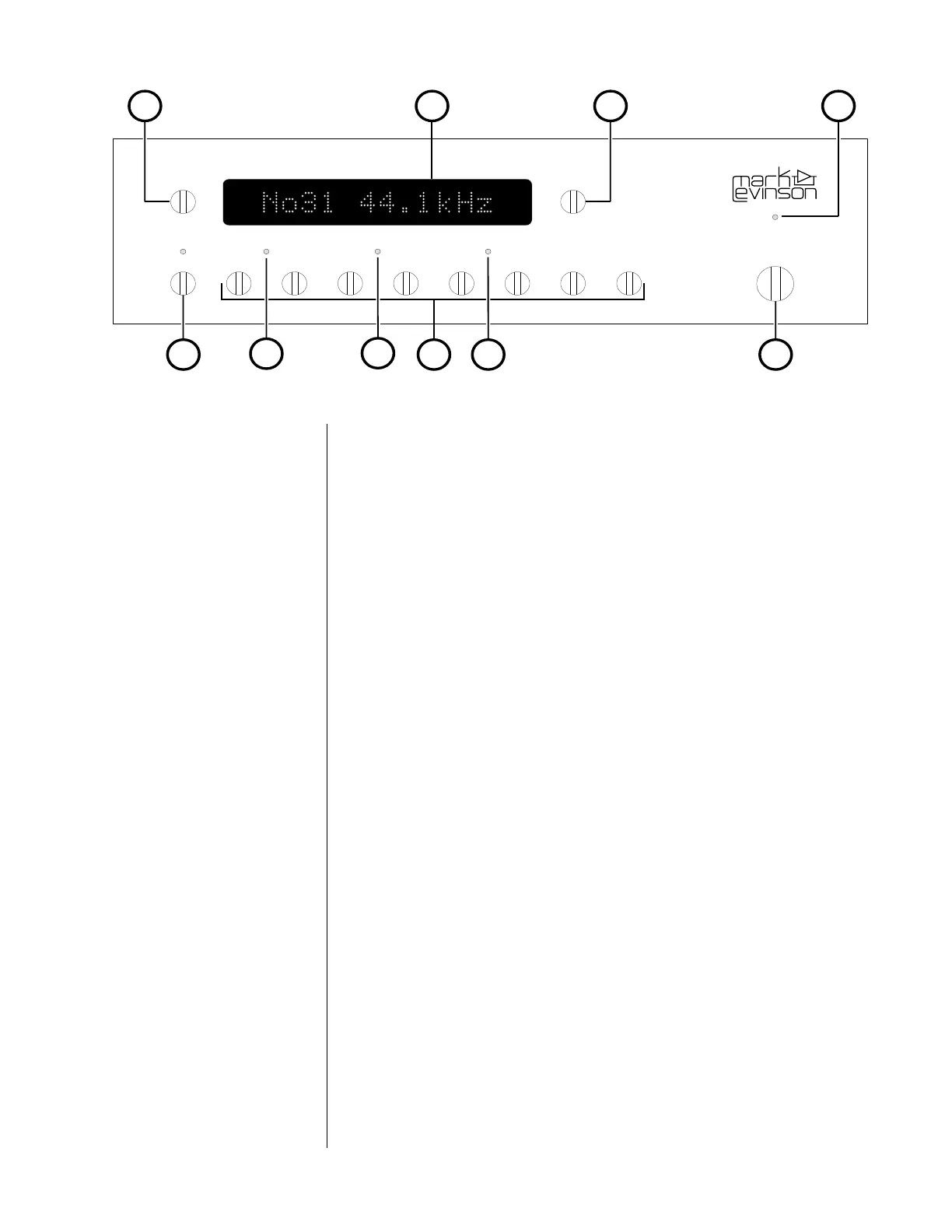
Front panel, Nº30.6
1 standby
Provided the Nº30.6 is connected to AC power (via the PLS-330),
pressing this button takes the Nº30.6 out of “standby” mode, turns
the display on, and enables the front-panel controls.
Pressing standby again places the Nº30.6 into standby mode,
turns the display off, turns off all outputs (including the record
outputs), and disables the front-panel controls.
2 standby LED
While the Nº30.6 is in standby mode, this LED flashes approxi-
mately every five seconds. When the Nº30.6 is ready to operate
(that is, when it is not in standby mode), this LED remains lit.
3 Source selection buttons
Pressing these buttons selects the digital source, according to the
input connections on the rear panel (see “Rear panel, Nº30.6”).
Only one source at a time may be selected.
When power is first applied to the Nº30.6 (or when power is re-
stored after an interruption), it will search for and select the first
input with an active digital signal. If none is found, it will select
the first named source. As delivered from the factory, this input
will be “CD1.”


 To Next Page