◢MR6100 Serial UHF reader user manual(Ver 1.0)◣
Address:
Floor 3/5, Block D,Changyuan New Material Port, No 2 Central 1st Hi-tech Av., Nanshan Shenzhen, P.
R.C. Post:518057
Phone:0755-2654 6392 FAX:0755-2655 3743
E-mail:technical@marktrace.com Website:www.marktrace.com
6 Demo software demonstration
6.1 EPC Gen2 tag Demonstration
6.1.1 Multi tag Identify
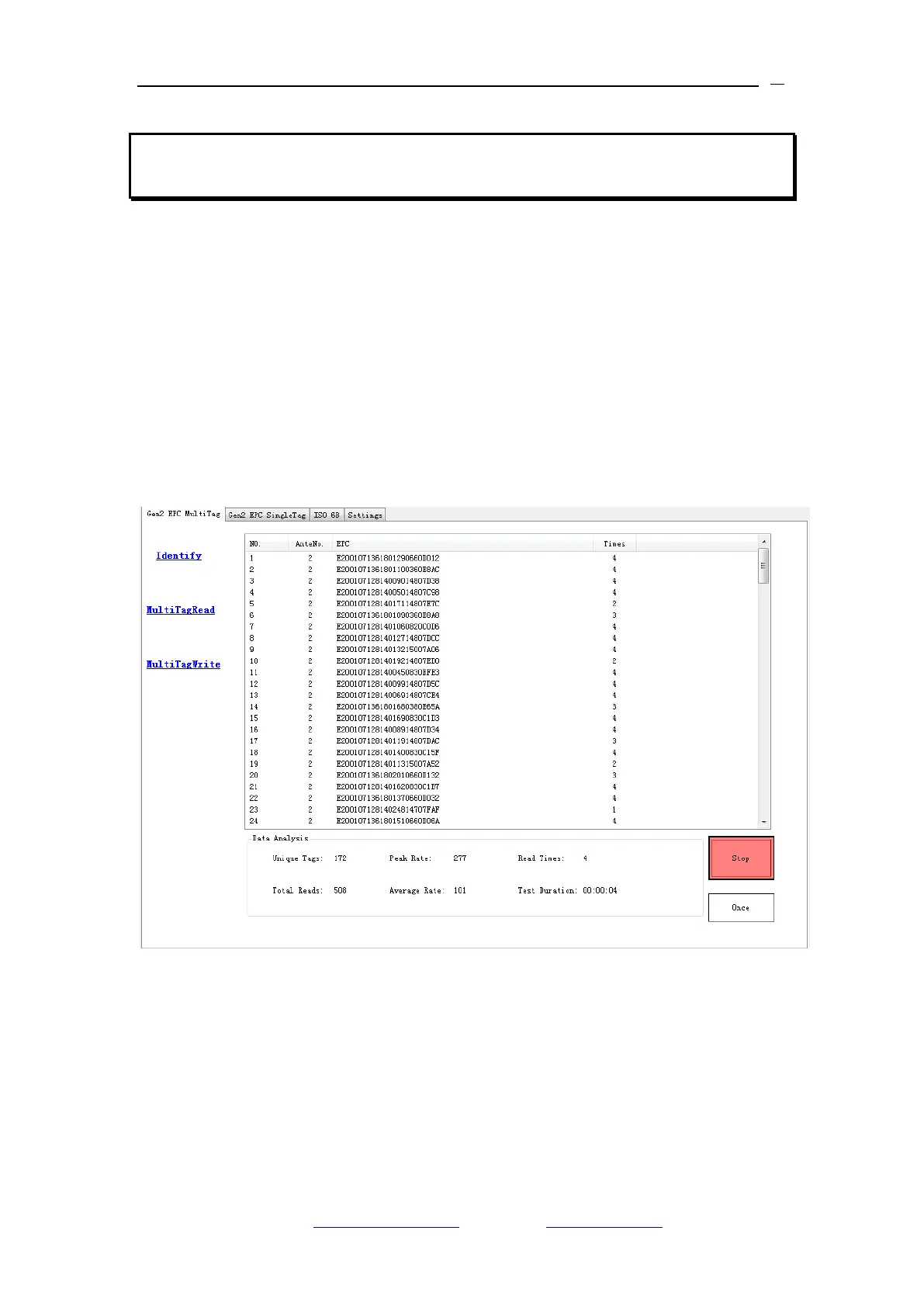
1、On Gen2 EPC Multi Tag interface‟s Identify menu for the Multi tag identify,
and click Identify ICON to start the reading. EPC code, antenna number and
tag reading times displayed on the interface info. box. On the interface bottom
displays tag number, Peak reading rate, Read times, total reads, Average
reading rate, and duration reading time. Take below image for the reference.
2、Click „Stop‟ ICON for stopping tag identify.
3、Click „ Once‟ ICON for sending once tag detect command, and returns the
tag number, take below image for the reference.


 To Next Page