◢MR6100 Serial UHF reader user manual(Ver 1.0)◣
Address:
Floor 3/5, Block D,Changyuan New Material Port, No 2 Central 1st Hi-tech Av., Nanshan Shenzhen, P.
R.C. Post:518057
Phone:0755-2654 6392 FAX:0755-2655 3743
E-mail:technical@marktrace.com Website:www.marktrace.com
6.2.4 Single tag writing and write with UID
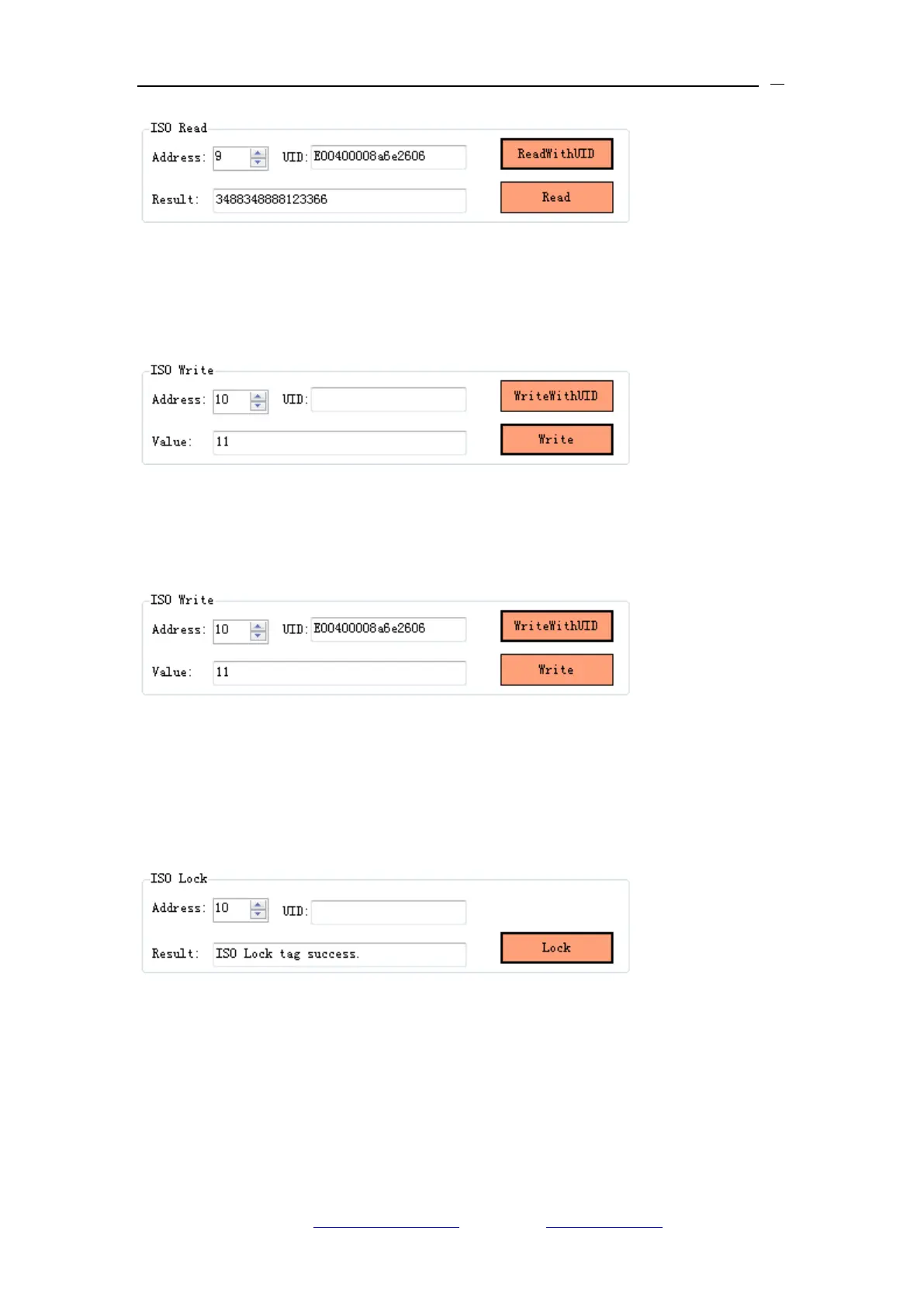
1、Single Tag operation interface,choose the data address you want to write in
the ISO Write menu item,click“Write”button to write data;
2、When operate writing data with UID,except for inputting the single byte data
that needs to write,it also needs to put the UID number of tag,choose the
start address that want to write,click“Write With UID”button to write data;
6.2.5 Single tag data lock
1、Single Tag operation interface,choose the data address you want to lock in
the ISO Lock menu item,click“Lock”button to lock data,if return “ISO Lock tag
success” in “Result”column,it means lock successfully:
2、It is unable to rewrite data in the address that is successfully locked;
6.2.6 Single tag lock and query
Single Tag operation interface,choose the data address you want to query in
the ISO Query Lock menu item,click “Query”button to lock and query,it will


 To Next Page