38
OPERATION
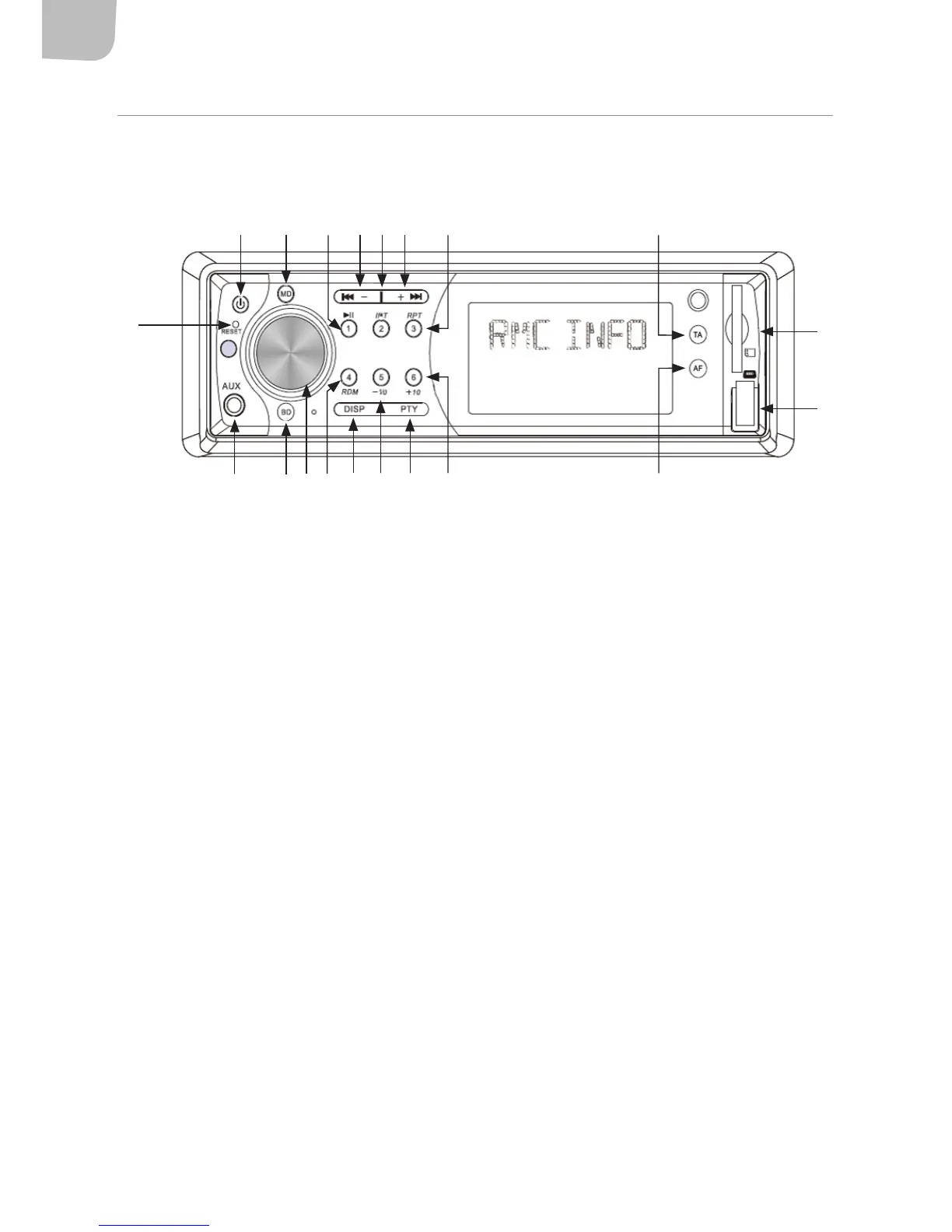
FRONT PANEL
1. Turn car stereo on/o.
2. In radio mode, turn ANS mode on-o. The AF function must be turned o if channels without
ANS are selected.
3. SEEK-/+: In radio mode, keep pressed to initiate manual channel scanning, press and release
to initiate automatic channel scanning. When playing audio from a USB stick/memory card,
press once to go to the next track.
4. DISP: press once to show the clock, keep pressed for two seconds to start the hours ashing,
turn the volume knob to change the hour. Press the SEL button. The minutes display will start
ashing. Turn the volume knob to change the minutes.
5. BAND: press to select FM band (FM1, FM2, FM3).
6. MODE: Press to switch between radio/USB/memory card/AUX.
7. TA: Press to turn automatic ANS station scanning on/o in radio mode. In playback mode,
with AF and TA activated, TP will be shown in the display if there is an ANS signal. In playback
mode, these signals may be received if the car stereo is set to automatically switch to
radio mode.
8. 8.1 Volume control knob
8.2 Multifunction button
Keep the button pressed to switch between the following settings:
– Press once for BAS
1 6 10 11 123 3 7
18
15948519 13 14
17
16
2



 To Next Page