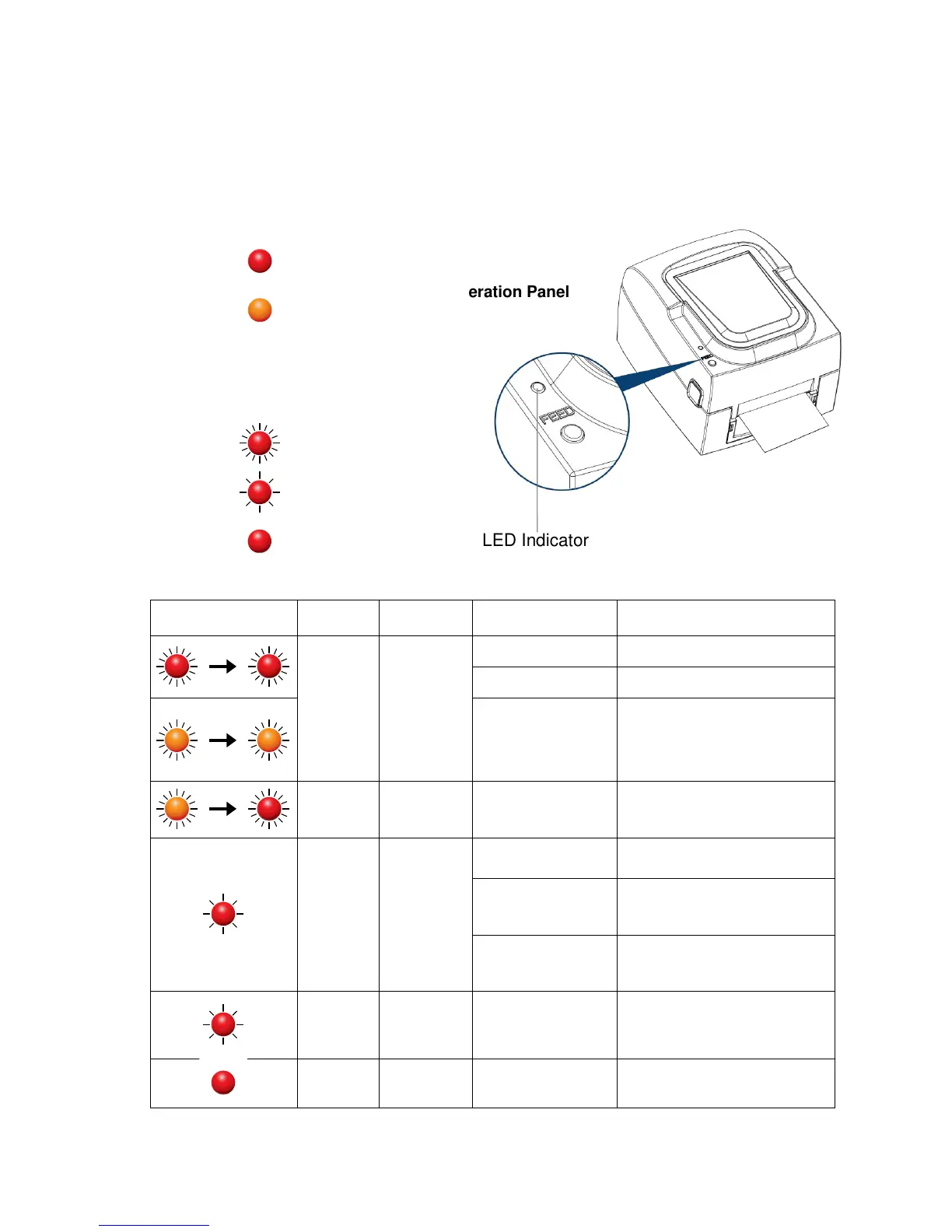
3-2 Error Alerts
In the event of a problem that prevents normal functioning of the printer, you will see an error message on LED
indicators and hear some beep signals. Please refer to below table for the error alerts.
Error Indicators
Please execute Auto Sensing again.
Replace the paper or ribbon.
Possible reasons: the print medium
has become trapped around the
rubber roll; the sensor cannot detect
a gap or black mark between the
labels; there is no paper. Please reset
the sensor.
No ribbon is installed and
the printer is set to
direct thermal printing
mode.
1. To work in thermal transfer mode,
load a ribbon.
2. Alternatively, select the direct
thermal printing mode.。
First 2 beeps,
than 3 beeps
The memory is full. The
printer prints the message
"File System full".
Delete unnecessary data from memory.
Unable to find file. The
printer prints the message
"File Name Not found".
Use the "~X4" command to print all
files. Then check whether the files
exist and whether the names are
correct.
A file of the same name
already exists. The printer
prints the message "
Filename is repeated”".
Change the name of the file and try
storing it again.
High temperature at the
print head.
Wenn the printer is overheated, The
printer will stop printing automatically.
Once the print head has cooled down,
the printer switches to standby mode.
The LED indicator stops flashing.
The printing head is not
correctly closed.
Open the print mechanism and close
it again.


 To Next Page