AC power
7
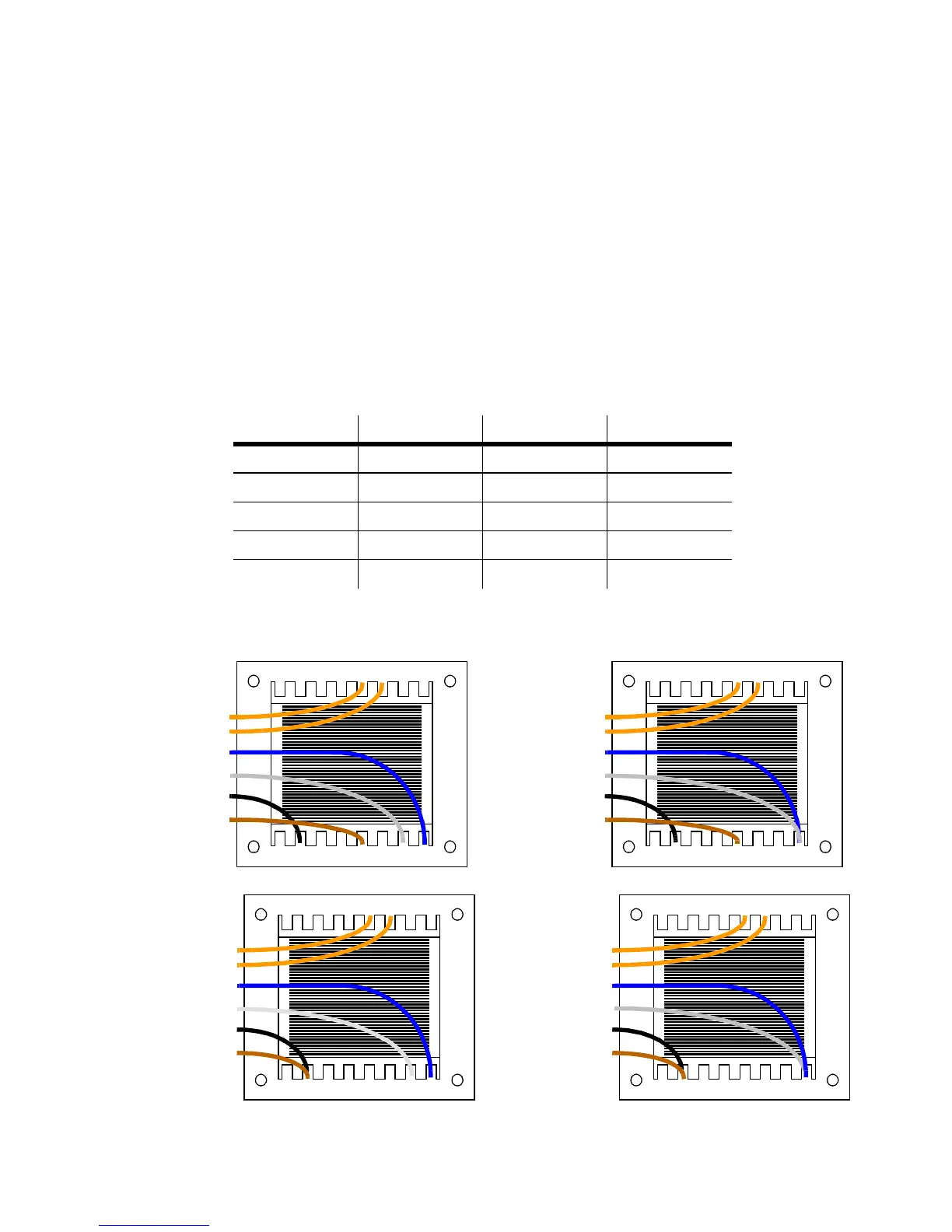
To rewire the power supply
Always use the setting that most closely matches the local AC mains voltage and
frequency.
1Disconnect the fixture from AC power. Remove the top cover bolts with a 4 mm
Allen wrench and lift off the cover.
2On the transformer, which is located behind the color wheel, move the brown
and white wires to the transformer taps shown for your mains voltage. (If your
MX-4 has 2 blue wires, the blue wire
with the insulated spade plug
corresponds
to the white wire.)
Important! Do not move the blue wire from terminal 9 or the black wire from
terminal 15.
Mains voltage Setting Brown White
95 - 109 V 100 V 12 10
110 - 130 V 120 V 12 9
200 - 219 V 210 V 15 10
219 - 239 V 230 V 15 9
240 - 260 V 250 V 16 9
Table 2: Transformer settings
10 11 12 13 14 15 169
23456781
orange
orange
blue
white
black
brown
100 V
10 11 12 13 14 15 169
23456781
orange
orange
blue
white
black
brown
120 V
10 11 12 13 14 15 169
23456781
orange
orange
blue
white
black
brown
210 V
10 11 12 13 14 15 169
23456781
orange
orange
blue
white
black
brown
230 V


 To Next Page