Information subject to change without notice. HARMAN Professional
Denmark ApS disclaims liability for any injury, damage, direct
or indirect loss, consequential or economic loss or any other loss
occasioned by the use of, inability to use or reliance on the
information contained in this document.
©2017 HARMAN Professional Denmark ApS.
All rights reserved.
Martin® is a registered trademark of HARMAN Professional
Denmark ApS registered in the United States and/or other
countries. Features, specifications, and appearance are subject to
change without notice.
HARMAN Professional Denmark ApS
Olof Palmes Allé 18 8200 Aarhus N • Denmark
www.martin.com
Document Revision: B
gobo wheel calibration with DMX value 210-214, pan
calibration only with DMX value 235-249, or tilt calibration
only with DMX value 240-244.
5. When finished calibrating effects, set channel 10 to “No
function” to resume normal DMX control.
Strobe effects
The Mini Profile electronically provides instant open and
blackout, variable speed flash from 3 to 20 flashes per second,
random strobe effects, and pulsing effects.
Electronic dimming
Overall intensity can be precisely adjusted from 0 to 100% using
2-channel coarse and fine dimming control.
Four dimming control modes are available (see „Dimmer
settings‟). The dimming mode can be selected from the control
menu or by DMX commands on channel 10.
Colors
The color wheel provides eight colors plus an open white position.
Colors can be individually selected or scrolled to give split colors.
The wheel can be rotated at varying speeds, both clockwise and
counter- clockwise, or set to display random colors at slow,
medium and fast speeds.
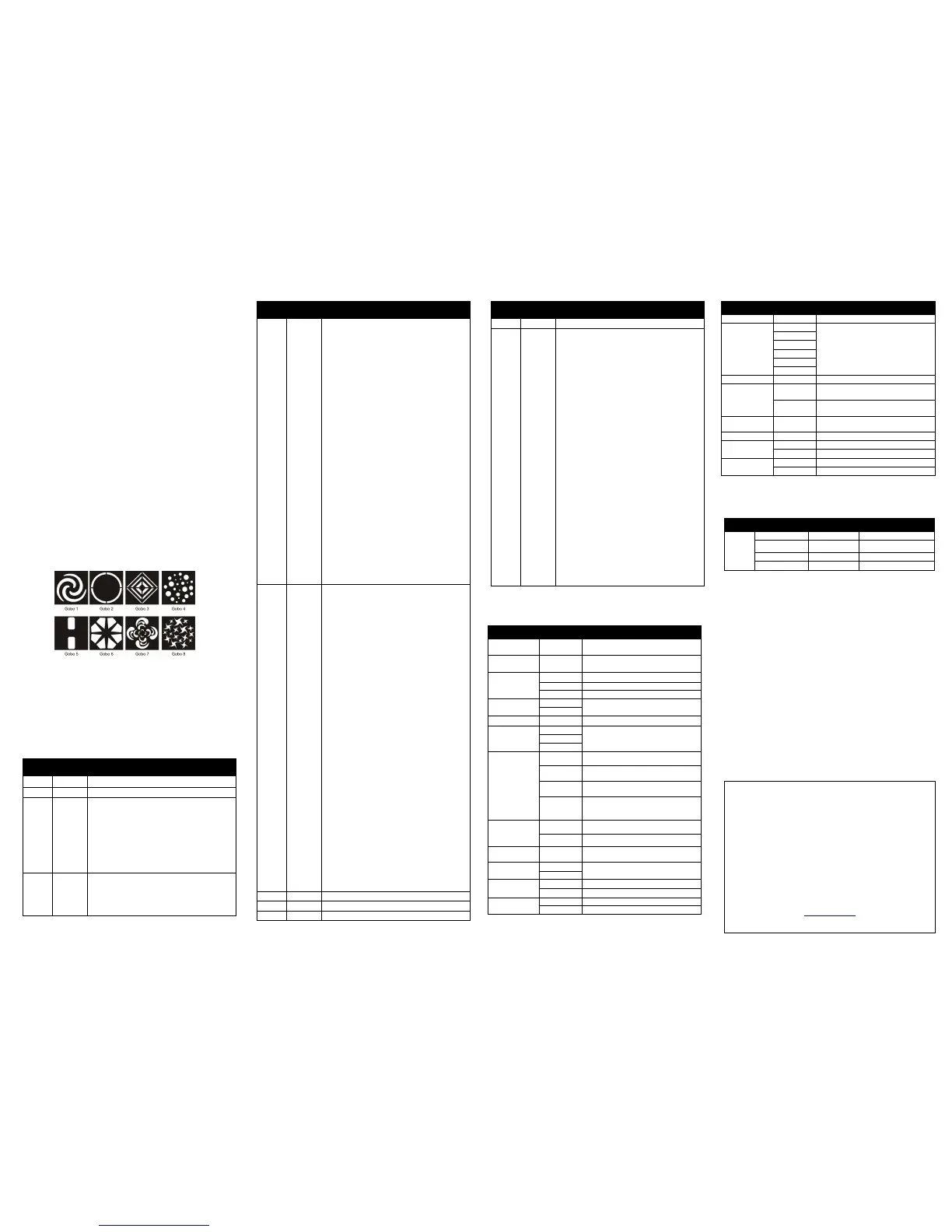
Gobos
The gobo wheel provides eight gobo patterns, shown below, plus
an open position. Gobos can be stepped, or continuously scrolled
to give split gobo patterns. The wheel can be rotated at varying
speeds, both clockwise and counter-clockwise, or set to display
random gobos at slow, medium and fast speeds. Adjust the focus
lens manually to project the sharpest image.
To avoid passing the open position when changing colors and
gobos, use the “Parameter shortcuts = OFF” DMX command on
channel 10. For faster color and gobo changes, use Parameter
shortcuts = ON”.
Note: The gobo wheel is made of a single stamped piece of
aluminum; therefore, gobos are not field replaceable. It is
possible to replace the entire wheel with a custom wheel from a
custom gobo supplier. For more information, contact Martin
service.
DMX protocol
Dimmer, coarse control, full off to full on
0-7
8-15
16-131
132-167
168-203
204-239
240-247
248-255
Strobe
Off (blackout)
Open (steady on)
Strobe, slow to fast
Pulse, fast close / slow open
Pulse, fast open / slow close
Pulse open and close
Random strobe
Open (steady on)
Color Wheel
White (no filter)
White → Red
Red
Red → Orange
30
31-44
45
46-59
60
61-74
75
76-89
90
91-104
105
106-119
120
121-134
135-160
161-163
164-166
167-169
170-172
173-175
176-178
179-181
182-184
185-192
193-214
215-221
222-243
244-247
248-281
252-255
Orange
Orange → Yellow
Yellow
Yellow → Light Green
Light Green
Light Green → Dark Blue
Dark Blue
Dark Blue → Magenta
Magenta
Magenta → Light Blue
Light Blue
Light Blue → Pink
Pink
Pink → White
White
Stepped Scroll
Red
Orange
Yellow
Light Green
Dark Blue
Magenta
Light Blue
Pink
White
Continuous Rotation
CW, Fast → Slow
Stop
CCW, Slow → Fast
Random Colors, Fast
Random Colors, Medium
Random Colors ,Slow
0
1-14
15
16-29
30
31-44
45
46-59
60
61-74
75
76-89
90
91-104
105
106-119
120
121-134
135-160
161-163
164-166
167-169
170-172
173-175
176-178
179-181
182-184
185-192
193-214
215-221
222-243
244-247
248-251
252-255
Gobo Wheel
Open
Open → Gobo 1
Gobo 1
Gobo 1 → Gobo 2
Gobo 2
Gobo 2 → Gobo 3
Gobo 3
Gobo 3 → Gobo 4
Gobo 4
Gobo 4 → Gobo 5
Gobo 5
Gobo 5 → Gobo 6
Gobo 6
Gobo 6 → Gobo 7
Gobo 7
Gobo 7 → Gobo 8
Gobo 8
Gobo 8 → Open
Open
Stepped Scroll
Gobo 1
Gobo 2
Gobo 3
Gobo 4
Gobo 5
Gobo 6
Gobo 7
Gobo 8
Open
Continuous Rotation
CW, Fast → Slow
Stop
CCW, Slow → Fast
Random gobos, fast
Random gobos, medium
Random gobos, slow
0-9
10-14
15-19
20-24
25-29
30-34
35-54
55-59
60-64
65-69
70-74
75-79
80-84
85-89
90-94
95-99
100-104
105-144
145-149
150-154
155-159
160-164
165-169
170-209
210-214
215-234
235-239
240-244
245-249
250-255
Control Settings
No function (disables calibration)
Reset fixture
No function
Reset color
No function
Reset pan and tilt
No function
Enable calibration
Linear dimmer curve
Square law dimmer curve
Inverse square law dimmer curve
S-curve dimmer curve
Pan and tilt speed = Normal
Pan and tilt speed = Fast (default)
Pan and tilt speed = Slow
Parameter shortcuts = ON (default)
Parameter shortcuts = OFF
No function
Auto-blackout = On
Auto-blackout = Off (default)
Illuminate display
Turn off display
Store pan & tilt calibration
No function
Store gobo wheel calibration
No function
Store pan calibration
Store tilt calibration
Reset all calibrations to factory default
No function
Control menu
Default settings shown in bold.
Select stand-alone program
Master-slave mode control fixture
Copies master with small variations
Toggle music trigger for stand-alone
operation
Select behavior if no DMX signal
Select optically linear dimming
Select finer control at low levels than
high levels
Select finer control at high levels than
low levels
Select finer control at high and low levels
than medium levels
Reduce output to match other fixtures
Toggle display panel backlight
Select normal tilt motion
Manual control of all effects
Fan speed varies as needed for cooling.
Light output is constant.
Light output reduced if needed for cooling.
Fan speed is constant.
Installed firmware version
Restore factory default settings
To access the Offset menu, press MENU to enter the menu and
then press and hold ENTER for three seconds


 To Previous Page
 Loading...