EasyManua.ls Logo

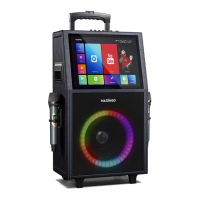
MASINGO Allegro X8 - User Manual

MASINGO Allegro X8
20 pages
Print Icon
To Next Page IconTo Next Page
Loading...
1
USER
MANUAL
Karaoke Machine Allegro X8
It’s time to like a pro
KARAOKE

Questions and Answers

Summary

Parts & Features Overview

Function Board Diagram

Detailed diagram of the karaoke machine's function board with numbered components.

Remote Control Functions

Remote Button Functions

Explanation of the various buttons and their functions on the remote control.

Important Precautions

General Safety and Usage Guidelines

Key instructions and warnings for safe operation and maintenance of the machine.

Quick Start Guide

Getting Started Steps

Step-by-step instructions for initial setup and operation of the karaoke machine.

Operational Warnings

Important warnings regarding machine usage, environment, and attachments.

Detailed Usage Guide - Machine Operation

Charging the Machine

Instructions on how to properly charge the karaoke machine using the provided cable.

Powering the Machine On;Off

Procedure for powering the karaoke machine on and off using the power switch.

Detailed Usage Guide - Microphone

Microphone Power and Battery Replacement

Steps to power microphones on/off and replace their AA batteries.

Adjusting Microphone Volume

Instructions for adjusting the microphone volume using the machine's controls.

Using PA and Mic Priority Modes

Explanation and usage of PA Mode and Mic Priority features.

Detailed Usage Guide - Music Playback

Playback Options Overview

Overview of the six available playback options for the machine.

Connecting via Bluetooth

Steps to connect a Bluetooth-enabled device to the machine for audio playback.

Using SD Card Mode

Instructions for playing music from a MicroSD card.

Using AUX (Out) Mode

Guide for using the AUX output to connect to external speakers.

Detailed Usage Guide - Connectivity

Using AUX (In) Mode

Steps for playing music from an AUX-compatible device via the Line In port.

Starting USB Mode

Instructions for playing music from a USB drive connected to the machine.

Connecting to TV (HDMI Mode)

Guide on connecting the machine to a TV using an HDMI cable for audio/video output.

Detailed Usage Guide - Special Features

Using Karaoke Mode

Instructions on how to activate Karaoke Mode to mute vocals from songs.

Connecting a Guitar

Steps for connecting a guitar to the machine and adjusting its volume.

Live Broadcasting with Phone

Guide on using the live port to broadcast audio online with a smartphone.

Singing Karaoke via Touch Screen

Steps for finding and playing karaoke tracks via the machine's touch screen.

Detailed Usage Guide - Touch Screen

Connecting to WiFi

Instructions for connecting the machine to a WiFi network.

Using the Slide-Up Menu

Explanation of the slide-up menu functions and navigation on the touch screen.

Detailed Usage Guide - Settings & Apps

Magic Mode and EQ Settings

Guide on using Magic Mode for voice effects and EQ settings for audio balance.

Accessing Notifications

Instructions for viewing notifications on the touch screen.

One Clean Up App

Guide on using the One Clean Up app to improve touch screen performance.

Lycoo Wallpaper App

Instructions for changing the display wallpaper using the Lycoo Wallpaper app.

Remote Operation Details

Operating and Aiming the Remote

Instructions on how to properly operate and aim the remote control for best results.

Using Magic Mode with the Remote

Guide on using the Magic Mode feature via the remote control for voice effects.

Switching Modes Using the Remote

Instructions for switching between Bluetooth, AUX, and Touch Screen modes using the remote.

Maintenance

Cleaning the Machine

Instructions for cleaning the machine and microphones safely and effectively.

Storing the Machine

Guidelines for storing the machine and accessories for optimal preservation.

Transporting the Machine

Steps for safely transporting the karaoke machine, utilizing its design features.

Troubleshooting Guide

Machine Power and Touch Screen Issues

Troubleshooting for machine power failures and touch screen malfunctions.

Microphone and Media Playback Issues

Solutions for microphone problems and issues with USB/MicroSD playback.

Remote Control and Audio Problems

Troubleshooting steps for remote control unresponsiveness and no sound output.

Playback and Input Control Issues

Solutions for music playback errors and unresponsive buttons/knobs.

MASINGO Allegro X8 Specifications

General IconGeneral
ConnectivityBluetooth, USB, AUX
Signal-to-Noise Ratio≥70dB
USB PortYes
BluetoothYes
DisplayLCD
Microphones2
PowerAC 110V-240V, 50/60Hz
Input Voltage110V-240V
Microphone Input6.35mm jack

Related product manuals