EasyManua.ls Logo

MASINGO Burletta C10 - User Manual

MASINGO Burletta C10
13 pages
Print Icon
To Next Page IconTo Next Page
Loading...
5
Congratulations!
You’ve just taken your party
game up a notch.
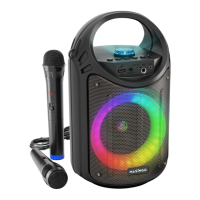
Meet your compact, karaoke buddy - the Burletta C10 from Masingo.
The C10 is on hand for convenient karaoke whenever and wherever you
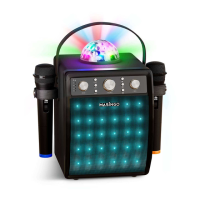
desire. Its 10-watt speaker, 6 playback modes, 2 microphones, and co-
lorful LEDs turn your casual fun into seriously good times. Plus, it does
double duty for party announcements.
Choose from Bluetooth, AUX, USB, MicroSD, or FM to fill the room with
melody. Sing out some show tunes with Grandma, blast out some big
hits with your pals, or serenade your sweetheart. Need to take your show
on the road? No problem! This portable party can be carried easily by
all ages via shoulder strap or handle.
Whatever your musical mood, you’ll find the C10 is pitch perfect for any
musical occasion!
Sing on!
[Welcome]

Other manuals for MASINGO Burletta C10

Questions and Answers

  • B
    Brittany ReidAug 21, 2025
    What to do if MASINGO Burletta C10 is not playing microphone vocals?
    • W
      wramirezAug 21, 2025
      If the MASINGO Karaoke System is not playing microphone vocals, verify that your microphone is on, ensuring the VHF microphone isn't muted (power switch all the way up). Check that the wired microphone is correctly plugged in, and the wireless microphone's batteries are properly installed and charged. Also, ensure the machine volume is turned up.
  • R
    Roberta BrownAug 23, 2025
    Why is there no sound coming from my MASINGO Burletta C10 Karaoke System speaker?
    • J
      julie54Aug 23, 2025
      If your MASINGO Karaoke System isn't producing any sound, first make sure that the volume on both the machine and your connected device (if you're using one) are set to a level you can hear.
  • W
    woodskatieAug 26, 2025
    Why does my MASINGO Burletta C10 Karaoke System power on and then shut down?
    • N
      Nancy TaylorAug 26, 2025
      If the MASINGO Karaoke System powers on and then shuts down, it's likely due to a low battery. Charge the machine, or replace the battery if charging doesn't resolve the issue.
  • H
    hharveyAug 28, 2025
    How to fix MASINGO Burletta C10 VHF wireless microphone that is not turning on?
    • M
      Margaret GarzaAug 28, 2025
      If the VHF wireless microphone on your MASINGO Karaoke System isn't turning on, make sure the power switch is fully in the up position and the indicator light is on. The VHF microphone has a middle “Mute” setting where it won’t function. If it still doesn’t work, try replacing the AA batteries in the microphone.
  • V
    Victoria CarrAug 30, 2025
    What to do if microphone vocals are echoing excessively on MASINGO Karaoke System?
    • G
      gregoryjohnsonAug 30, 2025
      If the echo from the microphone vocals on your MASINGO Karaoke System is too strong, move the speaker of the machine further away from the microphones to reduce the echo.
  • C
    Courtney MillerSep 1, 2025
    What to do if USB or MicroSD mode is not working on MASINGO Karaoke System?
    • C
      Cathy MorenoSep 1, 2025
      If the USB or MicroSD mode is not working on your MASINGO Karaoke System, check that the USB drive or MicroSD chip is properly inserted and contains readable music files. Also, ensure the machine volume is set to an audible level.
  • S
    Stephanie RogersSep 3, 2025
    What to do if button or knob on MASINGO Burletta C10 Karaoke System is not working properly?
    • W
      Whitney BarkerSep 3, 2025
      If a button or knob on the MASINGO Karaoke System isn't working correctly, power off the machine and then turn it back on.
  • D
    David GarciaSep 5, 2025
    What to do if MASINGO Karaoke System microphone is not working?
    • A
      adrienne02Sep 5, 2025
      If your MASINGO Karaoke System isn't producing sound from the microphone, there are a few things to check: * Make sure the microphone is switched on. * If you're using the VHF microphone, ensure it's not set to 'Mute' by pushing the power switch all the way up. * For wired microphones, verify it's correctly plugged in. * If using a wireless microphone, check that the batteries are correctly installed and have sufficient charge. * Also, ensure the machine volume is turned up.
  • S
    Scott WilliamsSep 7, 2025
    What to do if MASINGO Karaoke System VHF wireless microphone is not turning on?
    • D
      Dr. Brandon JuarezSep 7, 2025
      If the VHF wireless microphone on your MASINGO Karaoke System isn't turning on, check that the power switch is fully in the up position and the indicator light is on. Note that the VHF microphone has a middle 'Mute' setting where it won't function. If this doesn't solve the problem, the microphone battery might be low or depleted, so replace the AA batteries.
  • C
    Christopher Bowman Jr.Sep 9, 2025
    How to reduce microphone echo on MASINGO Karaoke System?
    • A
      anthony33Sep 9, 2025
      If the microphone vocals on your MASINGO Karaoke System are echoing too much, try moving the machine speaker further away from the microphones. This should help reduce the echo.

MASINGO Burletta C10 Specifications

General IconGeneral
BrandMASINGO
ModelBurletta C10
CategoryKaraoke System
Power Output10W
Frequency Response100Hz-18KHz
USB PortYes
BluetoothYes
Input Voltage5V
Microphone InputYes, 2 x 6.35mm

Related product manuals