10.BASS BOOST LEVEL CONTROL
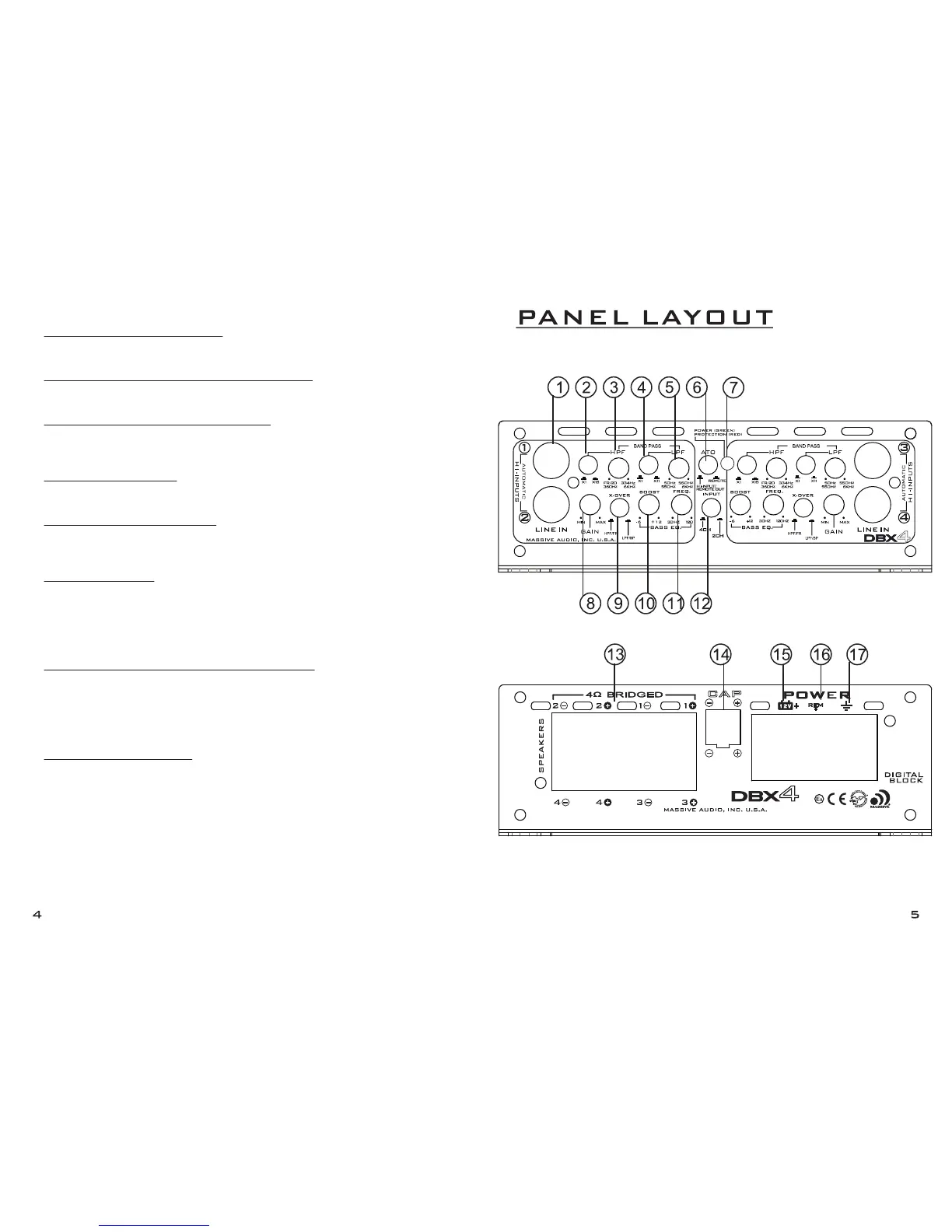
This control can boost bass levels between -6dB and +12dB at a adjustable
frequency response from 30Hz ~ 120Hz. (See #11)
11.BASS EQ W/ ADJUSTABLE CENTER FREQUENCY
Used for selecting center frequency for bass boost from 30Hz ~ 120Hz.
(See #10 for bass gain adjustments)
12.4CH / 2CH SELECTABLE INPUT BUTTON
When the button is set to the “out” position all 4 RCA inputs can be used.
When the button is set to the “in” position RCA’s inputs 1 and 2 will operate
for all 4 channels.
13.SPEAKER TERMINALS
Connect speakers/subwoofers to these terminals. Be sure to check wire for
proper polarity. Never connect the speaker cable to chassis ground.
14.EXTERNAL CAPACITOR INPUT
For connecting an optional (sold separately) external hi-voltage capacitor.
This will help stabilizing the amplifiers needed voltage during operation
while improving fidelity and maximizing head room.
15.+12 VOLT POWER
Connect this terminal through 4 gage power wire with a FUSE or CIRCUIT
BREAKER to the positive terminal of the vehicle battery or the positive termi-
nal of an isolated audio system battery.
WARNING: Always protect this power cable by installing a fuse or circuit
breaker of the appropriate size within 18 inches (45cm) of the battery termi-
nal connection.
16.+12V REMOTE TURN ON INPUT OR 12V OUTPUT
When the ATO button is set to the “in” position (see #6) the input turn on
terminal (see #16) becomes a +12 volt output turn-on lead for other
devices. When the ATO button is set to the “out” position only RCA inputs
are needed for turn on. (when a input signal is supplied) Optional connec-
tion of the 12Volt turn on terminal (see #16) will also operate turn on
function.
17.– GROUND CONNECTION
Connect 4 gage cable directly to the frame or metal of the vehicle. Make
sure the metal frame has been stripped of all paint down to the bare metal.
Use the shortest distance possible. CAUTION: Do not connect this terminal
directly to the vehicle battery ground terminal or any other factory ground
points.


 To Previous Page