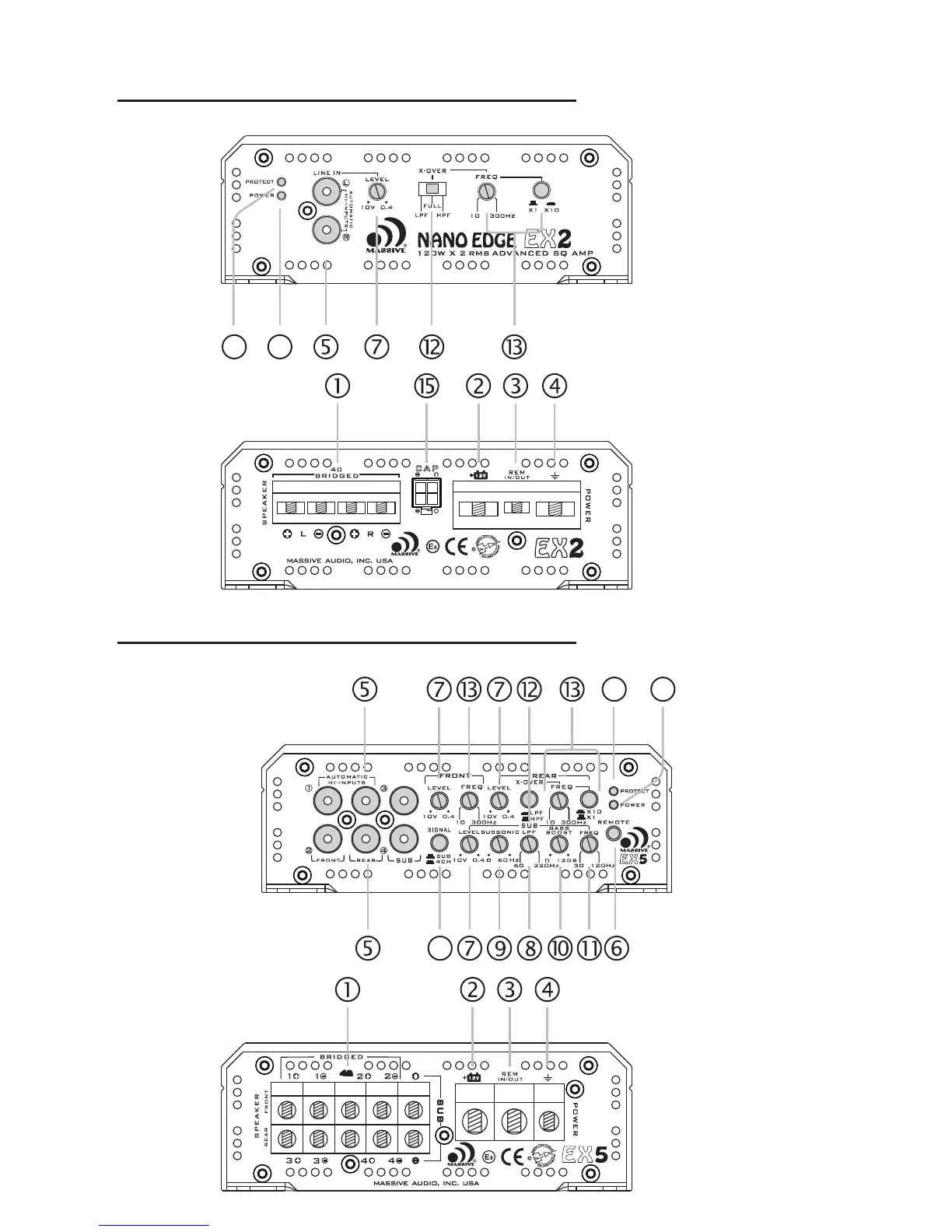
PANEL LAYOUT
17. Power Indicator
This LED will light up when amplifier works properly.
18. Protection Indicator
This red LED will light up and will be flashing if there is a fault presented to
the amplifier. Please disconnect the amplifier and resolve the fault before
reconnecting the amplifier.
15. EXTERNAL CAPACITOR INPUT
For connecting an optional (sold separately) external hi-voltage
capacitor. This will help stabilizing the amplifiers needed voltage during
operation while improving fidelity and maximizing head room.
17
18
5
6
PANEL LAYOUT
Fig 3. 2-ch amplifier panel l ayout
17
18
Fig 2. 4-ch amplifier panel l ayout
PANEL LAYOUT
Fig 4. 5-ch amplifier panel l ayout
17
18
16
16. Woofer channel signal selector(EX5)
The button select the signal source for subwoofer channel .When
the button is up, Subwoofer signal switched to the subwoofer
channel’s RCA input jack. When the button is down, It mix up 4x full
freqencny channel’s bass signal and pass to subwoofer channel.
EX44/EX46/EX48
Ex44
EX46/EX48


 To Next Page