17
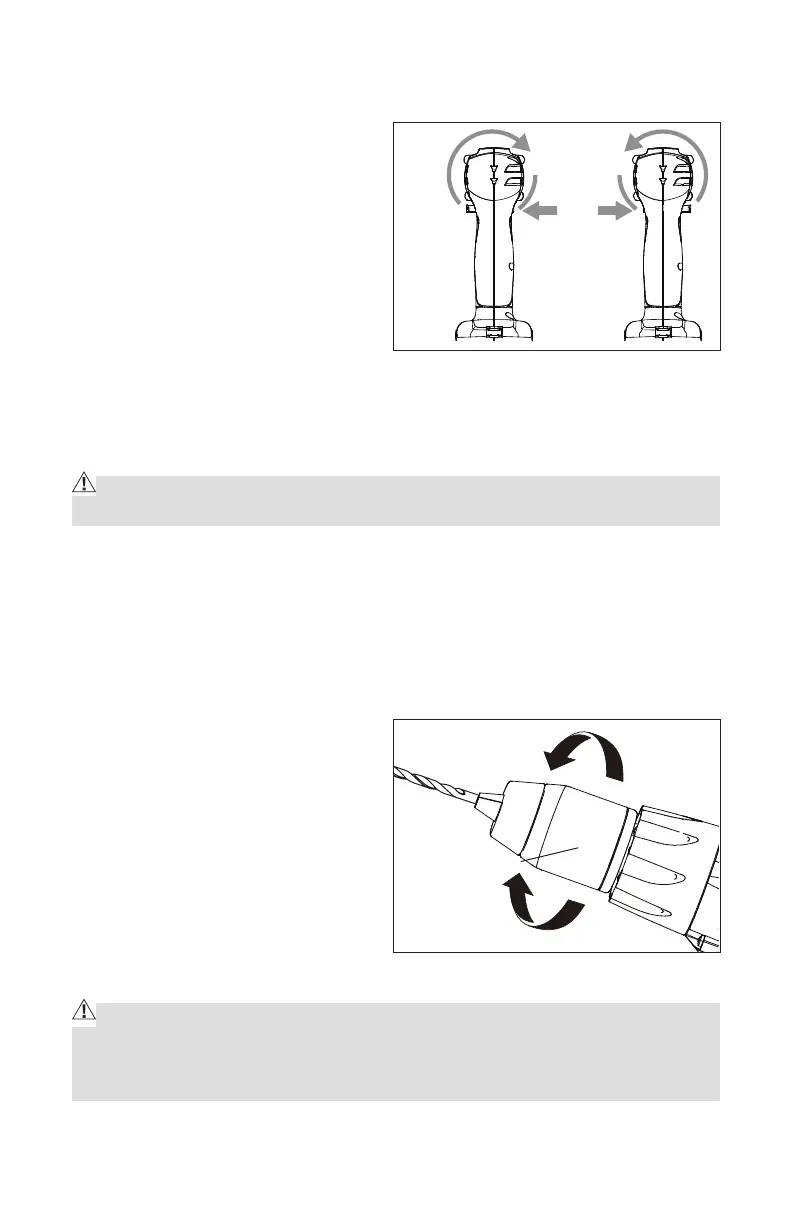
DIRECTION-OF-ROTATION SELECTOR (FORWARD/REVERSE/CENTER LOCK)
(Fig. 6b)
The direction of bit rotation is
reversible and is controlled by a
selector located above the trigger
switch. With the Drill/Driver held in
normal operating position:
1. Position the direction-of-rotation
selector to the left of the tool for
forward rotation.
2. Position the direction-of-rotation
selector to the right of the tool for reverse rotation.
3. Setting the switch in the OFF (center lock) position helps reduce the
possibility of accidental starting when not in use.
CAUTION: To prevent gear damage, always allow the Drill/Driver to come to
a complete stop before changing the direction of rotation.
NOTE: The Drill/Driver will not run unless the direction of rotation selector is
engaged fully to the left or right.
ELECTRIC BRAKE
To stop the Drill/Driver, release the trigger switch and allow the tool to come
to a complete stop. The electric brake quickly stops rotating. This feature
engages automatically when you
release the trigger switch.
KEYLESS CHUCK (Fig. 7)
The drill/driver has a keyless
chuck to tighten or release bits
in the chuck jaws. The arrows on
the chuck indicate the direction
in which to rotate the chuck body
in order to GRIP (tighten) or OPEN
(release) the chuck jaws on the bit.
WARNING! Do not hold the chuck body with one hand and use the power of
the drill/driver to tighten the chuck jaws on the bit. The chuck body could slip in
your hand, or your hand could slip and come in contact with the rotating bit. This
could cause an accident resulting in serious personal injury.
Fig. 6b
Fig. 7
Keyless chuck
GRIP
(Tighten)
OPEN
(Release)


 To Next Page