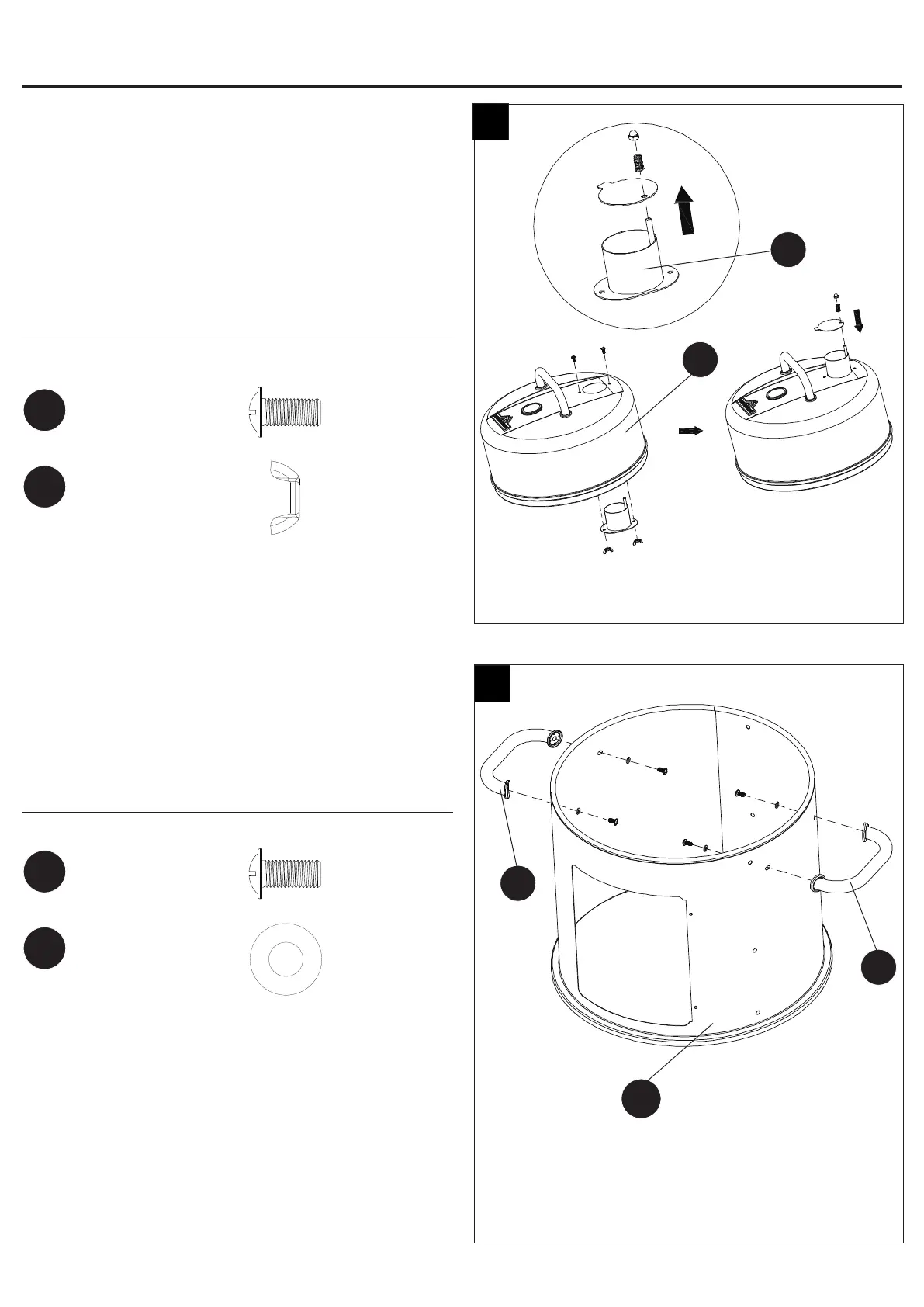
Step 3: Attach Smoker Stack
Firstly, remove smoker stack top, pre-assembled nut
and spring from smoker stack.
Secondly, attach smoker stack (C) onto the lid (D)
using two M5x12 screws (BB) and two M5 wing nuts
(EE).
Finally, attach smoker stack top onto smoker stack (C)
using the pre-assembled nut and spring.
Hardware Used
Step 4: Attach Side Handles
Attach side handles (J) to upper smoker body (K)
using four M5x12 screws (BB) and four Ø6.5xØ18
washers (FF).
Hardware Used
K
3
4
C
D
J
J
ASSEMBLY INSTRUCTIONS
First
Second
Third
M5
Wing Nut
EE
x 2
M5x12
Screw
BB
x 2
Ø6.5xØ18
Washer
FF
x 4
M5x12
Screw
BB
x 4
7


 To Next Page