DOLPHIN REMOTE
Operation
64
DO NOT DIVE.
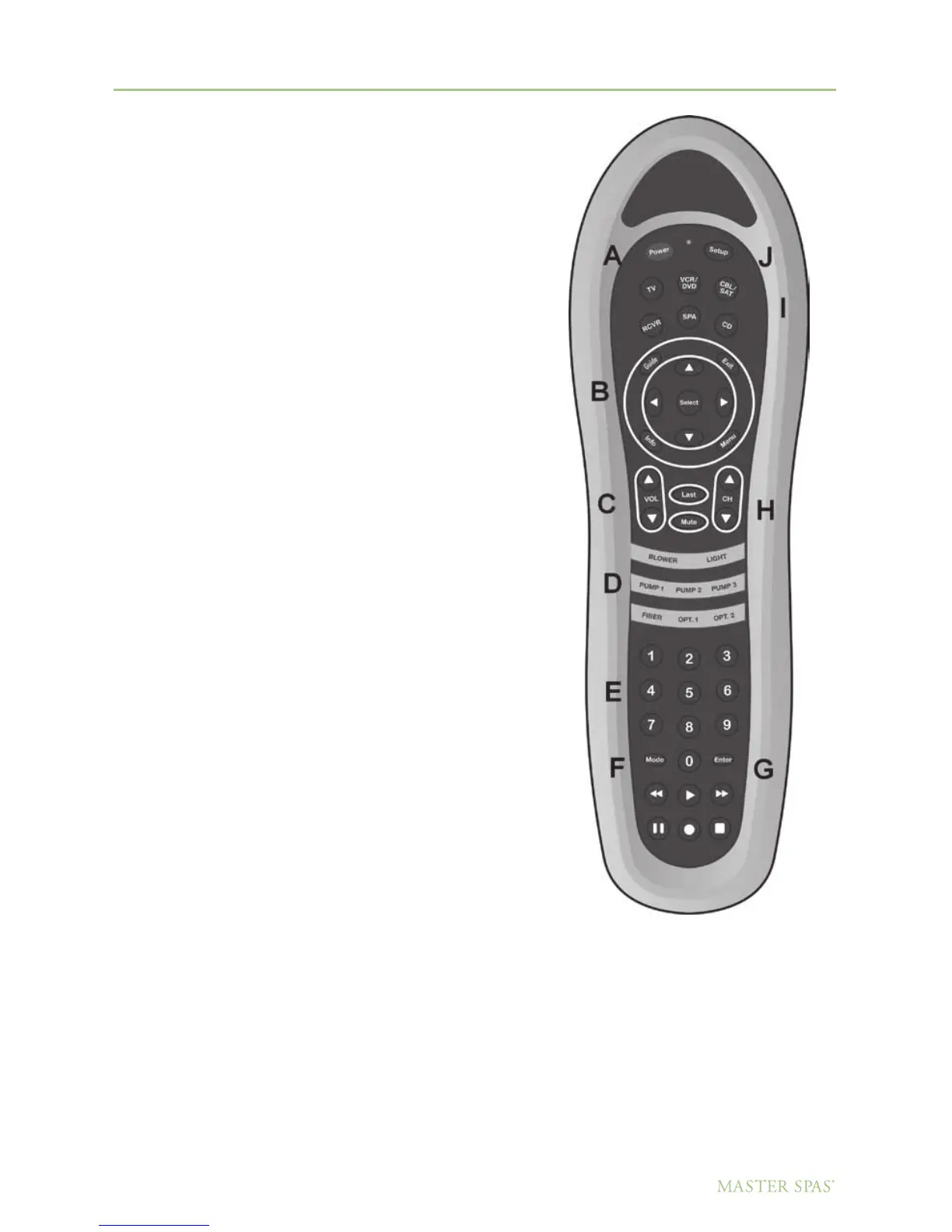
Power Key: (A)
Turns the power on and off to the TV
and one piece DVD/CD/Stereo receiver.
Volume Buttons: (C)
Adjusts the volume in the selected device.
Channel Buttons: (H)
In the CD mode, these buttons will scan
CD tracks or scan radio presets. In TV mode,
it will search through the TV channels.
Spa Function Buttons: (D)
Will control the pump 1, 2, 3 and the light operations.
Mode Button: (F)
In the CD mode, controls selection of different A/V modes,
Radio station, DVD play and A/V input. In the TV Mode,
this button will switch the video input to watch DVDs
and to the tuner for viewing broadcast TV.
Setup Button: (J)
Use this button to program device codes (see page 65).
Your Dolphin Remote has been preprogrammed at the factory
for all components included. When the batteries are replaced,
the code for each component may need to be reprogrammed.
Device Mode Buttons: (I)
Select unit to control by pressing device button once.
Directional Buttons: (B)
These buttons will navigate through “Menu” options
in the DVD device mode.
Numeric Keypad: (E)
These buttons will change the TV channel manually in the TV device mode.
NOTE: If utilizing a satellite receiver it is necessary to point the Dolphin Remote directly
at the receiver as the RF portion of the Dolphin remote is not programmable.



 To Next Page