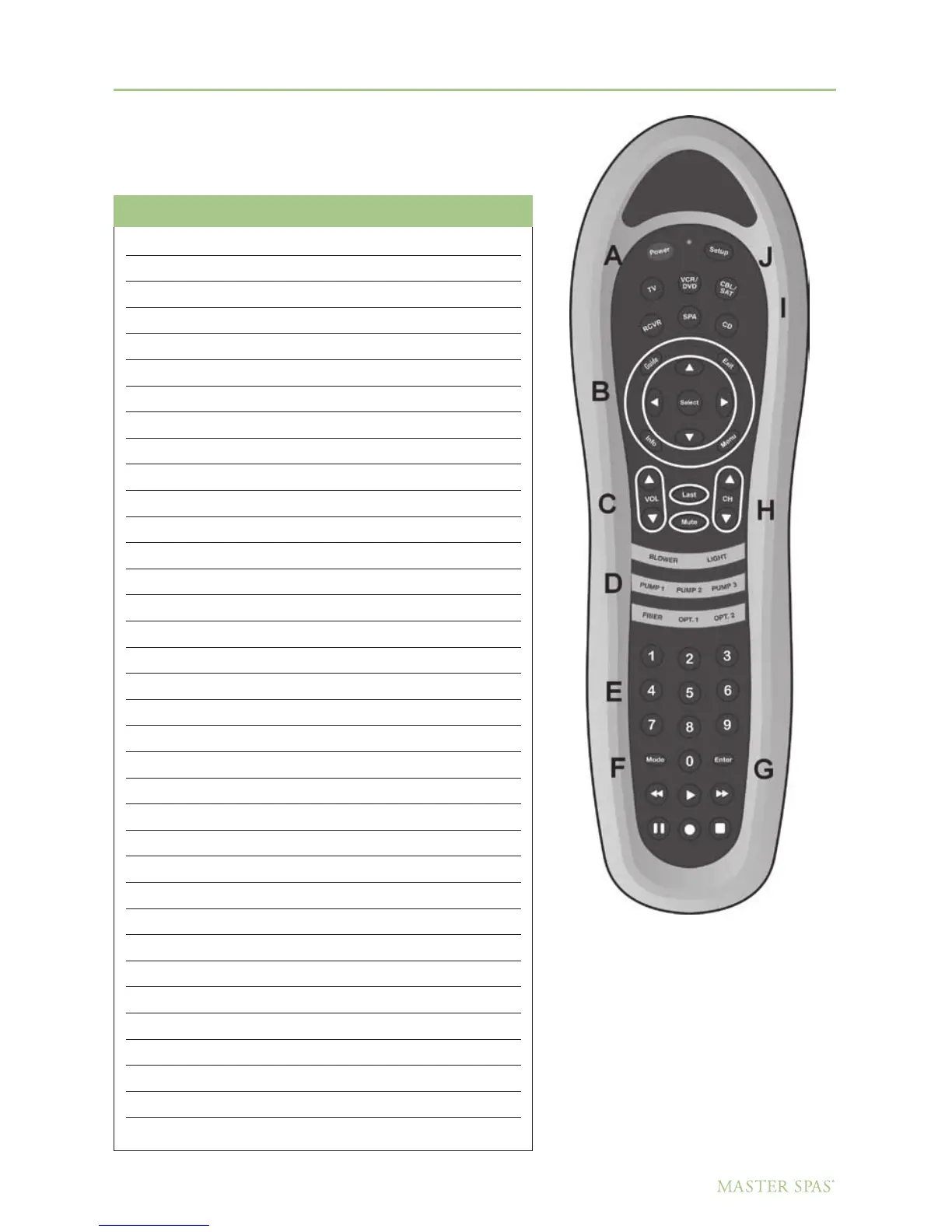
DOLPHIN REMOTE
Device Modes / Feature Buttons
68
DO NOT DIVE.
The Dolphin remote has multiple functions depending on
the device being controlled. Below is a matrix that explains the
operation of each button, depending on the device it is controlling.
15” & 19” TV Dolphin DVD/CD Stereo
1 Digit 1 1
2 Digit 2 2
3 Digit 3 3
4 Digit 4 4
5 Digit 5 5
6 Digit 6 6
7 Digit 7 7
8 Digit 8 8
9 Digit 9 9
0 Digit 0 0
CH+ Channel Up
CH- Channel Down
VOL+ Volume Up Volume Up
VOL- Volume Down Volume Dn
Mute Mute Mute
Format Play Play/Pause
TV Stop Stop
AV Pause DVD setup
HD Record Play/Pause
Sound Fast Forward FF/+
MTS Rewind RW/-
Up Up Up
Down Down Down
Left Left Skip back
Right Right Skip Forward
Enter Select OK
Standby/On Power Power
Picture Guide Title
Menu Menu menu
Exit Exit Audio
Display Info DVD Menu
——- Setup
Delimiter (.) Enter Enter/Band
Function Mode Mode
Last CH Last Sub T
Master Spa Parts - 1068 American Drive, Neenah, WI, 54956, USA



 To Next Page