82DO NOT DIVE.
SwimNumber System
100˚F
12:45 pm
Swim
USER
Michael
SMART WORKOUT
Morning
DURATION ELAPSED TIME STEP IN CYCLE
00:30:00 0:04:43 0:11:17
SWIM NUMBER
10 0
START
LOCK APP
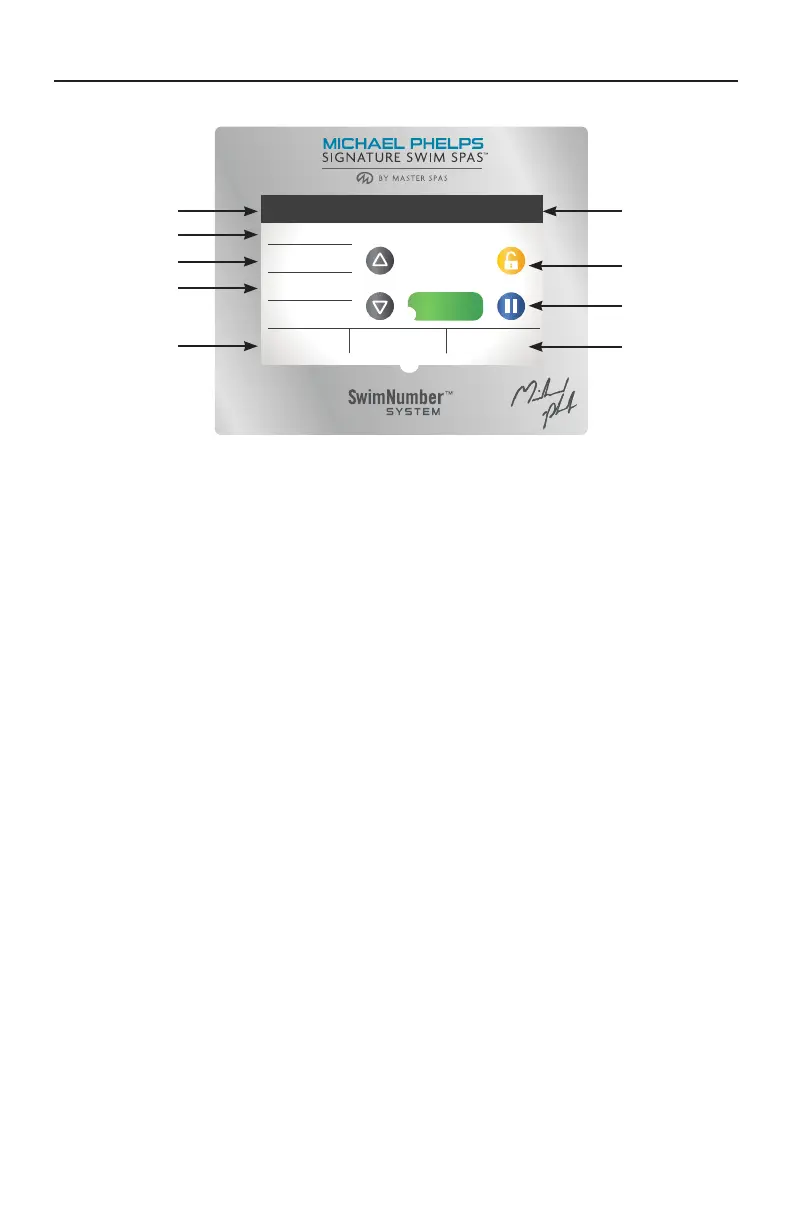
PROPULSION SYSTEM CONTROLS
SWIM CONTROL OPERATION
Temperature of water in swim spa.
Time of day.
Mode reference used during workouts to calculate calorie counts when used with Swim Number
App (SNAPP). During manual operation this setting can be changed by touching the highlighted
text but you will not see a change in the swim current.
User workout selection allows you to choose between the default user and any custom users that
have been added through the SNAPP APP.
Smart Workouts can be selected from here by touching the highlighted area. Please refer to the
Smart Workout Reference guide included with the swim spa information materials. From there you
can select Smart Workouts that will allow you exercise with preprogrammed workouts that control
the Wave Propulsion Systems.
Up button increases the swim number (speed).
Down button lowers the swim number (speed).
Swim Number indicates the speed of the propulsion system. Speed is indicated in numbers from
1 to 100, where the higher number indicates faster water flow.
Start button starts the propulsion system after a 5 second delay. This delay allows the swimmer
time to get into position and prepare for the swim current.
Lock APP allows you to restrict control of the propulsion system from the SNAPP.
Pause button allows you to momentarily pause the operation of the propulsion system. Whenever
the it is restarted, there will be a 5 second delay before it resumes operation.
Duration shows the duration of the complete workout.
Elapsed Time will be displayed in a manual mode workout and indicates the total time that the
propulsion system has been running in the current workout. It is only active in manual mode.
Remaining Time will be displayed in a Smart Workout and indicates how much time is left to
complete the workout.
Step in Cycle indicates the time you have been in a specific workout step.
NOTE: If the topside control touch screen becomes erratic or will not function correctly, it may need
to be synced to the main control pack. To sync the topside control hold the pause button until
the display resets and shows "Synchronizing" in the lower left hand corner of the display.
Current Water Temperature
Temperature Scale (F/C)
Set Temperature Down
Message Waiting Indicator
Heat Indicator
Swim Spa Equipment Control Icon
Settings Icon
Light Icon = Turns On/Off




 To Next Page