60DO NOT DIVE.
SPA CONTROLS - ICON SPA TOUCH
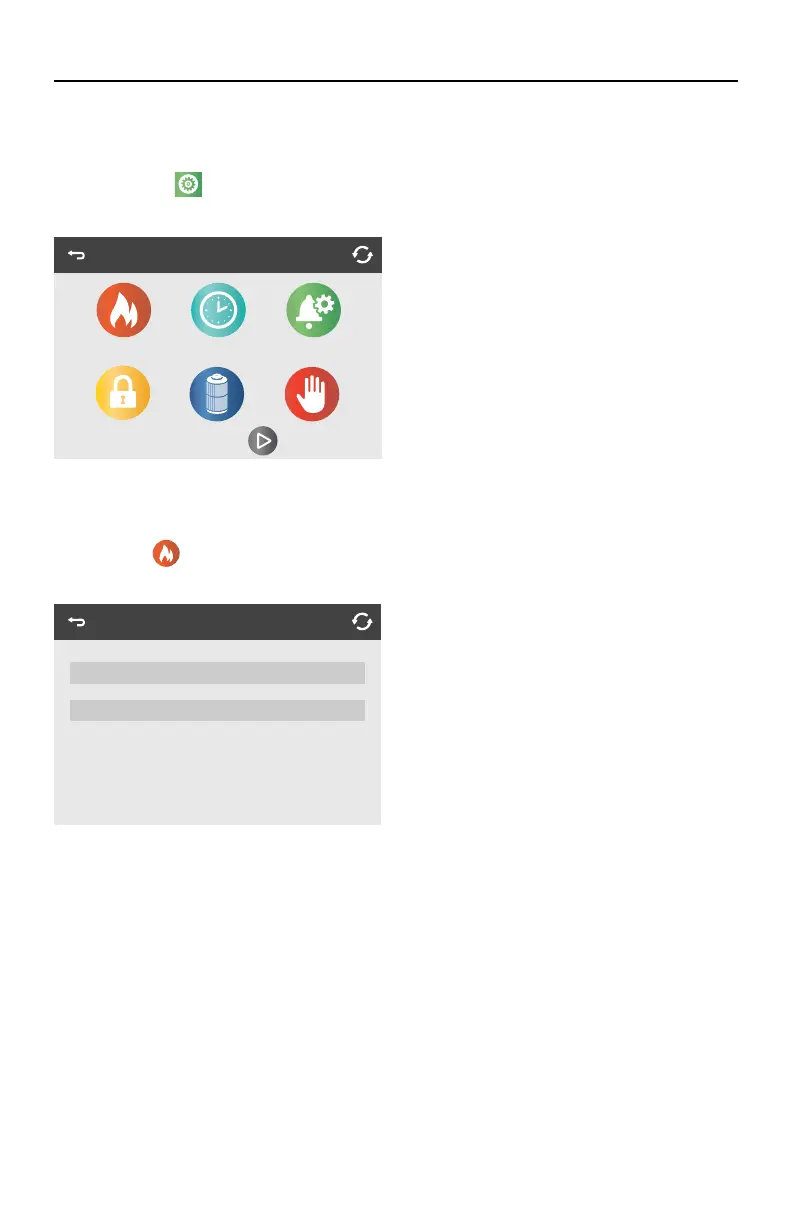
THE SETTINGS SCREEN
PROGRAMMING, ETC.
The Settings Icon
takes you to the Settings Screen, where all programming and other spa
behaviors are controlled.
HEAT MENU
The Heat Icon
in the Settings Screen takes you to a screen where you can control the Heat
Mode and the Temperature Range.
TEMPERATURE RANGES (HIGH VS. LOW)
This system incorporates two temperature range settings with independent set temperatures. The
specific range can be selected on the Settings Screen and is visible on the Main Screen in the upper
left corner of the display.
These ranges can be used for various reasons, with a common use being a “ready to use” setting
vs. a “vacation” setting. Each range maintains its own set temperature as programmed by the user.
This way, when a range is chosen, the spa will heat to the set temperature associated with that
range. Check the set water temperature and consider lowering it for the times when the spa will
typically not be in use.
High Range can be set between 80˚F (27˚C) and 104˚F (40˚C). Low Range can be set between 50˚F
(10˚C) and 99˚F (37˚C). Freeze Protection is active in either range. Consider that the comfortable
temperature range during use may be lower than the maximum safe temperature.
Each icon on the Settings screen takes you to
a different screen, where one or more settings
may be viewed and/or edited.
Settings
Heat Time
Lock
Reminders
Filter Hold
Heat Mode
Heat Mode Ready
Temp Range High



 To Next Page