EasyManua.ls Logo

Master AIR - User Manual

Master AIR
54 pages
Go to English
Print Icon
To Next Page IconTo Next Page
Loading...
1
CZ
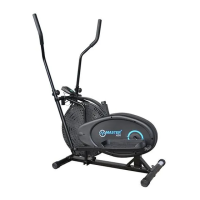
ELIPTICAL MASTER
®
AIR
UŽIVATELSKÝ MANUÁL
Question and Answer IconNeed help?

Do you have a question about the Master AIR and is the answer not in the manual?

Summary

Important Safety Instructions

General Safety Guidelines

Key safety precautions for using the elliptical trainer, including consulting a doctor and safe usage practices.

Assembly

Step 1: Main Frame Assembly

Attaching front and back bottom tubes to the main frame using specified bolts and washers.

Step 2: Pedal Bar and Crank Assembly

Connecting coupler bars to the main section and attaching pedal tubes to the crank.

Step 3: Pedal Attachment

Securing the pedals to the pedal tubes using bolts and nuts.

Step 4: Handle Bar Installation

Inserting handle bars into coupler bars and securing them with knob bolts.

Step 5: Computer Connection

Connecting the computer wire to the sensor wire and inserting the computer into the main frame.

Tension Adjustment

Computer Functions

Understanding Computer Display

Explanation of display metrics like SCAN, TIME, CALORIES, DISTANCE, and SPEED.

Using Computer Controls

Instructions for using the MODE/RESET button to navigate functions and clear values.

Parts List

Exercise Guide

Warranty Information

Summary

Important Safety Instructions

General Safety Guidelines

Key safety precautions for using the elliptical trainer, including consulting a doctor and safe usage practices.

Assembly

Step 1: Main Frame Assembly

Attaching front and back bottom tubes to the main frame using specified bolts and washers.

Step 2: Pedal Bar and Crank Assembly

Connecting coupler bars to the main section and attaching pedal tubes to the crank.

Step 3: Pedal Attachment

Securing the pedals to the pedal tubes using bolts and nuts.

Step 4: Handle Bar Installation

Inserting handle bars into coupler bars and securing them with knob bolts.

Step 5: Computer Connection

Connecting the computer wire to the sensor wire and inserting the computer into the main frame.

Tension Adjustment

Computer Functions

Understanding Computer Display

Explanation of display metrics like SCAN, TIME, CALORIES, DISTANCE, and SPEED.

Using Computer Controls

Instructions for using the MODE/RESET button to navigate functions and clear values.

Parts List

Exercise Guide

Warranty Information

Master AIR Specifications

General IconGeneral
Resistance TypeMagnetic
Resistance Levels16
Display TypeLCD
Heart Rate MonitorYes
Programs12
Warranty1 year

Related product manuals