11
EN
5/ DETERGENT PRODUCTS AND ADJUSTING THE WATER SOFTENER
EN
• FOR MULTI-PURPOSE PRODUCTS: OPTION
Advice:
To provide better coverage of the wide range of multi-purpose products available, your
dishwasher’s “4-in-1” option has two possible settings, accessible via the “Set” button.
“Extra Dry”
improves the drying results in the event of reduced performance from the
“2-in-1”, “3-in-1”
or “4-in-1” types of multi-purpose product.
“Sparkling Clean”
enables you to prioritise the sparkle of your crockery whatever the type of
multi-purpose product used.
Important :
The multi-purpose products setting enables you to deactivate the rinsing and salt warning
lights only on
and “
TABS
”.
• Loading multi-purpose tablets
To make loading the detergent easier, the distributor is located on the front of the upper basket; it
is compatible with all the products recommended for your dishwasher.
• Place the tablet
in the external compartment (Fig 04 on previous page) or, for optimum ope-
ration, pull out the distributor’s drawer and lay the tablet there. (Fig 05 on previous page).
- Close the distributor.
•
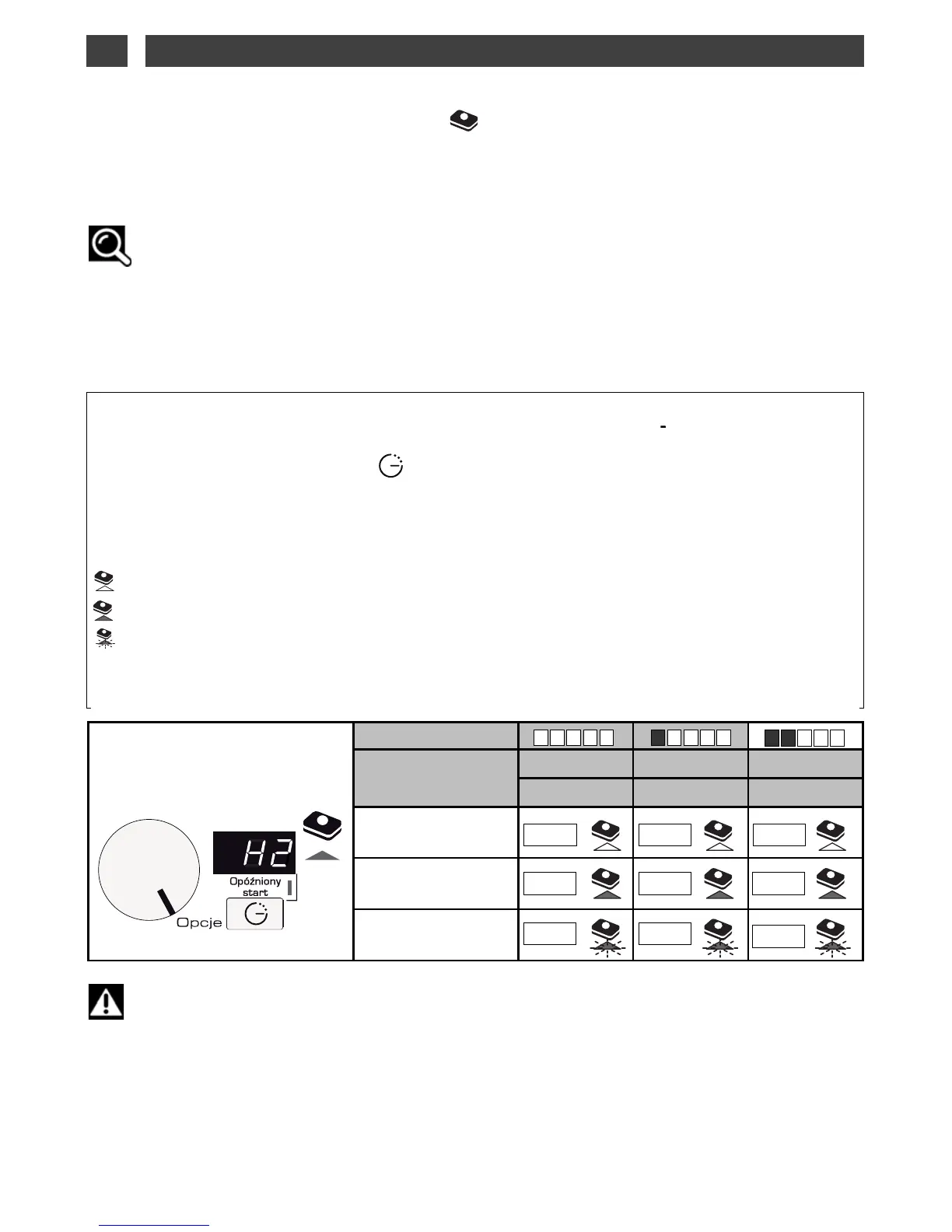
Proceed as follows to adjust the water softener on the control panel:
— Turn the selector to the
position. The screen now displays SEL to indicate that you are
in the setting mode.
— Press the “opóźniony start” button . The screen now displays the setting (factory setting of
).
— To use multipurpose tablets you must select setting
, according to the hardness
of the water.
— To change this setting (according to the hardness of the water) continue to press the “opóźniony
start” button. The setting changes every time you press the button.
: (light off) deactivates the "TABS" function.
: (light on) activates the "TABS" function with the setting "
".
: (flashing light) activates the "TABS" function with the setting "
".
— The setting is automatically validated when you exit
, namely, when the selector is in the pro-
gramme or Stop position.
— The setting selected will be applied automatically; the "TABS" light will come on.
0-10°F 10-18°F 18-25°F
0-1 mmol/l 1-1.8 mmol/l
1.8-2.5 mmol/l
Multi-purpose products
Function Deactivated
Multi-purpose products
“
Extra Dry”
Multi-purpose products
“Sparkling Clean”
H0
H0
H0
HI
HI
HI
H2
H2
H2
• Your appliance can be specially set to use multi-purpose if the water hardness is
<
25°F or < 2,5 mmo/l.



 To Next Page