masterforceopeners.com Customer Service: 1-877-436-4402 18
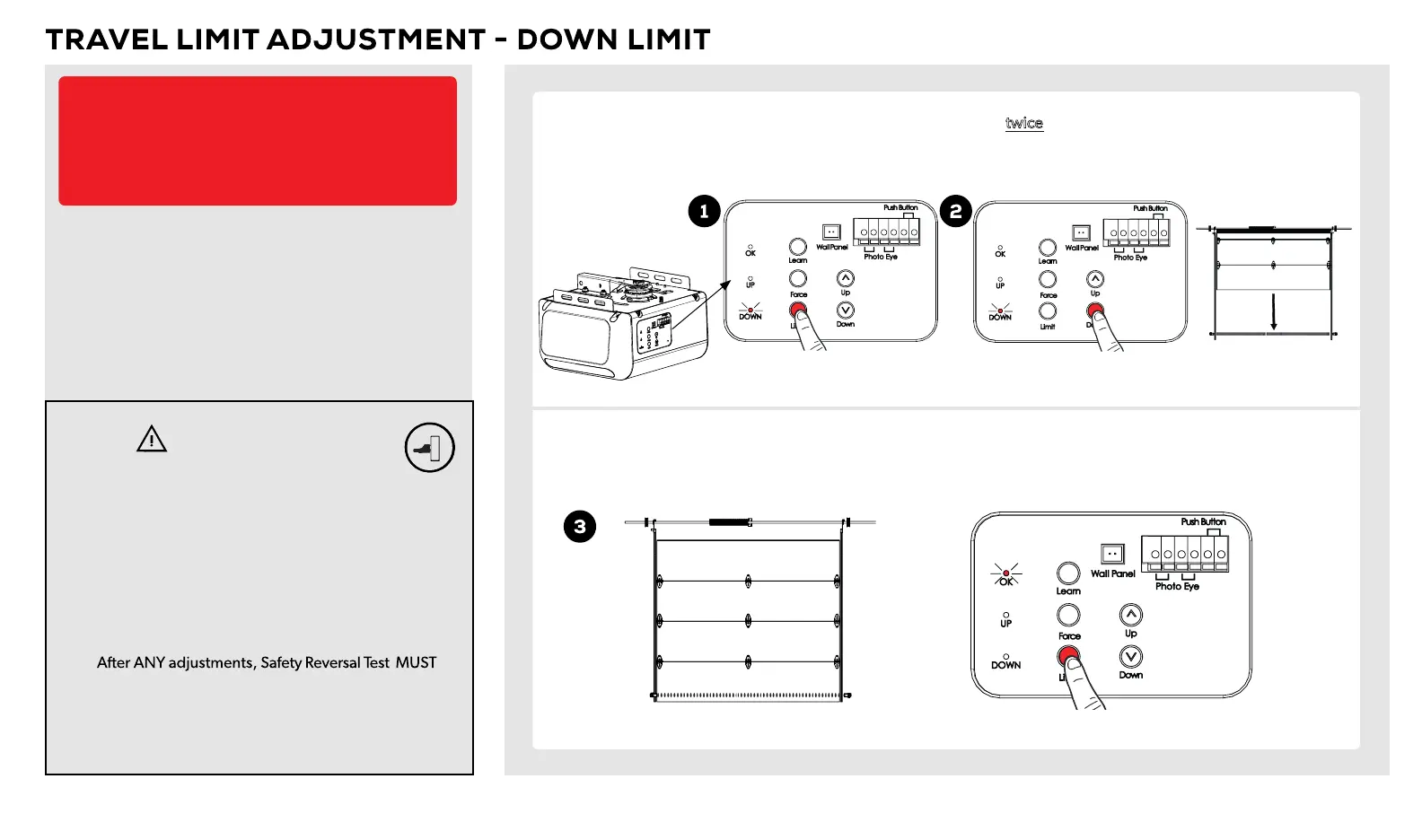
With door in the open position, press and release “Limit” button twice, the red (DOWN) LED will illuminate.
Press and hold the “Down” button while the "Down" light is illuminated until door reaches desired close
position. If needed, press the down or up arrow to micro-adjust.
Once the door is at the desired close position, press and release the “Limit” button once. The “OK” LED flashes
and turns off. The DOWN Limit has now been set.
Once the down limit has been set, both the up (green) and down (red) lights will be iluminated, move on to
setting the force on page 19 to complete the programming.
To prevent SERIOUS INJURY or DEATH from
improper Force Adjustment:
• YOU CANNOT adjust force manually to compensate
for binding or sticking of the garage door. Call
a qualified garage door service person to make
necessary adjustments in case of binding.
• YOU CANNOT manually increase the force required
for closing the door.
•
be performed to ensure the door reverses on
contact with a 1-1/2 inch (3.8 cm) high object (2x4
laid flat).
Press and release
LIMIT twice
Press and hold DOWN
Desired DOWN limit
Press and release LIMIT just once
WARNING
NOTICE:
Travel limits and auto force setting must be set for
the opener to work. All steps on pages 17-19 must
be followed.


 To Next Page