7
3. Yoghurt Function
• Place ingredients into cooking pot.
• Press
button to turn on appliance.
• Press Menu button until Yoghurt function is selected.
• Temperature is fixed and cannot be adjusted.
• Default cooking time is set at eight hours and can be adjusted using the Timer/Temp button and
pressing either + or - buttons.
• Press
button to start cooking process.
• Yoghurt function needs lid placed on appliance.
4. Slow Cook Function
• Place ingredients into cooking pot.
• Press
button to turn on appliance.
• Press Menu button until Slow Cook function is selected.
• Temperature is fixed and cannot be adjusted.
• Default cooking time is set at four hours and can be adjusted using Timer/Temp button and pressing
either + or - buttons. Time range is 30 minutes to 24 hours.
• Press
button to start cooking process.
• Slow Cook function works best with lid placed on appliance.
• After cooking is complete, appliance will enter Keep Warm mode.
• Delay Start can be used with this function.
5. Steam function
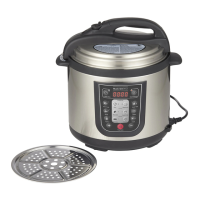
• Add one litre of water to cooking pot and place steamer insert in cooking pot.
• Place ingredients onto steamer insert.
• Press
button to turn on appliance.
• Press Menu button until Steam function is selected.
• Press
button to start cooking process.
• Temperature is fixed and cannot be adjusted.
• If steaming for an extended period of time, check the water level.
• Delay Start can be used with this function.
• Default cooking time is set at 15 minutes and can be adjusted using the Timer/Temp button and the +
and - buttons. Time range is one minute to two hours.
• Press
button to start cooking process.
• Steam function works best with lid placed on appliance.
• After cooking is complete, appliance will enter Keep Warm mode.


 To Next Page