EasyManua.ls Logo

Mat-Tuner mAT-1500Pro - User Manual

Mat-Tuner mAT-1500Pro
6 pages
Print Icon
To Next Page IconTo Next Page
Loading...
1 / 6
mAT-1500Pro ANTENNA TUNER OPERATION MANUAL
Thank you for choosing this our product.
Please READ ALL INSTRUCTIONS carefully and completely before using this tuner.
IMPORTANT
NEVER touch the antenna or antenna connector with your hand when the transmitter is
transmitting, it will cause burns!
NEVER use the antenna tuner during a lightning storm. It may result in an electric shock,
cause a fire or damage the tuner. Always disconnect the antenna before a storm.
NEVER operate the tuner with its cover removed. Contact with the components inside
the tuner while transmitting will result in painful RF burns.
Always turn your transmitter off before plugging or unplugging anything, otherwise it
would be damaged.
The tuner is designed for indoor operation onlyit is not waterproof. If you use it outdoors,
you must protect it from rain, dew and steam.
We cannot guarantee the mAT-1500Pro tuner will work well with those YAESU
transmitters which are released later than the tuner.
INTRODUCTION
The mAT-1500Pro is a multipurpose high-power automatic antenna tuner that can match almost
all transmitters and amplifiers. The maximum RF power allowed is 1500 watts (SSB), and two
antennas can be connected at the same time. According to the different connected transmitters,
the tuner has three working modes, YAESU mode, ICOM&KENWOOD mode and GENERAL
mode. The tuner can automatically determine and match the type of the currently connected
transmitters to minimize the manual operation and enhance the automation and convenience of
the wireless communication system.
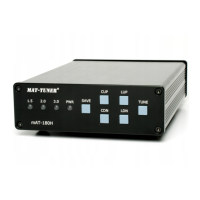
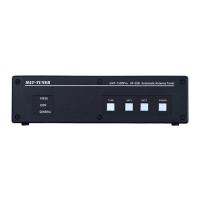
Front: There are 3 indicator lights on the left to show the current mode of the tuner. There are 4
buttons& indicator lights on the right to operate the tuner and indicate the status.
Question and Answer IconNeed help?

Do you have a question about the Mat-Tuner mAT-1500Pro and is the answer not in the manual?

Summary

Safety Precautions

General Warnings

Essential safety guidelines for operating the antenna tuner to prevent injury or damage.

Introduction and Front Panel

Front Panel Overview

Description of the indicator lights and buttons on the front panel of the tuner.

Rear Panel and Connectivity

Rear Panel Terminals

Details the sockets and terminals available on the rear panel of the antenna tuner.

Control Cable Connection for Working Modes

YAESU Mode Connection

Details on connecting the tuner for Yaesu transmitters using specific control cables.

ICOM&KENWOOD Mode Connection

How to connect the tuner for Icom and Kenwood transmitters using control cables.

General Mode Connection

Connecting the tuner for other transmitters using an external DC power supply.

Important Operational Notes

PTT Signal Control and Socket Usage

Crucial notes on controlling PTT signals and avoiding simultaneous connection of specific rear panel sockets.

RF Cable Connection and Remote Operation

RF Cable Setup

Instructions for correctly connecting RF cables to the antenna and amplifier.

Remote Control Ports

Information on the Remote1 and Remote2 RJ45 sockets for remote operation.

Grounding Recommendation

Advice on connecting the tuner's ground terminal for normal equipment operation.

Operation Modes and Tuning Cycle

Yaesu and Icom;Kenwood Operation

How to operate the tuner using "TUNE" or "AT" buttons on compatible transmitters.

General Mode Operation and Tuning Cycle

How to operate the tuner in general mode and initiate an automatic tuning cycle.

Antenna Switching and Specifications

Antenna Switching

Instructions on how to switch between connected antennas (ANT1 and ANT2) during operation.

Accessories and Electrical Specifications

List of included accessories and key electrical specifications of the antenna tuner.

Technical Support Information

Contact details and website for technical support and further information.
Mat-Tuner mAT-1500Pro Specifications

General IconGeneral
BrandMat-Tuner
ModelmAT-1500Pro
CategoryTuner
LanguageEnglish

Related product manuals