§4 Operation
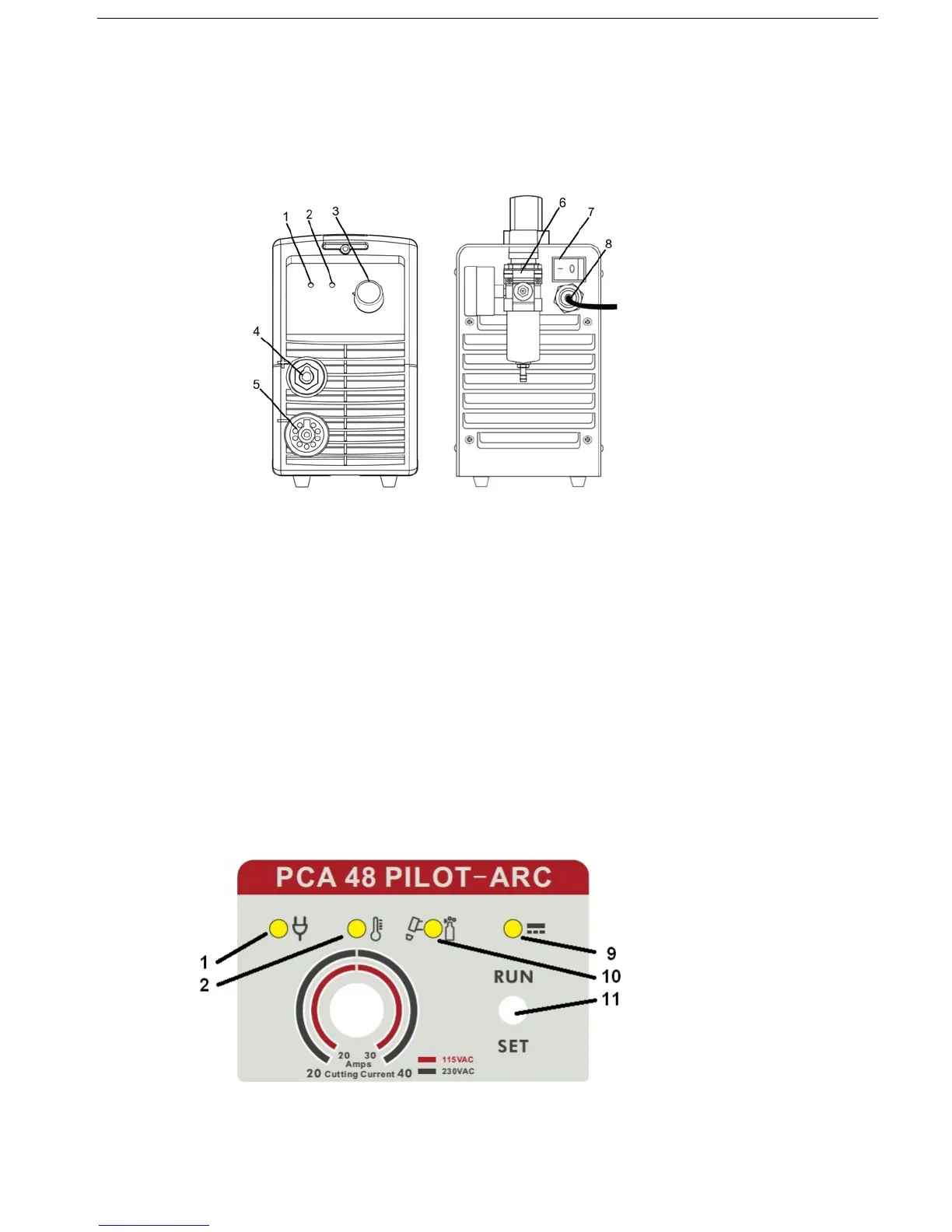
4.1 Layout of Front and Rear Panel
1. Power pilot LED Illuminates when machine power is switched ON
2. Alarm pilot LED Illuminates when machines exceeds duty-cycle operation (auto reset)
3. Current regulator Allows operator adjustment of output cutting current
4. Earth cable connector Connect earth cable from machine to the work-piece
5. Torch cable connector Connect plasma cutting torch cable to the power source
6. Compressed air fitting Connect compressed air hose to regulator (125 PSI maximum)
7. Power switch Flip toggle to turn line power ON or OFF to machine
8. Power cord Connected plug end to the appreciate power outlet (3.3 Above)
9. Torch / Air pilot LED Illuminates when shield cap is removed or air pressure below 30 psi
10. DC output pilot LED Illuminates when trigger is closed and DC current is flowing to torch.
11. RUN / SET switch Flip toggle to SET to purge air in torch. Flip to RUN to begin cutting.


 To Next Page