
EasyManua.ls Logo

Matrix Mini-i - User Manual

Matrix Mini-i
9 pages
Print Icon
To Next Page IconTo Next Page
Loading...
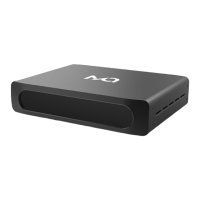
24Bit /192kHz High Performance Stereo Audio Processor
MATRIX
MATRIX
2 -Channels 24 bit /192 kHz
Desktop Digital Audio Processor
Mini-i
User Guide

Other manuals for Matrix Mini-i

Questions and Answers

  • F
    fuentesdeannaAug 11, 2025
    What to do if Matrix Mini-i has common breakdowns?
    • K
      kelly76Aug 11, 2025
      If the Matrix Media Converter experiences common breakdowns, turn it off, unplug it from the main power for at least a minute, then reconnect and restart it.
  • S
    Sarah PowersAug 17, 2025
    Why is there no analog output from my Matrix Mini-i Media Converter?
    • R
      Rachael JenkinsAug 17, 2025
      There might be no analog output from your Matrix Media Converter because the audio cable is disconnected. Ensure the audio cable is correctly connected. Also, check if the volume has been turned to the minimum; if so, adjust the volume accordingly.
  • A
    Andrew AlexanderAug 23, 2025
    What to do if NO SAMPE is shown on Matrix Media Converter?
    • A
      Anthony BrownAug 23, 2025
      If 'NO SAMPE' is displayed on your Matrix Media Converter, it could be due to a disconnected digital input cable or a missing input signal. Ensure the digital input cable is correctly connected. It may also be due to abnormal digital signal output, in which case you should check the digital signal output.
  • M
    mfisherAug 28, 2025
    Why is there no headphone output on my Matrix Mini-i?
    • D
      dmedinaAug 28, 2025
      If there's no headphone output on your Matrix Media Converter, it might be working in DAC mode. Switch to Pre-mode to enable headphone output.
  • K
    Karen SimpsonSep 4, 2025
    How to fix Matrix Mini-i if it has off power?
    • C
      Carrie PowellSep 4, 2025
      If your Matrix Media Converter has no power, ensure the power cable is properly connected to a functioning AC outlet and that the power switch is turned on.

Matrix Mini-i Specifications

General IconGeneral
CategoryMedia Converter
ModelMini-i
SNR120dB
Input InterfaceUSB / Coaxial / Optical
Output InterfaceRCA / Headphone
Supported Sample Rates44.1kHz, 48kHz, 88.2kHz, 96kHz, 176.4kHz, 192kHz
Bit Depth16-bit, 24-bit
DSD SupportDSD64, DSD128
Headphone Output6.35mm

Related product manuals
